pagination url is not in the anchor tag for this url

when I run Azerplumb thru Screaming Frog I'm still getting the pagination error. at first I didnt have the pagination option on for the posts. but added it last week and it is still having this issue:
"It says the pagination url is not in the anchor tag for this url: https://azerplumb.com/blog/ "
is there a way to fix it?
-

Hi Tatsiana,
Thank you for contacting us.
We weren’t able to replicate the issue, as shown in this screencast: https://youtu.be/FYZPOk0-PLQ
Could you share a similar screencast from your end? This will help us better understand the issue.
Best regards,
Ariel H.0 -
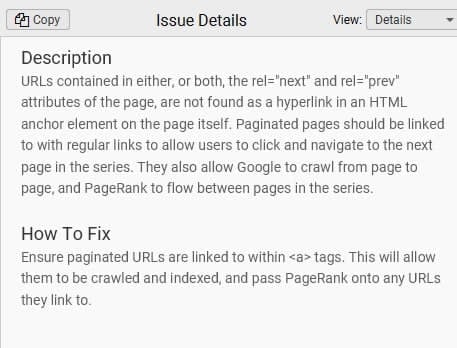
So I'm getting an error from Screaming Frog, I didn't encounter any issues on the website itself.But Screaming Frog is telling me that the pagination url for that page is not in the anchor tag.And that's making it hard for Google to index the pages. and I don't know where the anchor tag is that they are talking about. I didn't even know that pagination had an anchor tag.this is the explanation I am getting from screaming frog
 0
0 -
Hi Tatsiana,
Your SEO tool found some issues, but we’re unsure if Google Search Console would report the same ones. If Google doesn’t see them as errors, fixing them might not be necessary.To be sure, we recommend:
1. Submitting your site to Google Search Console
2. Waiting about a week for Google to index your pages
3. Checking the Indexing Report for real issues
4. Sharing any errors with us, especially if pages aren’t indexed, or there are duplicate content or broken link warningsIf Google flags any real issues, let us know—we’re happy to help.
Best regards,
Ariel H.0 -
so I think I figured out the issue. when you are on the blog page https://azerplumb.com/blog/ it shows first page with blogs. when I click on the. second page and it takes me there the URL becomes https://azerplumb.com/blog/bpage/2/ - how do I remove bpage from this? that is the problem
0 -

Hello Tatsiana,
Does your website have any indexing issues? What are your thoughts about disregarding the Screaming Frog warning and not fixing it?
0 -
we are working on figuring this out. but ideally we would like to have a it not have /bpage/ there at all so the structure of all the urls is looking great. is this an option at all? it is really strange that it is adding this extra path
0 -
Hi Tatsiana,
Thank you for the update.
Brizy uses /bpage/ as a custom pagination slug to ensure proper functionality within the builder. At the moment, there isn’t an option to change or remove it. Your SEO tool is likely flagging it because it expects the default WordPress pagination structure, but this shouldn’t negatively impact indexing as long as the URLs are included in your sitemap.xml and follow proper SEO best practices. Search engines like Google should still be able to crawl and index these pages correctly.
We understand that you’d prefer a cleaner URL structure without/bpage/, and we’re looking into this. While we don’t have a built-in way to remove it right now, we appreciate your feedback. If there are any updates or changes in this area, we’ll be sure to share them.
Best regards,
Ariel H.0
Please sign in to leave a comment.
Comments
7 comments