Migration to another server didn't go perfectly

I am leaving SiteGround and going to Hostlinger. At Hostlinger I created a temporary website of giftofbeing.org. It is at
beige-pig-984375.hostingersite.com
But some Brizy code shows up on the page, and the menu is messed up. Is there a way to fix it on all pages, instead of rebuilding each page individually?
And what's the difference between Brizy Builder and Brizy word press plugin. I know that I don't have the Cloud, and I do have Brizy Pro
Thank you!
-

Hi Timothy,
Thank you for contacting us.
It looks like the issue may be related to how your migration software or plugin handles URL updates during migration. While it typically updates URLs in the database, it can sometimes miss certain serialized data or plugin-specific settings, which might be why some pages are not rendering correctly in Brizy.
For future migrations, we recommend using WP All-in-One Migration or WPVivid, as these plugins automatically update URLs across all necessary database entries, reducing the chances of issues like this.
To fix the problem now, please use a Search and Replace plugin (such as Better Search Replace) to manually update the old URL (old-url.com) to the new one (new-url.com). Make sure to search in the following database tables:
wp_options
wp_postmeta
wp_postsI also recommend enabling the "Run as dry run" option first to preview the search results before making any changes.
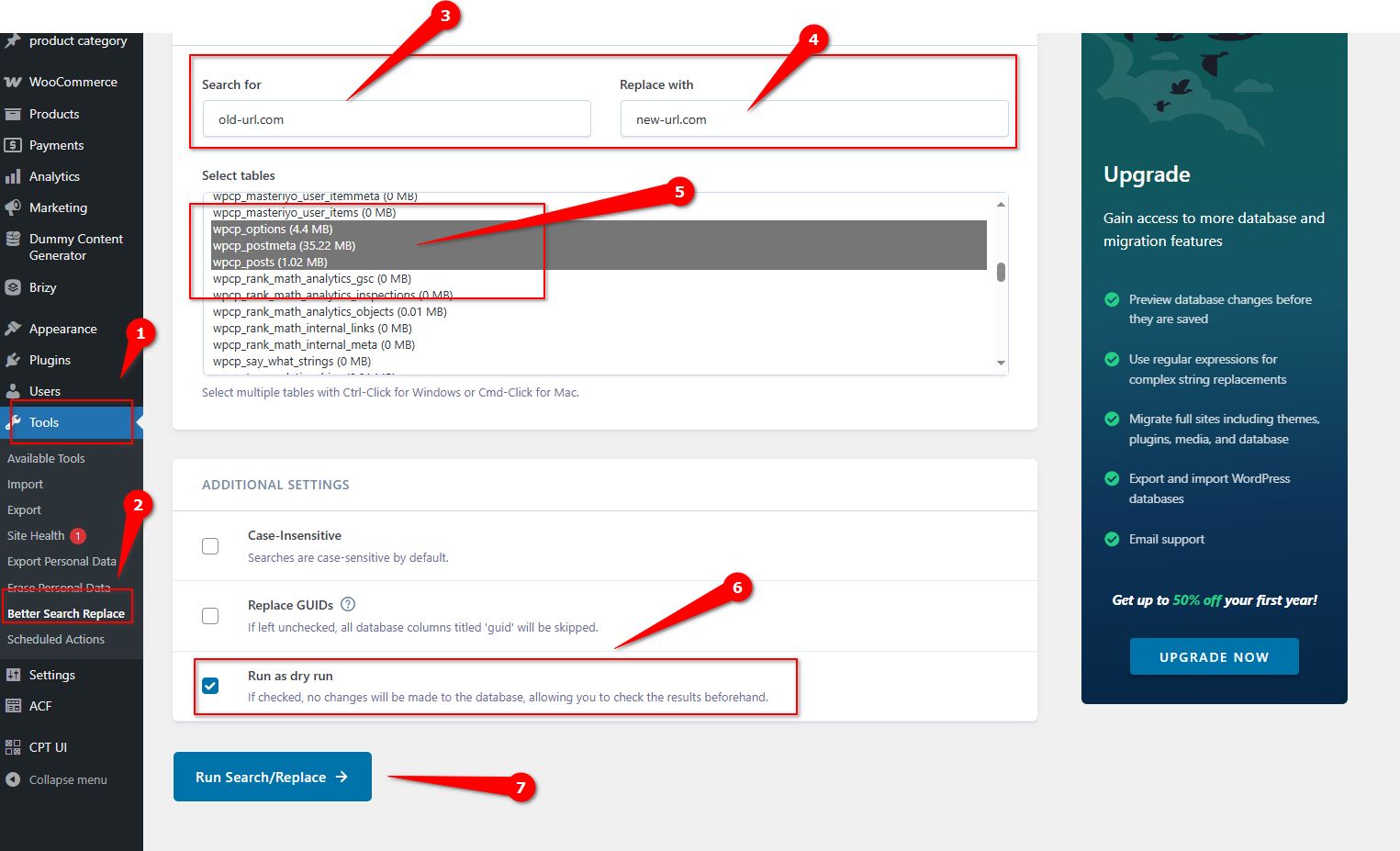
Please give this a try and let me know how it goes.
Brizy WP is a WordPress plugin for building sites within WordPress, using your own hosting. Brizy Cloud is a standalone, hosted website builder that doesn’t require WordPress, offering a simpler, all-in-one solution.Best regards,
Ariel H.0 -
Ariel,
Thanks for the detailed information! However, some of it may not apply. First, I did use the WP All-in-one plug-in, but not the Premium version. Also, I already switched the domain, so I don't think that I can use the search and replace plug-in. Is there anything else I can try before manually trying to rebuild each page?
Thank you.
0 -
Hi Timothy,
Please make sure you have these versions installed:
Also, I assume that the header on this site was set as a global block, If that’s the case, try this: edit just the home page, add 1px padding to all sides of the global header, save the changes, and check if the issue is resolved on the front end. If it works, go back, revert the changes, and update again—this should force Brizy to recompile the global headers. Since it’s a global header, you only need to do this on one page, and it should apply to all pages.
Give it a try and let me know how it goes.
Best regards,
Ariel H.0 -
Actually, I just got all the PDFs to work by just deleting and reloading one. And I deleted and re-installed a photo from the media library and it worked. I can do things manually, since it's not a huge site. I think that I just need to reinstall photos (and also update the email address.)
If I run into more problems I will post another request, but thanks for your suggestions. I will have to migrate a couple more sites soon.
0 -

Hi there,
in addition to the Better Search Replace (which is a great plugin) you could also try to use "automatic domain changer". These two always fixed my domain problems.
Only thing is, that I also had so open and save all pages of the brizy website - I guess - depending on the cache which I could not fix in another way (wherever what plugin I used to clear it).
Open the page, make minimalistic changes, undo them in a second and save had done the trick for me.
Hope this helps in addition.
Best,
Martin
0 -
Hello Ariel and Martin! Thank you for your suggestions. The problem is resolved! It turns out that Hostinger's AI "helper" gave me the wrong information! After three hours of various experiments I contacted their human people and they explained what I needed to do. I will keep in mind your tips. It turns out Martin's suggestion is close to something that I discovered on the way to repairing the websites that DID migrate.
You can close this thread. Have a good one!
0 -
Hi Timothy,
thanks for letting us know. I just came across and was curious. Great my suggestion helped / extended the problem-solving.
have a good one, guys!
Best,
Martin
0
Please sign in to leave a comment.
Comments
7 comments