How to prevent white flash Before Slides Load in Brizy Cloud?

I'm using Brizy Cloud and have enabled the Slides option inside a block (not a full slider section). I chose this method because I want a fade-in transition between slides instead of a sliding effect, which is what I get if I turn the block into a slider in the block settings.
The issue I'm having is that when the page loads, the slider area appears white before the images load. I want to make sure that this area stays black at all times, even before the first slide appears.
What I’ve Tried:
-
Setting the background color of
.brz-sliderto black:.brz-slider { background-color: black !important; }- This does turn the background black during transitions, but the white flash still happens before the slides load.
-
Adding a fade-in effect to
.brz-slider:.brz-slider { opacity: 0; background-color: black !important; animation: fadeIn 1s forwards; } @keyframes fadeIn { to { opacity: 1; } }- This hides the slider initially and fades it in, but the white flash still appears before the fade starts.
-
Applying black to the parent section:
.brz-section { background-color: black !important; }- This works for the section itself, but the slides seem to load on a white background behind the images.
I'm out of guesses.
Any help would be very much appreciated.
-

Hi Jose,
Thank you for reaching out.
Could you please share the URL so we can take a look?
Best regards,
Ariel H.0 -
Thank you:
0 -
Hi Jose,
Thank you for the update. Please try the following CSS and let us know if it works for you:
.brz-slider,
.brz-slider .brz-slide {
    background-color: black !important;
}

.brz-slider img {
    display: block;
    background-color: black; /* Ensures any gaps remain black */
}

.brz-slider {
    background-color: black !important;
    transition: opacity 1s ease-in-out;
}
Best regards,
Ariel H.0 -
It doesn't solve the issue, sorry. :/
I've tried this on 2 browsers and on a private window.
0 -

Hello Jose,
This behavior could be due to the way the background slider is currently designed to work. What about considering an alternate implementation strategy to achieve a similar result?
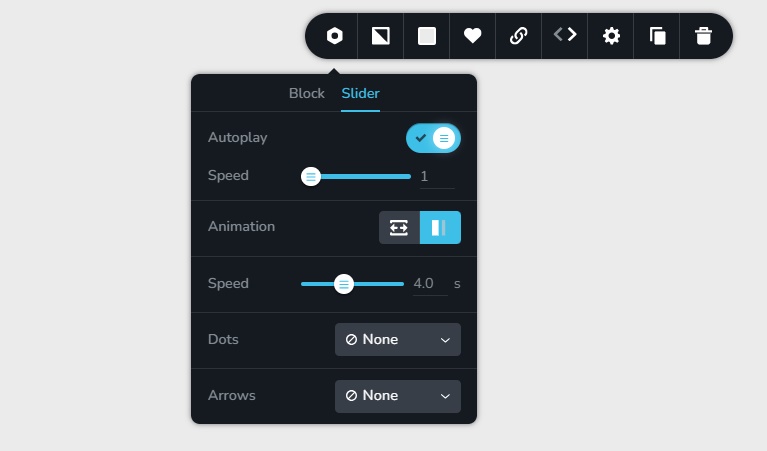
Have a look at the slider transition at the hero section of https://riverflo.com/ Would the same slider transition work for your project? The hero section of this project is implemented by setting a block as a slider and having these settings in the slider
 0
0 -
Thanks KC George
0 -
Many thanks for all your help - you helped me solve this!
I've built a slider block using your suggested settings and added a bit of CSS to turn the slider's bg black, and it works beautifully.
Thanks again!
0
Please sign in to leave a comment.
Comments
7 comments