Can I add Brizy to a section of a Shopify Built Page?

I'm loving Brizy in Shopify as it provides a lot of flexibility for the design. However I'm having some issues with the Product Page Design and Features.
Quite a few Shopify components don't work the same way as they do in the Shopify Builder.
- When you press 'Add to Cart' it doesn't show any feedback i.e I want the side Cart Drawer to open and the little basket icon to update right away
- The image can't be shown in a carousel as seen in Shopify with the smaller images below (I have made a workaround by using some Shopify App Code
- I have already raised the issue of not being able to change the colour of the variant pills (I know this is being worked on, but I've had to use a CSS workaround)
I only know basic code so can't figure out how to sort the issues out myself. Ideally I want the cart button fixed the most.
I was wondering because of the limitations to Brizy Builder in Shopify showcasing Shopify features the same way. Is there a way I could add my Brizy Product Page into the Shopify Builder Product Page?
So I mean the top of the page will have the product listing using all Shopify features. Then below it I have injected my Brizy website which has the custom layout I have designed. This would allow me to use the Shopify features natively as they work and also keep my custom website design.
-

Hi Farah,
Thank you for your feedback. We're glad to hear you're enjoying Brizy in Shopify.
At the moment, we don’t have a solution for the issues you mentioned, particularly with the Add to Cart button not triggering the cart drawer. These are current limitations of the Brizy Shopify integration, and our team is aware of them. We are working on improvements, but unfortunately, we don’t have an ETA for when these will be addressed.
If you’d like to keep using Shopify’s native product features while incorporating your Brizy design, embedding your Brizy content below the Shopify product listing might be an option, though it would require custom code implementation.
We appreciate your patience and will share updates as soon as we have more information.
Best regards,
Ariel H.0 -
Hi Ariel,
I appreciate you getting back to me and understand a lot of the elements are still a work in progress.
Would you happen to be able to support me with any guidance on how I would go about custom code implementation of the Brizy content below the Shopify Product Page?
It'd be much appreciated as it'll provide the workaround I need to have the functionality I require active.
Thanks,
Farah
0 -
Hi Farah,
Thank you for the update. While my experience with Liquid code is limited, it is possible to embed a completed Brizy page within a Shopify product page using an iFrame.
Here’s how you can do it:
1. Open your Brizy page (e.g., mydomain.com/shop).
2. Copy the full URL from your browser’s address bar.
3. In Shopify, go to Online Store > Themes, find your theme, and click Actions > Edit Code.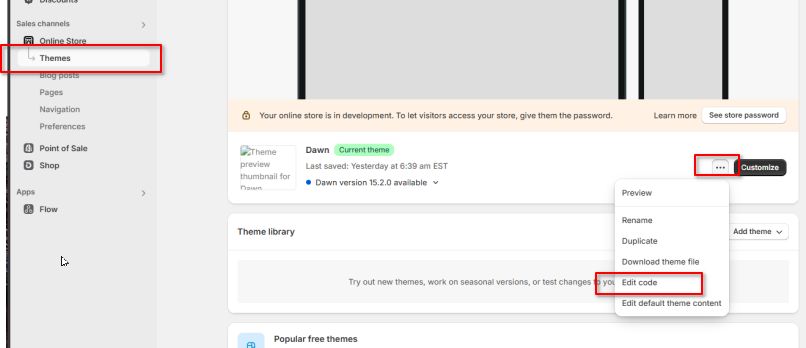
4. In the left sidebar, locate main-product.liquid and click on it.
5. Find a good spot in the code (e.g., after the product description) and paste the following:<iframe
src="https://mydomain.com/your-brizy-page"
width="100%"
height="500px"
style="border: none;">
</iframe>
6. Replace https://mydomain.com/your-brizy-page with your actual Brizy page URL.
7. Adjust the height as needed (e.g., 500px).This method allows you to display Brizy content on your Shopify product pages without modifying Liquid code.
I hope this helps.
Best regards,
Ariel H.0 -
Hi Ariel,
Thank you for the steps. I have followed it accordingly and even tried moving around the iframe within the code but it won't show on my live webpage?
I also did a test embed within the Brizy page and for some reason it does not like looking up the website. I even tried it with https://google.com and it wouldn't show the site.
Any ideas what could be going wrong?
Thanks,
Farah
0 -
Hi Farah,
Please try the steps suggested on this link and see if this works for you:
https://community.shopify.com/c/technical-q-a/embed-a-3rd-party-website-into-the-shopify-store/m-p/1098266Best regards,
Ariel H.0
Please sign in to leave a comment.
Comments
5 comments