Blank pages & slow performance after migration – Brizy not loading existing pages

Hi,
We are experiencing a severe issue with Brizy/Brizy pro on a cloned WordPress installation (for a development server to implement a new brand identity) where existing pages do not load correctly. This issue persists despite multiple troubleshooting steps. Here’s a full breakdown:
Context
- new.label-up.nl is a cloned website from a live production environment (
label-up.nl), created via Installatron and imported to another server using Installatron. The live website has no issues. This ticket is about the installation on the production server (new.label-up.nl). - The production server is a dedicated machine with 24 cores, 16GB RAM, and ample available resources. CloudLinux confirms resource usage is well within limits and reports no faults.
- PHP 8.2 is being used with all necessary extensions enabled.
- The database is ~300MB in size and has been optimized. The website contains over 100+ pages.
- The cloned environment runs Brizy 2.6.11 and Brizy Pro 2.6.7. We used the Brizy Tool (Update Site Address (URL)) to update the url to the new domain (new.label-up.nl).
- We have also tried to completely remove and reinstal Brizy and Brizy pro with a fresh license.
- Caching (WP Rocket) has been disabled to rule out conflicts.
- Switching to a default WordPress theme and disabling as many plugins as possible made no difference.
The problem
-
All existing Brizy pages either:
- Load extremely slowly
- Are completely blank (no content, no header)
- When editing these pages in Brizy, all content is visible and appears normal. If one then loads the page as a visitor, it is blank.
- Important detail: creating a new page from scratch in Brizy works fine (it loads correctly, albeit slower than expected). But the pages are visable to visitors.
Additional findings
- Fonts are behaving unexpectedly. The Poppins font (previously used in an old design) is still being loaded from
fonts.bunny.net, even though it is not configured anywhere on the site as we are upgrading to a new brand identity (work in progress). - Even after removing Brizy and reinstalling, the problem remains for old pages but not for newly created ones.
- Pages that fail or load extremely slow often show font-related requests
- Blank pages show no Brizy-rendered elements in HTML source.
- Some AJAX calls related to Brizy time out or return empty responses.
Server logs & debugging findings
- The server logs show no critical PHP errors related to Brizy.
- The HTML output of blank pages only contains:
<!DOCTYPE html>
<html lang="nl-NL">
<head>...</head>
</html> - Meaning Brizy is failing to render the page content at all.
Steps taken to troubleshoot
- Removed and reinstalled Brizy & Brizy Pro
- Disabled caching (WPRocket)
- Switched to a default WordPress theme
- Disabled as many plugins as possible
- Verified server resources are not an issue
- Checked logs for PHP errors (none related to Brizy)
- Found unexpected font requests still being loaded from
fonts.bunny.net
Potential causes
Based on our findings, we suspect the issue lies in how Brizy handles migrated content. Some (wild) speculations:
-
Font settings from the previous installation may be interfering? The Poppins font is still being loaded from
fonts.bunny.neteven though it is not configured anywhere on the site. Could Brizy be storing outdated font references in postmeta or internal tables? -
Brizy’s content rendering engine fails to process migrated pages, possibly due to serialization/deserialization issues. The frontend only outputs an empty
<html>structure with no content, while the Brizy editor correctly displays all page elements. - AJAX calls or backend processes might be failing when trying to load migrated content, but only for old pages. New pages work correctly, although slightly slower than expected.
- Brizy’s internal database structures may not be updating correctly for existing pages, leading to missing or broken content.
Request for assistance
- We have spent hours trying to debug and fix this, but unfortunately to no avail.
- What could be causing existing pages to break while new pages load correctly?
- Is there a known issue with Brizy struggling after a migration like this?
- How do we force Brizy to regenerate all pages correctly?
- Why is Poppins still being loaded from Bunny Fonts despite no references to it in the theme or Brizy settings?
This issue is critical because it prevents us from properly working with Brizy in a development environment. Please assist in resolving this issue.
-

Hi B.J.,
Thank you for contacting us.
It looks like the issue may be related to how Installatron handles URL updates during migration. While it typically updates URLs in the database, it can sometimes miss certain serialized data or plugin-specific settings, which might be why some pages are not rendering correctly in Brizy.
For future migrations, we recommend using WP All-in-One Migration or WPVivid, as these plugins automatically update URLs across all necessary database entries, reducing the chances of issues like this.
To fix the problem now, please use a Search and Replace plugin (such as Better Search Replace) to manually update the old URL (label-up.nl) to the new one (new.label-up.nl). Make sure to search in the following database tables:
wp_options
wp_postmeta
wp_postsI also recommend enabling the "Run as dry run" option first to preview the search results before making any changes.
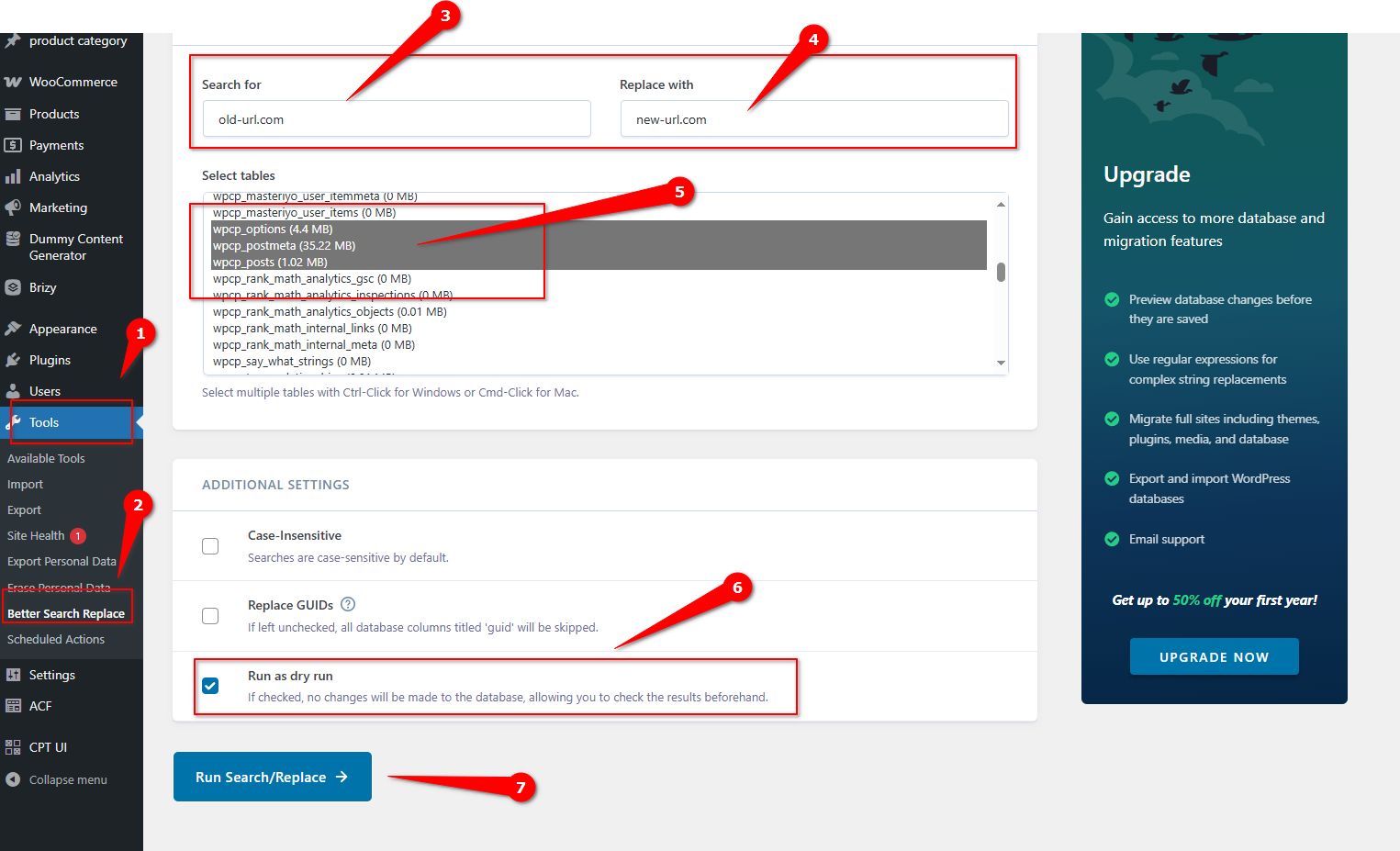
Please give this a try and let me know how it goes.
Best regards,
Ariel H.0 -
- Thanks for your input Ariel, much appreciated. Unfortunately it didn't solve the issue. Also a small note on your screenshot and suggestion: if you do a search and replace for label-up.nl to replace with new.label-up.nl, you also run the risk of updating existing data in the tables of [new.label-up.nl] to new.new.label-up.nl.
- Regarding your comment about using different tools for cloning and migration: that's what we're going to do from now on.
- We have chosen to bite the bullet and have very reluctantly decided to clone again with one of your suggested tools and started again from scratch.
0
Please sign in to leave a comment.
Comments
2 comments