Woocommerce Builder

Hu, can anyone help with how I configure my woocommerce products? I've found a video which is about 5 years, but the elements are not available in my brizy. I am using pro, do I need to activate something else?
Thanks
-

Hello Dom,
Are you attempting to create a single product Brizy template and experiencing that the elements required to build your product details page are missing?
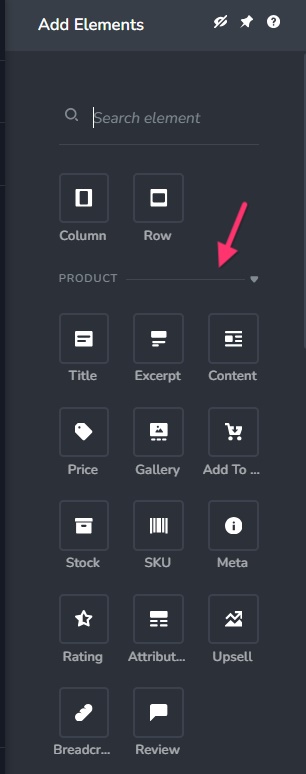
Brizy Elements panel is context sensitive and you will have access to the WooCommerce product related elements only when you are working on a Brizy template for WooCommerce products. Kindly open your Brizy Template and check your "Display Condition". You may have a "Display Condition" similar to the screenshot below. Do you see the "Delete" option next to your Display Condition? Or do you see the "Add" button in place of "Delete"? If you see the "Add" button, kindly click on it to add the Display Condition and check if this resolves the issue.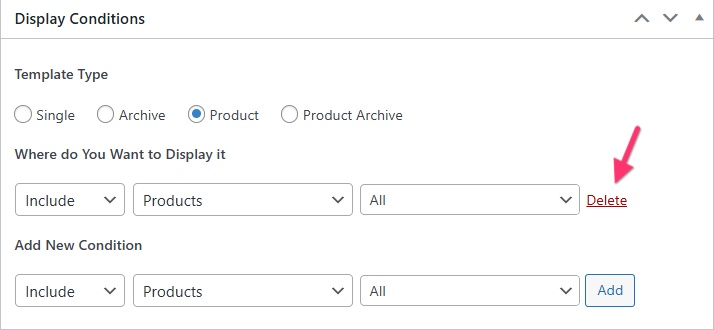 0
0 -
Hi, thanks for the reply. I've tried your method as described and the add condition made them appear.
Why is this?
Thanks
0 -
Is there anything by way of a tutorial to help setup my shop, categories layout and products?
Thanks
0 -
Hello Dom,
The Display Condition is applied and it becomes a single product template when you click the "Add" button. Only when working on a single product template will the Brizy Elements panel show product-related elements.
We do not have a recent tutorial on creating a WooCommerce website using Brizy. This 4 year old webinar can give you a broad idea. WooCommerce Builder is Here If you have questions after watching this webinar, kindly let us know. We can make a screen recording for you if you need specific help.
0
Please sign in to leave a comment.
Comments
4 comments