Issue with Contact Form Emails on Brizy Cloud

Hi there,
I have a site on Brizy Cloud (FindYourHour.com), and I'm experiencing an issue with the contact form. The form is set up to trigger a popup at the bottom of the page, and while submissions appear in the Leads section, I am not receiving them via email.
Could you help me troubleshoot this issue?
Best,
Steven Orlosky
-

Hello Steven,
I have tested the popup form on your website. I received an email notification from the form. Please check if you have received the same email. Kindly also check the Spam folder for the email.
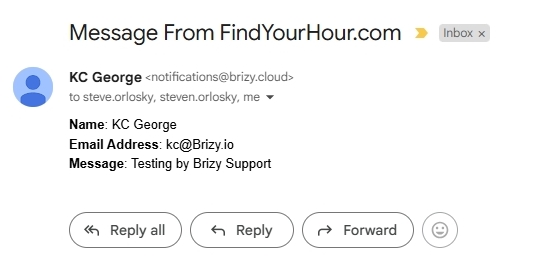 0
0 -
Hi George,
I tried replying to your email, but I ended up just replying to myself. The form still does not work for me - I don't receive a message to either of my email addresses I've tested it with, and it's not in my spam/junk folders.
0 -
Hello Steven,
Are you referring to the email notification from my test when you say, "I tried replying to your email"? Have you used multiple computers and devices to test the form? If not, please do so and check if you receive email notification from those tests. If none of it resolves the problem, we will need to troubleshoot it on your computer over a Zoom call. Kindly get back to us with your findings.
0 -
Hi George,
Thanks for your response! I’ve tested it on my Apple computer and my iPhone - Safari and Chrome - and I still can’t’t get it to come to my inbox. What I mentioned earlier about replying was simply a reply to your support message - not replying to the lead notice. I do see your messages arrive when you test it. I don’t know what the issue is.
0 -
Hello Steven,
It's possible that something in your local setup is keeping you from getting email notifications if you have received my test leads. Can you do some more tests to isolate the issue?
Check to see if you can test the form outside of your usual location, with a different WiFi or cell network, with a different ISP, etc. For instance, ask a cousin who lives in a different city to fill out the form for you, or borrow another person's cell for a minute to test the form.
0 -
I had my coworker try the form from her iPhone, and I still didn’t get the message. I have tried from work and from home on multiple devices. Just to be clear, this is the pop up contact form at the bottom of the page.
0 -
Hello Steven,
Are you talking about the popup added to the Contact Us text at the footer? You have not setup email notification for the form in the popup.

Kindly click on the "Contact us" text, select the "link" icon and click on the popup and configure email notification for the form.
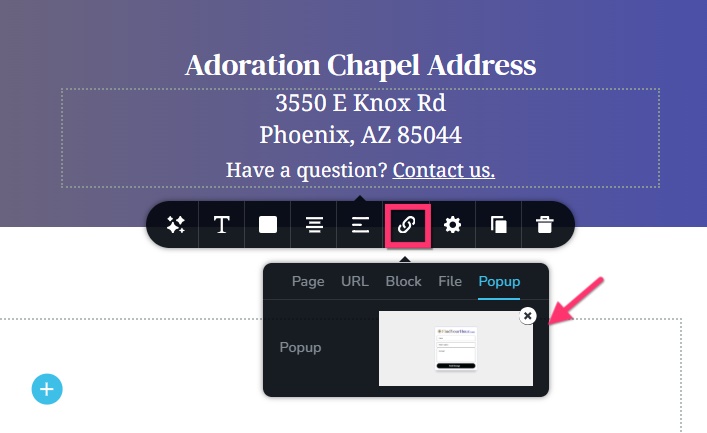 0
0 -
You figured it out! That was the issue! I thought if I set this to the pop-up form, that it would automatically use those settings when I applied it to the website - I guess not! Thank you, George! 😊
0
Please sign in to leave a comment.
Comments
8 comments