Block width not responding

Blocks are not responding to the width slider on a site I'm designing for a client. Video demo below:
https://www.loom.com/share/c09cff35da7f428fb83e16fa76a02165?sid=84755bd3-6761-4181-a17c-d86033b81793
The site is in Maintenance mode right now as I'm still developing at the moment.
https://kraftmaidpolyfurniture.com
-

Hi Nick,
Thank you for contacting us.
Please add our email address communitysupport@brizy.io as an Administrator so we can take a closer look.
In the meantime, have you tried isolating the issue by disabling all other plugins except Brizy and Brizy Pro to see if the problem persists?
This issue can also occur if there’s embedded custom code with unclosed tags. If you have any, try temporarily removing the code and check if that resolves the issue. If it does, you’ll need to review the code syntax, correct any errors, and then re-add it to see if the issue reappears.
Please try this and let me know how it goes.
Best regards,
Ariel H.0 -
Hi Ariel,
I added communitysupport@brizy.io as an administrator.
There is no added code, and I tested the post with all plugins disabled except Brizy; the issue persists.Thanks,
Nick0 -
Hi Nick,
Thank you for your cooperation.
The issue occurs because Blocksy’s default 'blog post' template controls the content width, which can override Brizy’s settings. While pages work fine, blog posts follow Blocksy’s predefined layout.
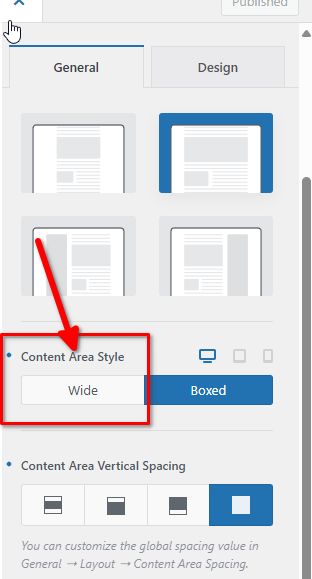
To fix this, set the Content Area Style to Wide under Appearance > Customize > Blog > Single Post. This allows Brizy’s block width to apply correctly.
Best regards,
Ariel H.0 -
Thank you, sir.
0
Please sign in to leave a comment.
Comments
4 comments