RTF element paragraph font size

How can we modify the typo settings in Rich text format element so it matches the Website elements. When I add a paragraph, it's not the right size
-

Hello Jean-Pierre,
Kindly watch the screen recording at https://jmp.sh/mdvBLbRN for the procedure to set typography to a dynamic text added using the Rich Text editor. If I have not understood your request correctly, kindly elaborate your question.
0 -
Yes that’s what I was doing. But then I don’t have the rtf formatting with (bold) headings etc… the only way to use the RTF formatting is going with custom. And then modifying manually every element… that’s strange
0 -
Hello Jean-Pierre,
Headings within the Rich Text editor, can be mapped to heading typographies in the Brizy editor.
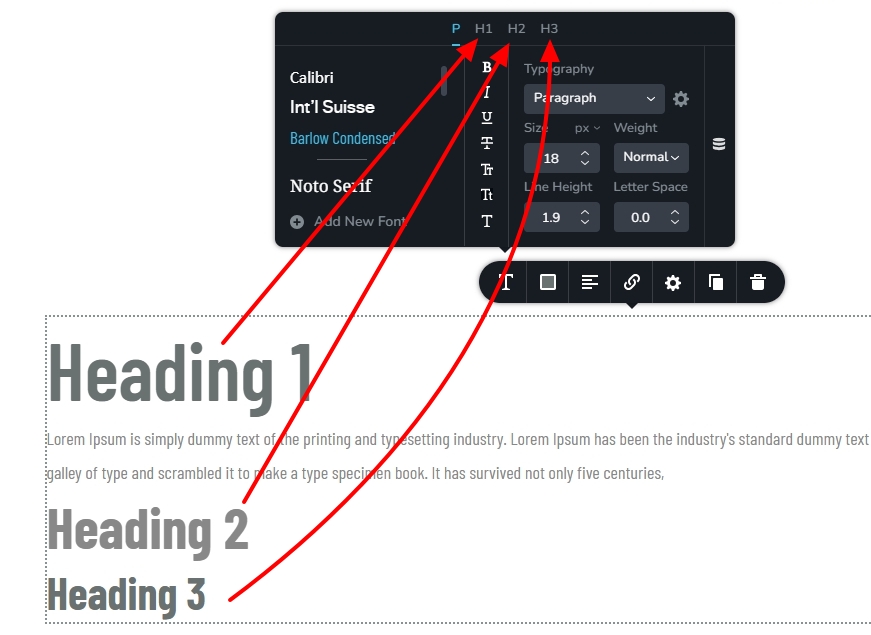 0
0 -
Well. If I add an element that includes both paragraphs and headings or list, and if I choose pargraph setting instead of custom, Everything turns into a paragraph, including the headings and list.
0 -
Hello Jean-Pierre,
You're right; the Rich Text editor's heading typographies do not translate well to Brizy typographies when you paste content from an external application. Only when typing content into the Rich Text editor and using the editor to apply typographies does the mapping of headings work well.
0 -
Is this going to be improved?
Because I added manually some text and format it as paragraph, H2,H3 etc... But nothing show up on the front end.
It looks like it doesn't work at all. and If I add the custom, i can see the formatting but sizes are not like the website.
0 -
Hello Jean-Pierre Michael
Have a look at https://jmp.sh/fWA1MeVz for my test. As you can see, the Brizy headings in the dynamic text can be mapped to the manually applied headings in the Rich Text Editor. However, the typographic mapping does not work when pasting formatted text.
0 -
Ok, will try that. What is strange is that some pasting coming from AI apps do paste with the right formatting and others don’t…
0
Please sign in to leave a comment.
Comments
8 comments