Dynamic HASH in Brizy for Wordpress

Hi
I would like to initiate posts as BRIZY programtically (using Javascript or PHP).
I noticed you are using the format https://WWWWWW/wp-admin/admin-post.php?action=_brizy_admin_editor_enable&post=XXXXX&hash=YYYYYYYYYY
but the HASH value is changing from time to time (daily?)
how can i keep track of the right HASH value or use an alternative methods to PROGRAMTICALLY initialise my posts as BRIZY posts?
Thanks
-

Hello Koby,
Are you using a Brizy blog post template? If not, have a look at this tutorial for the procedure to develop a Brizy blog post template Part 3 WordPress Blogging: Templates in Gutenberg Posts When using a blog post template, the blog posts are added to the Gutenberg editor. Instead of adding blog posts to Brizy, kindly attempt to add blog posts to the Gutenberg editor.
0 -
Hi George
Thanks for your reply.
I am NOT using the templates as yet.
But looking at them and trying them out does not seem to offer me any help - as they also require me to use manual backend editing - and my question refers to programmatically launching a new brizy page.
In both cases (Brizy Templates or Brizy Page) I need to launch a link that contains the parameter HASH=YYYYYYYYYY (that's the URL format behind your "EDIT WITH BRIZY" in both cases).
and since i don't know what will be the value of the HASH parameter today - it is not possible for me to have my program initiate a brizy page (i.e. without a user / WordPress editor clicking on the button EDIT WITH BRIZY)
I hope this explains my issue better....
Thanks
0 -
Hello Koby,
Let me elaborate a bit more on my previous comment. There are two ways one can add blog posts in a Brizy WP project.
-
Content in the Gutenberg Editor: You add the blog post content in the Gutenberg Editor. You develop a Brizy blog post template to give your blog post a Brizy design following the procedure at . Part 3 WordPress Blogging: Templates in Gutenberg Posts Your blog post edit URL looks like https://brizy.online/wp-admin/post.php?post=123&action=edit.
- Content in the Brizy Editor: You add the Page Name, Featured Image, Category and Tags in the Gutenberg editor and click on the "Edit with Brizy" button to add the blog post content directly in the Brizy editor (just like you add Pages) following the procedure at Create Your WordPress Blog with Brizy | Part 2: The GLOBAL BLOCKS Way Your edit URL may look like https://brizy.online/wp-admin/post.php?action=in-front-editor&post=3053
If you follow the approach 1, you can add blog posts programmatically following the procedure provided at https://smartwp.com/wordpress-insert-post-programmatically/ or any other recommended procedure and you would not need a Brizy specific process.
0 -
Content in the Gutenberg Editor: You add the blog post content in the Gutenberg Editor. You develop a Brizy blog post template to give your blog post a Brizy design following the procedure at . Part 3 WordPress Blogging: Templates in Gutenberg Posts Your blog post edit URL looks like https://brizy.online/wp-admin/post.php?post=123&action=edit.
-
Dear George
I'm sorry for not getting back to you sooner.
I have carefully examined the links you sent, including the video.
in all of it there is ONE CRUCIAL link executed manually - and that is "EDIT WITH BRIZY" - and that is exactly the missing link for me....
To be clear - here is what i've got so far:
1. I have a custom post type called BRIZY
2. I am able to programatically create NEW post/s of type BRIZY - using PHP code (similar to the examples you provided)
3. The BRIZY custom post/s are created with the Brizy Template assigned to them - programmatically on the outset
4. These posts are created EMPTY deliberatly - with no content at all.
BUT
until I use a MANUAL the [EDIT WITH BRIZY] button the BRIZY Post/s are NOT initialised as Brizy elements.
see below - the 3 posts are BRIZY posts created by PHP. Only the bottom one is READY / INITIALISED to be edited in the brizy editor, since i already clicked the [EDIT WITH BRIZY] for it.
The top 2 are marked as non-brizy elements yet.
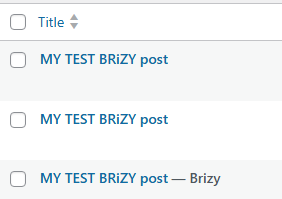
Here you can see the top post template is Brizy Template
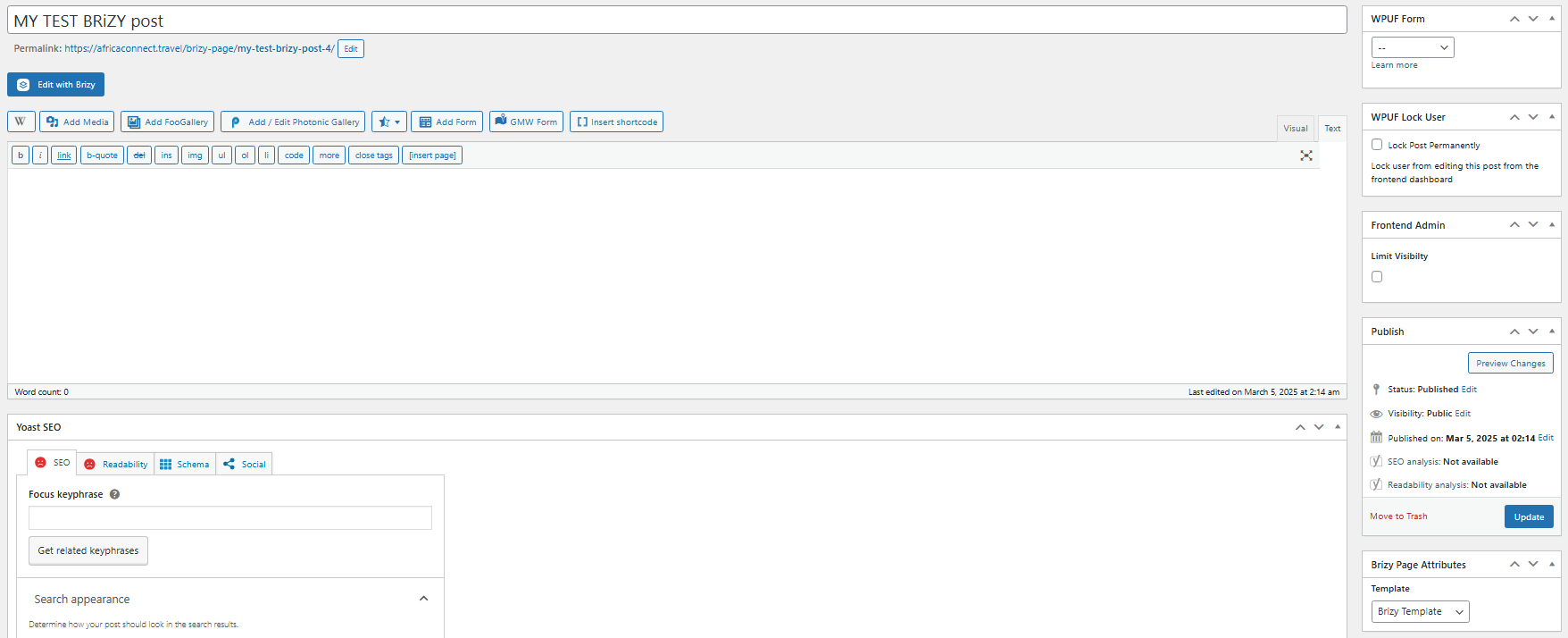
so, MY MISSING LINK is how to I make the top 2 posts become Brizy Editable WITHOUT clicking the [EDIT WITH BRIZY] button - which in effect is using this format :
https://mydomain.com/wp-admin/admin-post.php?action=_brizy_admin_editor_enable&post=51803&hash=7f8da61a12
which again, contains a random hash code which I cannot guess.
in other words - if there is a way for me to know the hash value - my problem is solved
Thanks again
_Koby
0 -
or let me ask it differently -
can you kindly provide a php function to retrieve the HASH code?
Thanks,
0 -
Hello Koby,
The above issue occurs only if you click on the "Edit with Brizy" button. Have you considered an approach where you do not have to click on the "Edit with Brizy" button? You must follow these steps
- Create new Gutenberg post/s of type BRIZY - using PHP code programmatically
- Do not set Brizy template for these posts
- Do not edit the posts by clicking on "Edit with Brizy" button
- Add a Brizy blog post template to provide your blog posts a Brizy design following the procedure at Blog post template Brizy Pro
0 -
Hi George
thanks a million for your reply.
I followed your guide and i fully inderstand that once you set up a Brizy Template you can VIEW any Brizy Post with that Template "mask".
That's all fine - BUT not what i am asking or looking for.
What i am trying to achieve is different.
I would like to allow a process where editing of the BRIZY post is done only by the Brizy Editor - but without access to Wordpress admin back end.
Imagine this following whole process is triggered and managed from the frontend only.
1. (programmatically) a new BRIZY Post xxxxx is created (using PHP)
--------------------
2. (Front End) User is presented with this same BRIZY Post xxxxx inside the Brizy Editor on the Frontend. Edits and saves it
3. (Front End) User pools out this same BRIZY Post xxxxx as many times and whenever they like to keep editing it to their heart's content
-------------------
4. (Front End) user can also view the Post xxxxx using the Brizy Viewer
The only part I am missing is marked as number 2 above.
The ability to initially load a "vanilla" BRIZY Post created programatically , load it to the Brizy editor.
You guys are doing exactly that when a back end user click the [EDIT WITH BRIZY] by using the HASH value.
for point 2 above - I wish to use exactly the same link as in the [EDIT WITH BRIZY] but without the using getting access the Wordpress backend.
I am able to do all that without any problem except the HASH code keeps renewing and hence i ask for assistance querying the Brizy plugin for the current hush value.
I hope this makes sense to you
Thanks,
0 -
Hello Koby,
Thanks for your detailed explanation of your project. Now I finally understand what you are attempting to accomplish. The editor URL for Pages and Posts look like these at my end.
wp-admin/post.php?action=in-front-editor&post=2839
I do not see the below format with hash=YYYY
wp-admin/admin-post.php?action=_brizy_admin_editor_enable&post=XXXXX&hash=YYYYYYYYYY
Kindly watch the screen recoding at https://jmp.sh/ZCyu9A0y for my test: What are the steps we must follow to see the hash value like &hash=7f8da61a12?
0 -
Thanks George.
The link you shared
wp-admin/post.php?action=in-front-editor&post=2839
is what transpires AFTER the initial
wp-admin/admin-post.php?action=_brizy_admin_editor_enable&post=XXXXX&hash=YYYYYYYYYY
which is what you can see in the back end if you inspect the EDIT WITH BRIZY button.
But ok, this seems like too much to ask.
I will work around it....
Thanks
0
Please sign in to leave a comment.
Comments
9 comments