layout in the Brizy editor/builder has disappeared

Dear support,
I am building a WordPress website using the Brizy builder. The website was almost complete, but there was an issue with the site URL that needed to be changed. I made the adjustment, which caused the fonts not to load anymore.
I guess I did something wrong somewhere, because all my Brizy layouts no longer load when I try to edit the pages. The content is still on the WordPress page, but the layout in the Brizy editor/builder has disappeared?? Only the footer is visible.
Can you please help me resolve this issue? Thanks in advance!!
-

Hi Jack,
Thank you for your cooperation.
It appears that you may have duplicated this page with the 'Duplicate this' link which broke the layout.
Unfortunately, we don't recommend this approach of duplicating pages due to potential compatibility issues as it could lead to layout issues, broken elements, corrupt the page or unexpected behavior on the site, which can be difficult to troubleshoot.
Unfortunately, there's not much we can do on these pages, our best recommendation is to rebuild it or restore it from a previous backup. Sorry for the inconvenience.
To duplicate an existing page in Brizy, we recommend using Sync - https://youtu.be/iid5ZagYpuE
Best regards,
Ariel H.0 -
Hi Ariel,
Thank you for the clarification. It’s good to know that duplicating pages is not recommended. That said, I had created all my pages using the duplication method without encountering any issues initially.
The problem started when I changed the Site URL. While I was able to update the Site URL, the new URL didn’t work properly. To resolve this, I exported the database, manually updated the links in the SQL file, and then re-uploaded it to the database. Unfortunately, this caused everything to break. I restored the original SQL file, but from that point on, all Brizy layouts disappeared.
Interestingly, I can still see the layouts in the Brizy editor for some pages, but when I view these pages on the front end, they load using the default Twenty Twenty-One template instead.
Thanks again for your feedback. I’ll recreate all the pages and, moving forward, I’ll make use of the “Save Layout” and “Sync” options as you suggested.
Best regards,
Jack0 -
Hi, I've rebuilt all the pages and the site is on a staging server. I want to go live with this website today on the live environment.
Before I do that, I have changed the site URL in the WordPress settings from: https://staging2.artofevents.be/fine-art-wedding-and-events/weddings/
to: https://staging2.artofevents.be/
I still have all my page layouts, but it won't load the fonts after this change. How can I fix this and what is going wrong? Because this will probably also go wrong when I put the website live. The strange thing is that in the Brizy builder, while editing the page, the fonts are visible. So, they appear in the builder but not on the front-end.
 0
0 -
Hi Jack,
Thank you for contacting us.
Could you please try replicating the issue with all other plugins disabled except for Brizy and Brizy Pro?
If the issue persists, please provide temporary access to your WP Admin so we can take a closer look at your site. Kindly add us as an Admin user in your WordPress Dashboard and send the details to communitysupport@brizy.io:
- Community Post link: https://support.brizy.io/hc/en-us/community/posts/24486110770578
- WordPress Admin URL:
- Username:
- Password:
Best regards,
Ariel H.0 -
The issue still remains.
E-mail with login credentials is send.
Subject: posts/24486110770578 - Brizy Styles: Font, Colours not loading on front-end0 -
Hi Jack,
Thank you for the update.
It looks like the issue might be related to missing font files. Since you're using custom fonts uploaded to your server, I recommend reuploading them and ensuring that the necessary font weights (300, 400, 700) are available. Some fonts don’t support all weights, so please check if yours includes the ones being requested.
Once you've done that, try clearing the cache and testing again.
Let me know how it goes!
Best regards,
Ariel H.0 -
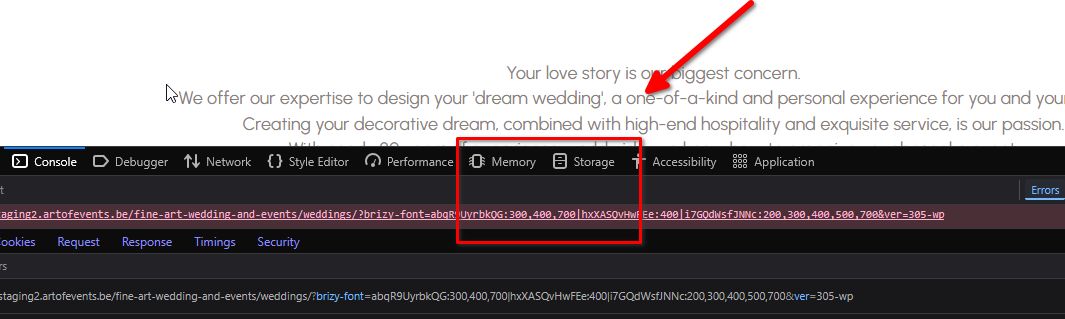
I have re-uploaded the fonts and cleared the cache! The problem still persists. When I check in the console, it still shows an error.
It can't find this file: https://staging2.artofevents.be/fine-art-wedding-and-events/weddings/?brizy-font=abqR9UyrbkQG%3A300%2C400%2C700%7Ci7GQdWsfJNNc%3A200%2C300%2C400%2C500%2C700%7Cg03_rb3yKK3t%3A400%7Cm9dDhFH3nJeK%3A300%2C400%2C700&ver=305-wp
This is because I have changed the Site Url in the WordPress admin to: https://staging2.artofevents.be/
Instead of the old site URL: https://staging2.artofevents.be/fine-art-wedding-and-events/weddings/
Only the self-uploaded fonts are not working. When I add fonts from Google, it works, but the custom fonts do not. Therefore, the issue with this CSS file not being found versus the change of the Site Url needs to be resolved.
0 -
Hi Jack,
Thank you for the update. Please try using the Better Search Replace plugin to update the old URLs. You should find the URLs in the wpd7_postmeta table.
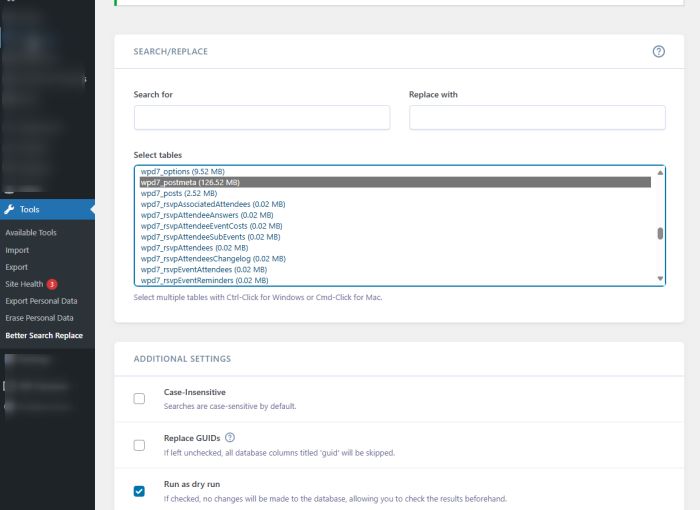
Give it a try and let me know how it goes.
Best regards,
Ariel H.0 -
Hi Ariel,
I purchased the plugin and used "Find and Replace" to change the URL in the wpd7_postmeta table. The error has disappeared, and I was able to re-add the font and link it with the correct styles.
I did have to open each page and re-select a text in the correct style once, and from that moment, all the texts on that page were recognized with the correct font.
It works! Thanks so much for your help!!
Now we can go live with the website and hopefully everything still works! Have a great day!0
Please sign in to leave a comment.
Comments
9 comments