Can't save progress through Brizy wordpress

Hi,
I'm having issues with saving my work on Brizy. The blue 'Update' button just keeps spinning, eventually getting an error message.
I have the most up to date versions - Brizy 2.6.9 and Brizy Pro 2.6.6
I have deactivated all the external plugins to test and have switched theme to default Wordpress one. I have been working in Chrome but tested it also in Firefox also.
-

Hi Orla,
Thank you for contacting us.
Please try the steps outlined in this article and see if they help:
https://support.brizy.io/hc/en-us/articles/22590197512210If the issue persists, please provide us temporary access to your WordPress Admin so we can investigate further. You can add us as an Admin user in your WordPress Dashboard and send the details to communitysupport@brizy.io:
Community Post link: hhttps://support.brizy.io/hc/en-us/community/posts/24470324443282
WordPress Admin URL:
Username:
Password:Best regards,
Ariel H.0 -
Hi Ariel,
My hosting is with Cloudways and there is no access to Modsecurity. I have accessed my .htaccess file and added the extra configurations but this has not had any effect on the issue.
I don't use Wordfence on the site.
I will send temporary access details now so you can have a look!
1 -
Hi Orla,
Thanks for the update. Since Cloudways doesn’t offer direct access to ModSecurity settings, you may need to contact their support team for further assistance.
In the meantime, please share your site credentials so we can take a closer look.
Best regards,
Ariel H.0 -
Thanks Ariel. I had gotten on to Cloudways in the meantime and they were able to update the settings for me on their end. It all seems to be working okay now.
Thanks for your help
0 -
Hi Orla,
Thank you for your cooperation.
After checking, it looks like the issue is only affecting the homepage. The problem seems to be caused by the apostrophe in the title, as some web hosts use rules that may block requests containing certain characters or patterns. Removing the apostrophe resolved the issue.
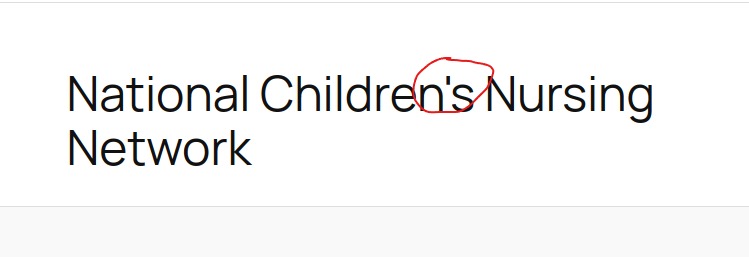
Please give it a try to confirm and let us know if you have any further questions.
Kind regards,
Ariel H.0 -
Hi Ariel,
Yes the issue seems to be resolved. It was happening across many pages though so I think it was due to Cloudways adding the configuration details to Mod security.
Thanks for your help.
Órla
0
Please sign in to leave a comment.
Comments
6 comments