Updating from 2.4 to the current version

Hello,
I was trying to update brizy wordpress plugin from 2.4 to 2.6, the current version.
The update went well for most of the pages except for two issues.
i. one page on the website totally messed up on the frontend, but displaying and responding perfectly well in the builder, at the backend.
ii. the page could not be published or updated in the builder. The error ("This page needs a refresh. You've probably updated the page in a different tab or browser") was mentioned in the support forum, but I don't have any security or cache plugin installed. So, I don't know what to do.
Is there a way I can get around these issues and still update to the current version?
I will appreciate the help.
Thanks.
-

Hi Tomiwa,
Thank you for contacting us.
Sorry to hear that you're experiencing this issue with Brizy after the recent update.
Could you please provide temporary access to your WP Admin so we can take a closer look at your site? Kindly add us as an Admin user in your WordPress Dashboard and send the details to communitysupport@brizy.io:
Community Post link: https://support.brizy.io/hc/en-us/community/posts/24445868511250
WordPress Admin URL:
Username:
Password:Additionally, we will also need temporary access to FTP/cPanel:
FTP / cPanel host address:
Username:
Password:As a precaution, please make a full backup of your site before providing us access.
Best regards,
Ariel H.0 -
Hi Ariel.
I appreciate the fast response.
This seems more work to me than to just get the next higher version from you and do the upgrade step by step. I am currently working on the copy of the website on Local (by flywheel).
So, while I want to get it fix, I would like to first try a cascaded update of the versions from 2.4 to 2.6, one after the other. I am thinking it's the rash jump in databases from 2.4 to 2.6 that is causing this problem.
If I can't get the one page to start displaying properly, I will go ahead with your suggestion of creating an admin access on the live website.
Please, if it's available, kindly send the link to download the version 2.5.x.x.
My exact versions are:
Brizy version 2.4.45
Brizy Pro version 2.4.38
Thanks for your prompt assistant.
Cheers.0 -
Hi Tomiwa,
Please use this link to download version 2.5.x.x.
Best regards,
Ariel H.0 -
Hi Ariel,
Thanks for the link.
I will revert on the outcome.
Cheers0 -
Hello Ariel,
Thank again for the link. The website components and pages are working and displaying perfectly well on the version 2.5 you sent me.
However, WordPress is not showing any update for the Free version but showing version 2.6.6 for the PRO version.
I guess my question is can I run Pro version 2.6.6 on the Free version 2.510.
I will appreciate if you can send me the link to suitable stable update for me to upload manually.
I am currently running Free version 2.510 (not picking up update in WordPress), and Pro version 2.5.6 (picking up update for 2.6.6).
Thanks.
Best regards.0 -
Hi,
Thank you for the update.
Apologies for the inconvenience. It looks like automatic updates are not working in this version. I recommend installing the WP Rollback plugin, which will allow you to easily switch to previous versions.
In some cases, you may encounter a version mismatch, which can cause Pro features to become unavailable. If this happens, try switching to a version that closely matches the Pro version installed on your site.
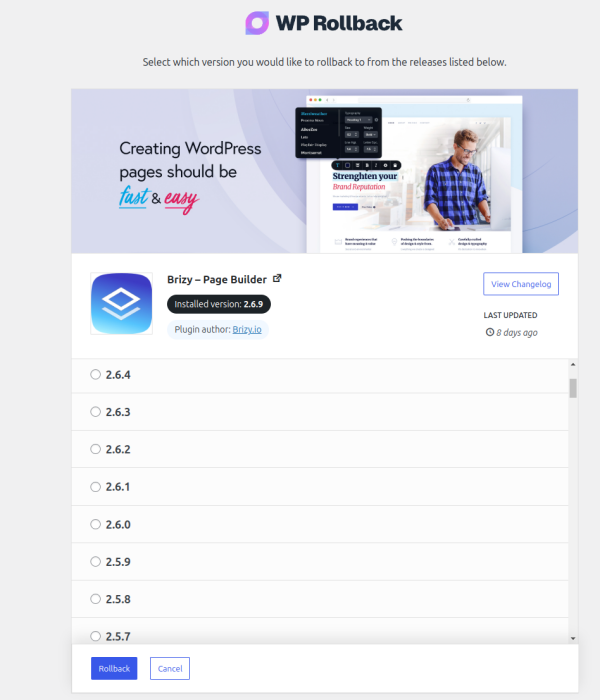
Let us know if you have any further questions.
Kind regards,
Ariel H.0 -
Hello,
Thank you, Ariel.
This helps a lot.
Everything is work great. I am on the current versions for both Free and Pro plugins.
Initially messed up page is displaying as it should.
Thanks for the support. I really appreciate it.
Best regards.
Tomiwa.0 -
Hi Ariel.
Trust you are good.
I thought I have left this issue behind but found out that after updating to the latest version, I began to get the error "This page needs a refresh". I have tried all the recommended solution to no avail. No luck.
I have to go back to version 2.4 as that is the most recent stable version in my case.
I have copied the site into a staging environment at new.tripatreat.net already. I plan to do everything there and move the solution to the live site when done.
I am sending the login details to Community Support as advised in the message above so that you can take a look at it.
Thanks for your help. It is well appreciated.
Cheers.0 -
Hi Tomiwa,
Thank you for keeping in touch.
Please send us the credentials using this format:
Community Post link: https://support.brizy.io/hc/en-us/community/posts/24445868511250
WordPress Admin URL:
Username:
Password:Best regards,
Ariel H.0 -
Done.
Thanks.0 -
Hi Tomiwa,
Thank you for your cooperation. I’ve asked a colleague to take a closer look at your site, and I’ll update you as soon as I have more information.
Best regards,
Ariel H.0 -
Hi Tomiwa,
Thank you for your cooperation. It looks like the issue may be related to ModSecurity. Could you ask your hosting provider to temporarily disable it for troubleshooting?
If that’s not an option, please provide us with temporary access to your hosting control panel (cPanel) so we can investigate further.
Best regards,
Ariel H.0 -
Hi Tomiwa,
Thank you for the update. The credentials provided are for FTP, but unfortunately, that doesn’t give us the access we need. Could you provide cPanel access instead?
Best regards,
Ariel H.0 -
Hi Tomiwa,
Thank you for your cooperation. We now have access to HPanel. I will get back to you as soon as I have an update.
Best regards,
Ariel H.0 -
Hi Ariel,
Hope you're well.
Could you please provide an update on the "This page needs a refresh" error I'm encountering when updating to the latest version?
It's been a month, and I'm concerned about remaining on v2.4, especially as my WordPress installation continues to update normally. I've only prevented updates to Brizy and a few potentially conflicting plugins.
Is there anything I can do to assist in resolving this? Any response would be greatly appreciated.
Thanks for your help.
0 -
Hi Tomiwa,
Thank you for following up — I hope you're doing well too.
It looks like the issue no longer occurs in the latest versions of Brizy and Brizy Pro. We've tested it as you can see in this short screencast: https://youtu.be/RNeAxZN8Gnk
You can safely update to the latest versions of Brizy and Brizy Pro. Please let us know how it goes, and if the issue persists, we’ll be happy to assist you further.
Best regards,
Ariel H.0 -
Hello Ariel,
Thanks for the fast response.
This is good news. I am glad to hear this has been resolved.
I will test it out on the live site and let you know how it goes.
Thank you.
Regards.
Tomiwa.0
Please sign in to leave a comment.
Comments
17 comments