Menu disappears

Hey.
Somehow our menu has disappeared and nothing really works for getting it back.
We've tried everything on similar support ticket but nothing works.
Can you help us out?
-

Hi Magnús,
Thank you for reaching out, and sorry to hear you're experiencing this issue with Brizy.
Could you please provide temporary access to your WP Admin so we can take a closer look at your site? Kindly add us as an Admin user in your WordPress Dashboard and send the details to communitysupport@brizy.io:
Community Post link: https://support.brizy.io/hc/en-us/community/posts/24233476418194
WordPress Admin URL:
Username:
Password:Please make a full backup of your site as a precaution.
Best regards,
Ariel H.0 -
Hi Magnús,
My apologies for the inconvenience.
It looks like there are some ongoing issues with the recent update. A fix for this is currently in the Beta testing phase and should be released soon.
In the meantime, please revert to the following versions to resolve the issue:
Brizy 2.6.4 : https://jmp.sh/hTF2g1V8
Brizy Pro 2.6.3 : https://jmp.sh/3FPsswmyFollow the below procedure to roll back.
1. Deactivate and delete Brizy Pro
2. Deactivate and delete Brizy
3. In your WordPress Dashboard under Plugins - Add New - Upload Plugin, upload Brizy 2.6.4
4. In your WordPress Dashboard under Plugins - Add New - Upload Plugin, upload Brizy Pro 2.6.3We also recommend updating the following server settings for best restults, especially given the number of plugins you're using. Please reach out to your hosting provider to assist with these updates.
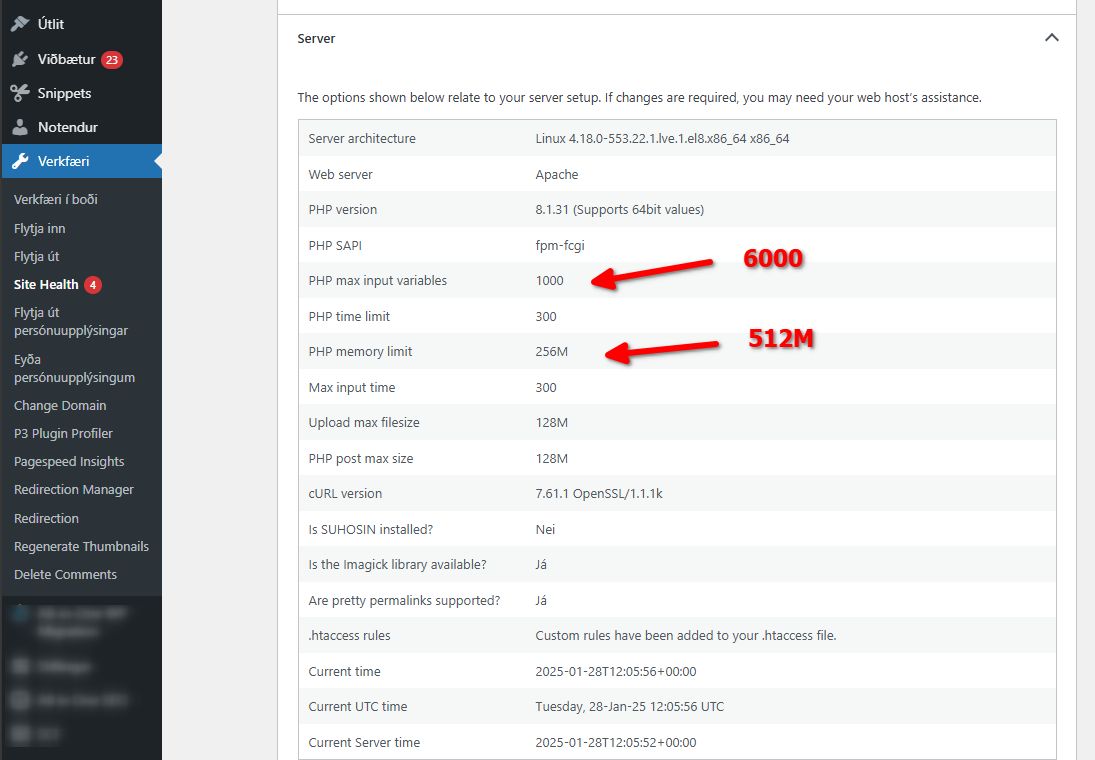
If you encounter any issues during this process, feel free to reach out for further assistance.
Best regards,
Ariel H.0
Please sign in to leave a comment.
Comments
2 comments