optin form disappearead

Hi, my optin forms have disappeared suddenly.
Yesterday they were there, today not anymore.
In the homepage https://alessiapandolfi.com/, you can now see it because I went in, duplicated one field, deleted it and voilà it was back.
The problem is that the optin form is missing from almost all my blog posts. In now way do I want to open all 20+ pages and manually re-add the fields that are missing, since this has already been done when I worked on those blog posts and it is absolutely unconceivable that optin forms disappear.
Kindly look into this and let me know how to fix it.
Here some examples:
https://www.alessiapandolfi.com/blog/automazione-dei-processi
https://www.alessiapandolfi.com/blog/accettare-pagamenti-online/
https://www.alessiapandolfi.com/blog/app-appuntamenti-clienti/
https://www.alessiapandolfi.com/blog/migliorare-la-customer-care/
https://www.alessiapandolfi.com/blog/programmi-per-organizzare-il-lavoro-freelance/
-

Hi Alessia,
Thank you for reaching out. It seems there are some ongoing issues with the recent update.
In the meantime, please revert to the following versions to resolve the issue until we can release a fix.
Brizy 2.6.4 : https://jmp.sh/hTF2g1V8
Brizy Pro 2.6.3 : https://jmp.sh/3FPsswmyFollow the below procedure to roll back.
1. Deactivate and delete Brizy Pro
2. Deactivate and delete Brizy
3. In your WordPress Dashboard under Plugins - Add New - Upload Plugin, upload Brizy 2.6.4
4. In your WordPress Dashboard under Plugins - Add New - Upload Plugin, upload Brizy Pro 2.6.3Best regards,
Ariel H.0 -
Hi, doo I need to try this on a staging website first? I don't really want to risk losing all my content by deleting the plugin..
0 -
Hi Alessia,
You can safely uninstall and reinstall Brizy without losing your content, as all your data is stored in the database, not within the plugin itself. Once you reinstall and activate the plugin, your content will reappear as it was.
However, if you still prefer to test this on a staging website first, that’s always a good practice.
Best regards,
Ariel H.0 -
Hi Ariel, in the staging website it seemed it worked, but not on my main website: still the same AND now all my blog pages have disappeared, there is only page 1!
https://www.alessiapandolfi.com/blog/bpage/4/
0 -
Hi Alessia,
Could you please provide temporary access to your WP Admin so we can take a closer look at your site? Kindly add us as an Admin user in your WordPress Dashboard and send the details to communitysupport@brizy.io:
Community Post link: https://support.brizy.io/hc/en-us/community/posts/24221287283218
WordPress Admin URL:
Username:
Password:Best regards,
Ariel H.0 -
Hi Ariel, I just sent you the password reset.
The url is alessiapandolfi.com/wp-admin
0 -
Hi Alessia,
Thank you for your cooperation.
After rolling back Brizy and Brizy Pro to a previous version and making minor adjustments to the affected pages, they are now functioning as expected. Please check on your end to confirm, and let us know if you encounter any other issues.
We sincerely apologize for any inconvenience this may have caused.
Best regards,
Ariel H.0 -
Hi Ariel, thank you. I have just taken a look and the articles in the first blog page are ok, but if you go back to 2nd or 3rd page, most of those blogs don't have the optin form showing yet.
0 -
Hi Alessia,
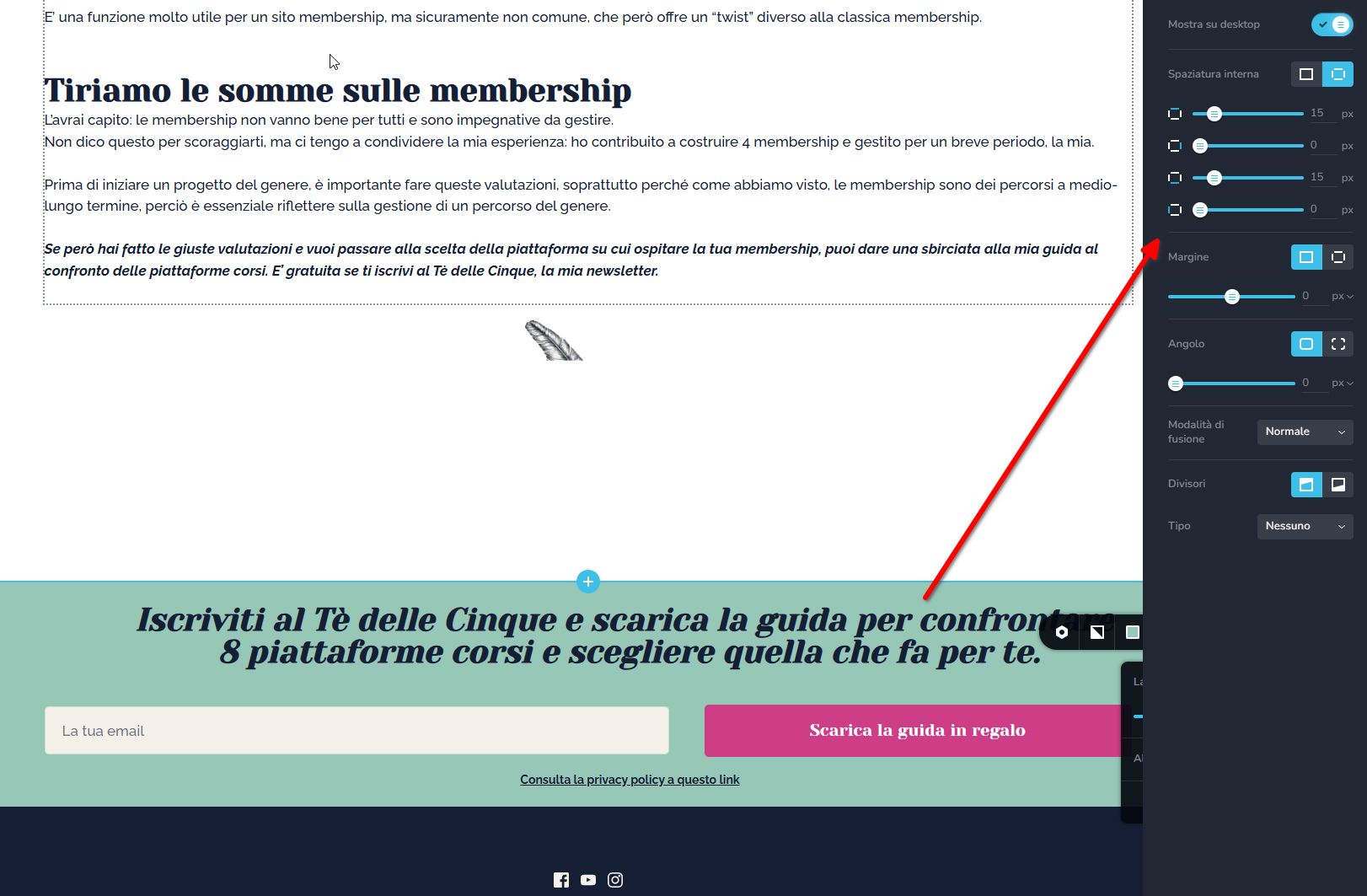
For the posts or pages where the opt-in form isn’t appearing, please try manually editing the blog posts ior the pages and adding 1px padding to the affected block. Then, save your changes—this should trigger a recompilation of the page and resolve the issue.
Best regards,
Ariel H.0 -
Hi Ariel, this means opening more than 15 blog posts and manually do that. I hope you understand that this is extremely inconvenient and that I don't really want to do this, because it is not my fault or responsibility that this is happening.
Why is Brizy doing updates that mess up the existing website?
Pretty much every time there is an update, there is something messed up in my website, although i don't use any of the plugins that create conflicts with Brizy. Once is the menu that disappears, once is the optin form: when is this going to stop?To be truly honest I regret re-doing my website with Brizy last year.
0 -

Hello Alessia,
At the moment, your opt-in form is part of a regular block. If we set the block with the form as a global block, the changes can apply to all blog posts at the same time. If you want us to add the global block to all your 50 blog posts and delete the regular blocks, please let us know. We will do it for you.
0
Please sign in to leave a comment.
Comments
11 comments