Submenu not showing drop-down menu?

When I hover over "Developments" and then hover over the "New Developments" as shown in the image, it does not show the drop-down menu. But the "Existing Developments" shows the drop-down menu.
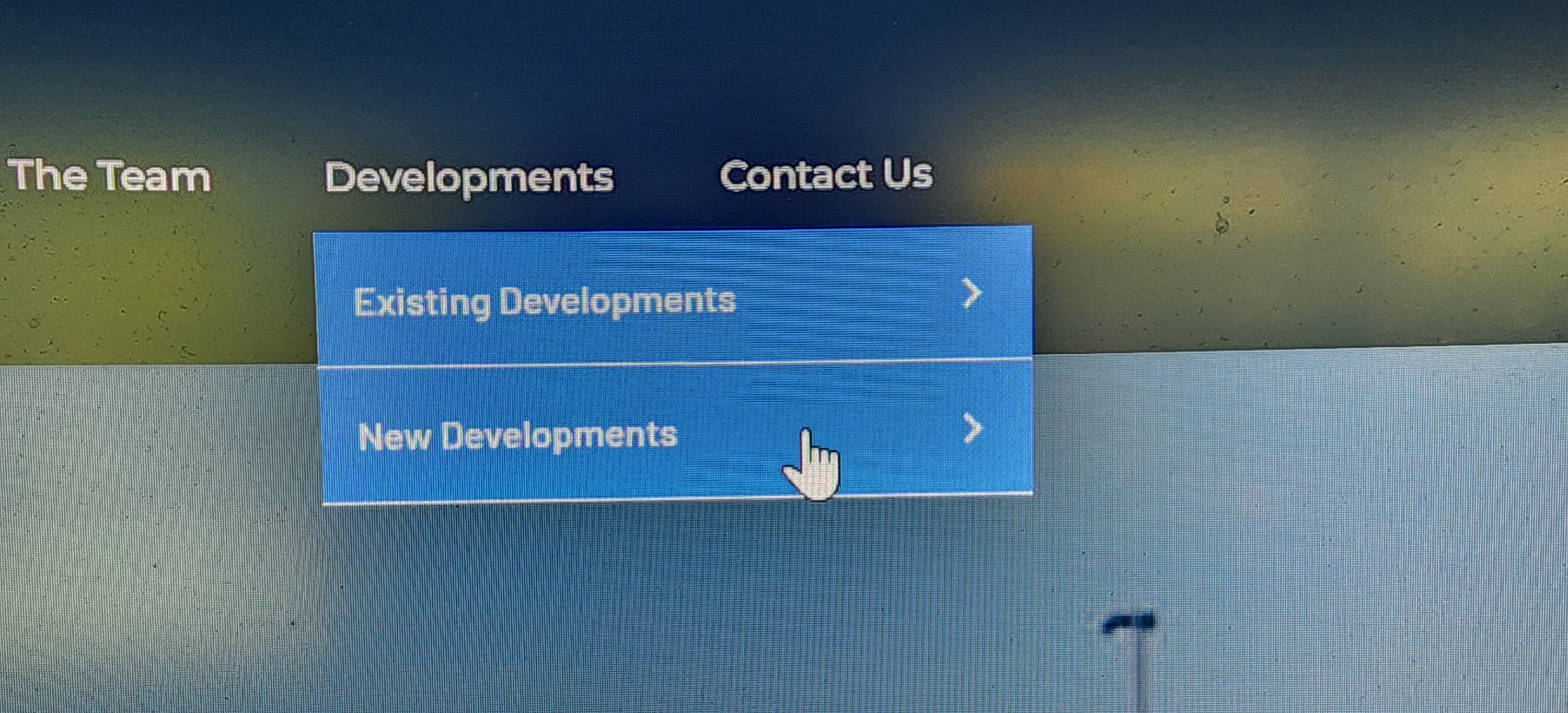
Website URL:
The Myriad Group | Retail, Development & Leasing Services
Please help, Thanks.
-

Hi Yianakis,
Thank you for reaching out. It seems there are some ongoing issues with the recent update.
In the meantime, please revert to the following versions to resolve the issue until we can release a fix.
Brizy 2.6.4 : https://jmp.sh/hTF2g1V8
Brizy Pro 2.6.3 : https://jmp.sh/3FPsswmyFollow the below procedure to roll back.
1. Deactivate and delete Brizy Pro
2. Deactivate and delete Brizy
3. In your WordPress Dashboard under Plugins - Add New - Upload Plugin, upload Brizy 2.6.4
4. In your WordPress Dashboard under Plugins - Add New - Upload Plugin, upload Brizy Pro 2.6.3Best regards,
Ariel H.0 -

This keeps coming up over and over again. It's pretty fundamental to have your menus working. Are you doing anything to keep this from happening on successive up-issues??
1 -

Hello Glenn,
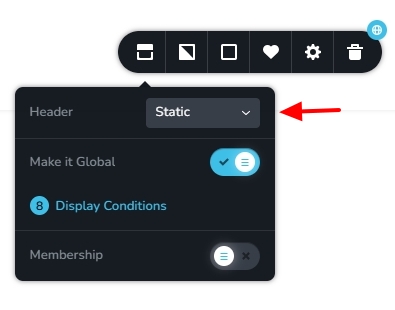
The most recent Brizy versions have a bug with the "Sticky" menu. Until we are able to roll out a fix, kindly use the "Static" or "Fixed" menu options for your header block.
 0
0 -

Neither type of menu is working for drop downs when you view it on a tablet or phone (only works correctly on desktop). This is such a core feature that needs to be working correctly. It's 2 months since the original comment was made and I'm still seeing issues with it.
I'm also having an issue with the hamburger menu.
You cannot click on the menu item text itself to open up the submenu. You have to click on the little arrow to the right of it which most viewers are not going to do.
I've also noticed how the submenu only opens up if I tap the menu item while I am on some of the pages and not while I am on others. It's just pot luck if it works.
I second the above comment. It's vital the menu works otherwise we will lose a lot of traffic as people are unable to even see half the website!
I'd appreciate this bug being fixed as soon as possible!
PS. It would also be nice to have some more control over the look of the submenu. At the moment, by default, little arrows are placed to the right. It would be good to be able to remove these arrows and only have plain text if possible.
0 -
Hi Greg,
Thank you for your detailed feedback, and we completely understand how important it is for the mobile menu to function smoothly.Regarding the issue where the submenu only opens when tapping the arrow and not the menu item text—this has been reported previously, and we do have a CSS workaround that should help make the entire menu item (not just the arrow) clickable to open the dropdown.
Please try adding this custom CSS to your site:
@media (max-width: 1024px) { /* Targets tablets and smaller screens */
    .brz .brz-menu.brz-mm-menu .brz-menu__item .brz-mm-btn_next {
        width: 100%;
        position: fixed;
        padding-left: calc(100% - 50px);
    }
}
I've tested this using an online CSS editor as demonstrated on this screencast: https://youtu.be/ZADYOeOByRY
This will make the full text of the menu item clickable, not just the arrow icon. You can add the CSS in Appearance > Customize > Additional CSS.As for the submenu not working consistently across different pages, it may be due to page-specific settings or caching. Please try the following steps:
1. Clear/purge any active caching plugins or server-level cache (like LiteSpeed or Cloudflare).
2. Ensure all Brizy plugins are up to date.
3. If the issue persists, try disabling all third-party plugins (except Brizy and Brizy Pro) and check again to rule out any conflicts.We’ve also noted your suggestion about having more control over submenu styling and the option to remove the arrows, we also recommend submitting this as a feature request on our Ideas and Roadmap page. This way, other users can vote on it, and our team can better prioritize the feature based on demand.
Let us know if the CSS fix helps and how things go after clearing the cache or testing with plugins disabled.
Best regards,
Ariel H.0
Please sign in to leave a comment.
Comments
5 comments