Brizy Post Element - Custom Query Possible?

Hi,
I’m trying to dynamically filter the content displayed in Brizy Post Elements. For example, if I have one Brizy Template with a single Brizy Post Element, I want to dynamically filter the content of that element so I can use the same template across multiple posts. Each post should show different, dynamic content in the Brizy Post Element when loaded in the browser. Is this possible?
I’ve already tried using custom PHP queries, which work on their own, but they don’t seem to affect the Brizy Post Element.
So, my questions are:
1. How does the Brizy Post Element query the content displayed inside it?
2. And how can I make the filtering dynamic, allowing me to reuse the same Brizy Post Element in a single template to display unique and dynamic content across multiple posts using that template?
My current PHP codce:
// Function to dynamically filter the Brizy Post Elements
add_filter('brizy_global_posts_query', function ($args, $post) {
// Check if we are on a Casino Top List post
if (is_singular('casino-top-list')) {
$post_id = get_the_ID(); // Get the current Casino Top List post ID
// Get the selected casinos from the ACF field
$selected_casinos = get_field('select_casinos', $post_id); // Ensure the ACF field is correctly set
if ($selected_casinos) {
// Extract IDs of the selected casinos
$casino_ids = array_map(function ($casino) {
return $casino->ID;
}, $selected_casinos);
// Modify the query arguments to filter by selected casinos
$args['post_type'] = 'casino-review'; // Replace with your Casino CPT slug
$args['post__in'] = $casino_ids; // Use selected casino IDs
$args['orderby'] = 'post__in'; // Maintain the ACF order
} else {
// If no casinos are selected, return no results
$args['post_type'] = 'casino-review'; // Replace with your Casino CPT slug
$args['post__in'] = [0]; // Ensure no posts are returned
}
}
return $args;
}, 10, 2);
I look forward to hearing from you.
Best,
Daniel
-

Hi Daniel,
Thank you for contacting us.
We understand that you'd like to dynamically filter content within the element using custom queries.
To clarify, the Brizy Post Element pulls data based on the settings in the Brizy interface, typically from posts or custom post types in your WordPress database. However, it doesn’t currently support dynamic filtering across multiple posts within a single element.
If you believe this feature would be valuable, we encourage you to submit it on our Ideas and Roadmap page at https://brizy.io/ideas-and-roadmap. By sharing your suggestion there, you can gain support from other users, increasing the chances of it being included in our development roadmap. This platform allows us to track suggestions effectively and prioritize features based on user feedback.
If you have any other questions or need further assistance, please feel free to reach out.
Best regards,
Ariel H.0 -
Hi Ariel,
Thank you for your response :)
I understand that the Brizy Post Element doesn’t support dynamic content, but I can work around that using custom PHP code in my functions.php file. However, to make my code work, I need to understand how the Post Element pulls in content. To clarify, could you please help me with the questions below?
-
What query does the Brizy Post Element use to fetch content?
- Is it using
WP_Query,get_posts(), or a custom query to retrieve posts from the database? - If it uses
WP_Query, does it respect hooks likepre_get_postsor filters likebrizy_global_posts_query?
- Is it using
-
How can we hook into or modify the query used by the Post Element?
- Is there a specific filter, action, or custom hook provided by Brizy to modify the query for Post Elements?
- For example, is there a hook like
brizy_post_queryorbrizy_post_filter?
-
Does the Post Element support custom query parameters?
- Can we add custom query arguments such as
post__in,tax_query, ormeta_queryfor more control over the filtered content? - If so, how do we pass these parameters?
- Can we add custom query arguments such as
-
Can the Post Element use a custom WP_Query?
- If the built-in functionality does not support dynamic filtering, is there a way to provide a fully custom WP_Query to the Post Element?
I look forward to hearing from you.
Best,
Daniel0 -
-

Hello Daniel,
Unfortunately questions regarding product source code is beyond the scope of our support. We only provide assistance for using the product's user interface.
0 -
Hi KC,
OK, and fair enough.
Still not having the Post Element capable of dynamic content is a huge issue, unfortunately :(
Do you know of any work arounds, or could you help my integrate my code with the Post Element?
Look forward to hearing from you.
Best,
Daniel0 -
Hello Daniel,
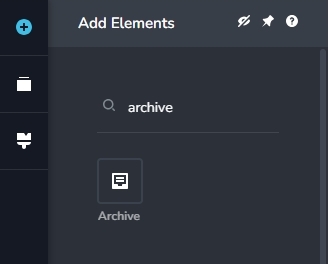
Are you trying to display a list of blog posts within a category dynamically while developing category archive template? Kindly use the Brizy "Archive" element for this purpose. Archive element can dynamically list blog posts based on the currently selected category.
If you are using the Posts element to display "Related Posts" within Brizy blog post template, dynamically displaying all posts within the same category is not possible. Consider adding a Gutenberg widget with the help of the Brizy "Sidebar" element to display "Related Posts". If you install a plugin like Related Posts for WordPress you can use the plugin shortcode to display Related Posts.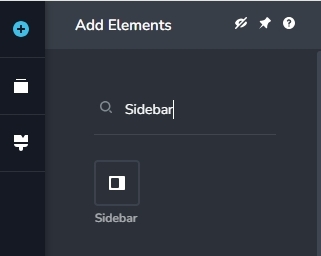
If your purpose is something else, kindly elaborate your statement "I’m trying to dynamically filter the content displayed in Brizy Post Elements"
0 -
Hi KC,
Thank you for your response, but it’s not quite what I’m looking for.
I create affiliate websites across various niches, and each site features Top Lists that rank products and services. These lists include a review link and an affiliate link to the products or services I promote.
For these Top Lists, I use a single Brizy Template to keep things consistent. For example, I might have a Top List titled "Best Webpage Builders" or another titled "Best Cloud Hosting Service." I can create dozens or even hundreds of these lists, all using the same template. However, I need a way to filter the content within the template so that it displays only the relevant posts for each list. These posts are the individual products or services I’m promoting, ranked in the list.
For instance, in the "Best Webpage Builders" list, I would show a Top 10 ranking of the best webpage builders (posts containing information about webpage builders, displayed as rows in the Brizy Post Element). For a different list, like "Best Cloud Hosting Service," I’d use the same template but show a different set of posts—this time featuring cloud hosting services.
I hope this explanation makes sense! This structure is quite common for affiliate websites, where Top Lists and product rankings are key components.
That said, I’m looking for a practical solution. I don’t think the Archive or Sidebar options are ideal. The Archive doesn’t work because the Top Lists are individual posts with their own content, while the Sidebar typically displays related posts and can’t be styled directly within the Brizy Template interface (as far as I know).
I’m open to suggestions if there’s a better way to achieve this.
Best regards,
Daniel0 -
Hello Daniel,
Let me describe in more detail how you can make the Archive element work in your project. Let's say you want to list 10 blog posts under these lists: "Best Webpage Builders" and "Best Cloud Hosting Service". I will follow these steps to develop these listings.
- Add 2 new blog post categories called "Best Webpage Builders" and "Best Cloud Hosting Service"
- Assign the category "Best Webpage Builders" to all blog posts you want to include in this list
- Assign the category "Best Cloud Hosting Service" to all blog posts you want to include in this list
- Develop Category Archive template by using the following Display Condition
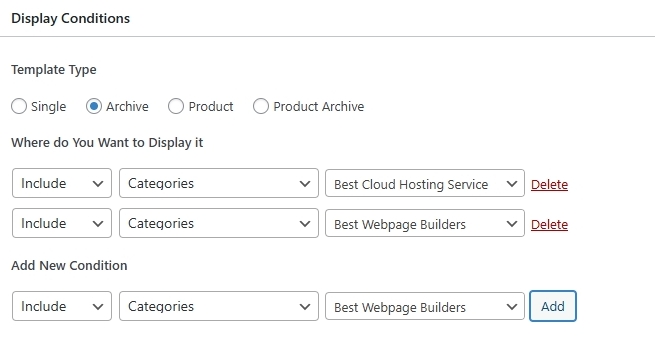
- Add the Brizy Archive element to display the blog post within each category.
If you give us access to your project, we can take a look at your project and give you a more comprehensive solution and even implement the solution and demonstrate it for you.
0 -
Hi KC,
Thank you for your suggestion 😊
While it’s a good solution, I’ve found that I’m unable to control the ranking of posts in lists generated using the Archive Element. For example, if I create a Top 10 list, I need precise control over which post appears in each position on the list. Unfortunately, the Archive Element only allows sorting by Title, Date, Random, or Comment Count, which doesn’t meet this need.To give an example, let’s say I have a Top 10 List where advertisers pay a fixed fee based on their position on the list. In this case, I need full control over which posts occupy specific spots, but the current functionality of the Archive Element doesn’t provide that flexibility.
Additionally, when using Archive Pages for Categories, I have to manually add any additional content to the Category Archive Page. For instance, I have numerous ACF Custom Fields for my Top 10 lists, such as List Description and List Header Image. Since this is an Archive Page, I’m unable to import the additional list content using tools like WP All Import. Instead, I must manually populate all the fields directly in the Category Editor, which is time-consuming and impractical when dealing with a large number of categories. I’ve found a workaround—exporting the Category ACF data, editing it outside WordPress, and then reimporting—but this is far from ideal.
The core issue with the Archive Category Element is its lack of control over sorting and ranking for any type of list, whether it’s a Top 10, Top 100, or similar.
Do you have a solution for the ranking issue with the Archive Element?
I look forward to your response.
Best regards,
Daniel0 -
Hello Daniel,
Kindly consider using the plugin Post Types Order to rearrange the sequence of blog posts. In the Archive element under the "Filter" tab, you must select the "Order By Title" option to make the plugin work with Brizy.
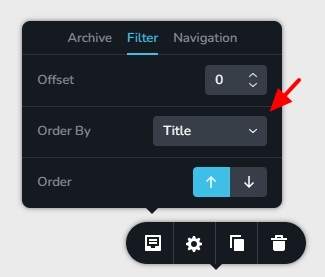
You can see this plugin in action on a blog page developed using Brizy in the screen recording at https://jmp.sh/3wYJjtyQ
Custom fields added to blog posts categories using the ACF plugin can be displayed dynamically in the Brizy Category Archive template following the procedure at https://jmp.sh/IDqp0Fkd If the information above does not answer your questions, kindly get back to us.
0 -
Hi KC,
Thank you for providing the detailed solution and video walkthrough. I greatly appreciate your help.
I believe this solution will work for our needs, but I would like to test it first. I will provide feedback once I have completed the testing.
Best regards,
Daniel
0
Please sign in to leave a comment.
Comments
10 comments