change email

Good morning, I was looking to change my email from soporte@breogangal.eu to toys@onlywp.work but I don't have the option to do so.
Regards.
-

Hello Noel,
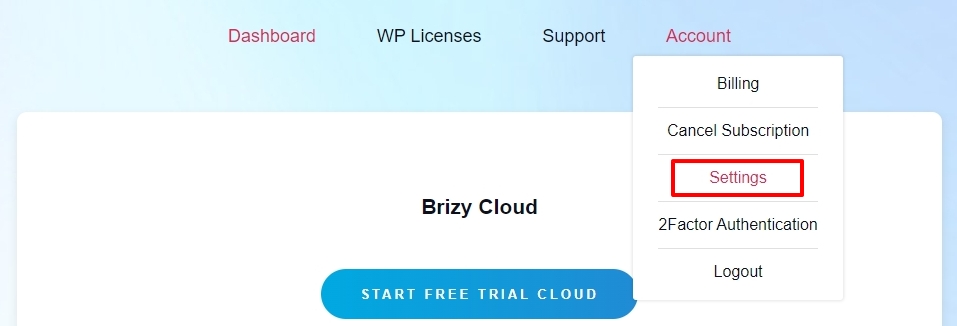
Kindly sign in to your Brizy account at https://www.brizy.io/account/login and navigate to the "Settings" option under the "Account" menu
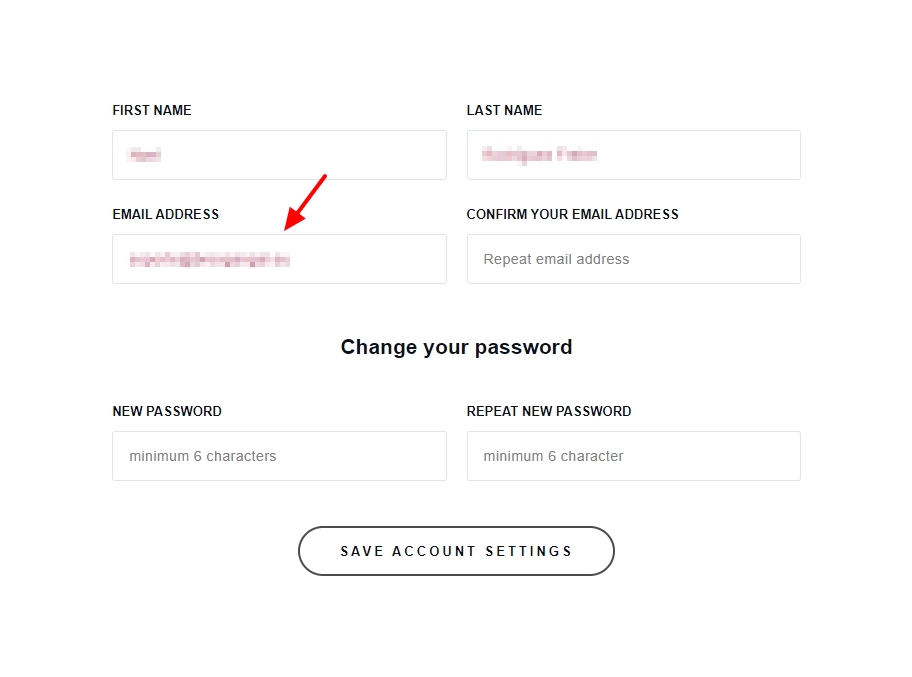
In the following page, add your new email address and click on "Save Account Settings" button
Then try signing in using your new email address. If it does not work, kindly get back to us.
0 -

Hello, Brizy support.
I followed the steps you shared in Jan 2025, but they did not work for me.
Has the ability to change our email and/or password on the Settings page been disabled?
Your advise would be helpful, please.
Alex
0 -
Hello Alex,
The form is the "Settings" page used to work well. We have not tested it recently.
Please let us know your new email address, and we'll update it for you. After we make the change, we will also remove your email address from this forum.
0 -

Thanks for replying, KC!
Interestingly, it worked out.
The email notification took a very long time, but I was able to receive it and respond to the CTA button to change it.Alex
0 -
Thanks, you can close the thread
0
Please sign in to leave a comment.
Comments
5 comments