Brizy Update breaks the forms, Slider/Carousel & the Mega menu dropdown

I have Brizy and Brizy Pro plugins on auto enabled updates but the way the updates break websites, i am thinking twice on disabling updates which then becomes an issue to manually manage updates for over 100 websites using brizy.
Could you please let me know the work around the forms being distorted and the sliders showing images in the builder but not showing in the live website. The mega menu dropdown also goes beyond the navbar and the images for custom post types are not showing.
I have done the following :
- I have updated brizy to 2.6.8 and brizy pro to 2.6.4.
- I have opened the page and tried editing the slider and contact us form but to no success.
Please advise on what to do as i think i have exhausted the listed solutions on the support forum.
-

Hello Edgar,
Are you using the Hummingbird Pro plugin by any chance? If you are, kindly deactivate and reactivate the plugin and then in your WordPress Dashboard under under Hummingbird Pro > Asset Optimization > Settings > disable the option "Generate Critical CSS" and then check if the issue resolves.
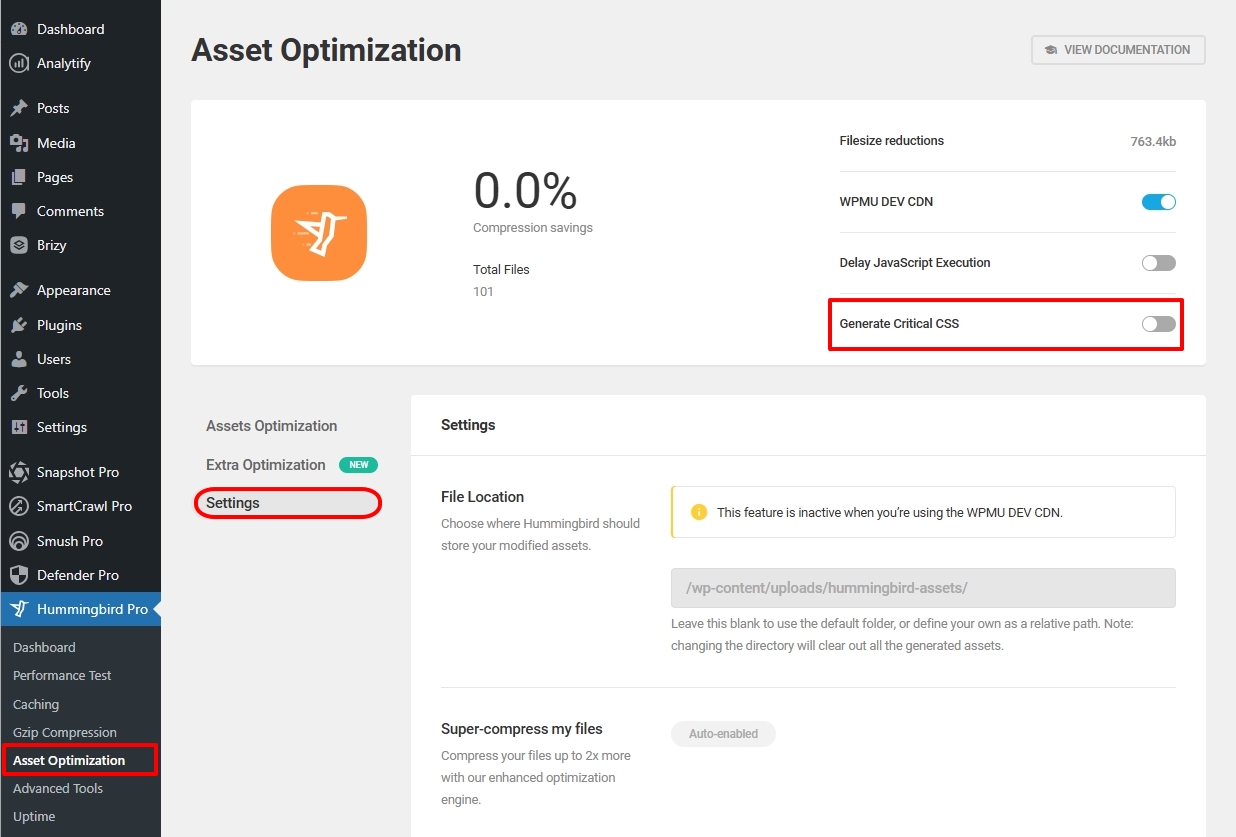
If you are not using the above plugin, kindly give us access to your project and we will take a look. Please add a new user to your WordPress Dashboard and send the following details to our email: communitysupport@brizy.io
- Support Forum link: https://support.brizy.io/hc/en-us/community/posts/24103170192658
- WordPress Admin URL:
- Username
- Password
Please let us know in this forum when you send us the email.
0 -
I am not using Hummingbird plugin. I am going to share the login
0 -
Hello Edgar,
Once you share the login, kindly let us know here.
0
Please sign in to leave a comment.
Comments
3 comments