Issue with Brizy Pro License Key After Website Migration

Dear Brizy Support Team,
I hope this message finds you well. My name is KC, and I am a virtual assistant for a law firm, currently managing their website. We’ve moved the website to a new hosting provider, since the previous admin of the website, wants us to change hosting provider because its expiring. We did and since then, we’ve been encountering an issue with Brizy Pro.
The website originally had a lifetime Brizy Pro license key, but after backing up and re-uploading the website, I’ve been receiving the message: Brizy Pro: License Key Not Found. This has been ongoing for some time.
In an attempt to resolve this, I purchased a new license key. However, when I try to update the license key on WordPress, I deactivate the previous one which shows as successful. But, the old license is still there. That is why I cant enter the newly bought license. Unfortunately, the license key remains unchanged, and I’m still seeing the same License Key Not Found alert.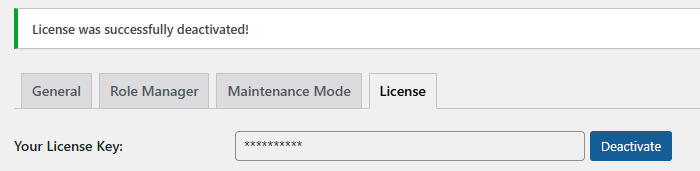
Additionally, this issue is preventing the Brizy Pro plugin from updating.
I've tried uninstalling and then installing the Brizy Pro plugin but the old license key just won't go away.
I have tried deleting Brizy Pro and Brizy Free,but when reinstalled, Brizy Pro still remembers the old license key.
Could you please guide me on how to resolve this issue? Any steps or assistance you can provide would be greatly appreciated.
Thank you for your help!
Best regards,
KC
-

Hello KC,
We would like to take a look at your WordPress Dashboard to fix this issue for you. Please add a new user to your WordPress Dashboard and send the following details to our email: communitysupport@brizy.io
- Support Forum link: https://support.brizy.io/hc/en-us/community/posts/24066570777106
- WordPress Admin URL:
- Username
- Password
Please let us know in this forum when you send us the email.
0 -
Hi,
I just sent the details to your email: communitysupport@brizy.io
Thank you for the assistance.0 -

Hi,
Thank you for your cooperation.
We resolved the issue by disabling all third-party plugins and reinstalling both Brizy and Brizy Pro. Subsequently, we installed Brizy Version 2.6.4 and Brizy Pro Version 2.6.3.
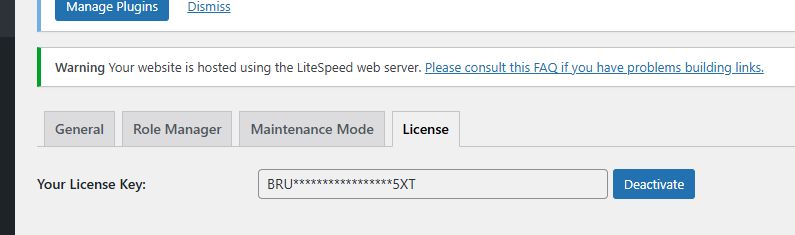
Additionally, we applied a temporary license for testing purposes. Please deactivate it and activate your own license to ensure it works correctly.
For now, we recommend postponing updates to the latest versions of Brizy and Brizy Pro, as there are still reported issues that we are actively addressing.
Best regards,
Ariel H.0 -
Hi Ariel,
Thank you for resolving the issue and providing detailed instructions. I appreciate your swift action in addressing this matter.
I will proceed to deactivate the temporary license and activate our own to ensure proper functionality. We’ll also hold off on updating to the latest versions of Brizy and Brizy Pro for now, as per your recommendation.
Please keep us informed about any updates or fixes regarding the reported issues. Thank you again for your support!
Best regards,
KC0 -
Hi Jesper,
I know this is too much but our website is not working earlier. The homepage is working but the rest of webpages like contact us, blogs etc has an error. I forgot to take a screenshot but it says its not working or something like its intentional.
So, I restore our website through hostinger. I am very sorry we cant really lose the webpages since we my client is a lawyer. But I think I did a wrong move.
I added you back with the same credentials I sent on communitysupport@brizy.io from email kcmonato11.tvh@gmail.com.
I also deleted few plugins and reinstalled Brizy Version 2.6.4 and Brizy Pro Version 2.6.3. like you mentioned but still I cant deactivate again the license key option. so sorry about this. I know this is so much work. But can you guide me? Thank you a lot
-KC0 -
Hi KC,
I’ve reinstalled Brizy Pro 2.6.3 and deactivated the license. Please try entering your site’s license and let me know how it goes.
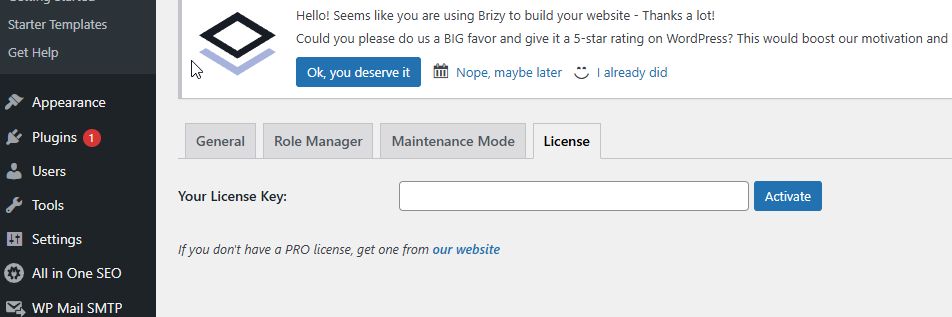
Your site should still function normally even with the license deactivated, but you won’t have access to the Pro features when editing pages. Once the license is activated, the Pro features will be available again.
I believe the Brizy Pro from the backup may be faulty. I've included the download links below in case you need them for your other websites if you encounter a similar issue.
Brizy 2.6.4 : https://jmp.sh/hTF2g1V8
Brizy Pro 2.6.3 : https://jmp.sh/3FPsswmyKind regards,
Ariel H.0
Please sign in to leave a comment.
Comments
6 comments