Carousel not showing in the frontend

Hi,
we have a problem with the carousel elements of our clients.
The elements show up in the backend as well as in the preview window, but not on the live site.
We tried deactivating all plugins, switching themes but no success.
How ca I submit details and login data for you?
-

Hello
Due to a bug with Brizy 2.6.7, Brizy Carousel element did not work well in the frontend. A fix for this issue was released with Brizy 2.6.8. Kindly ensure you have these Brizy versions.
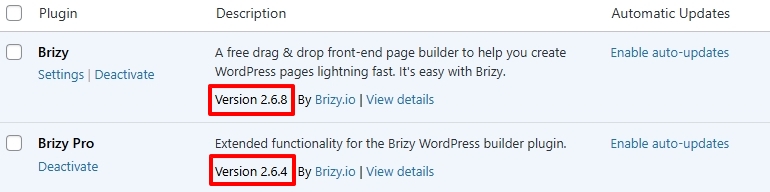
After updating to the above versions, make a minor change to the carousel element (like increasing the padding by 1 pixel), save your work by clicking on the "Update" button at the bottom right corner and check if the issue resolves.
If this does not help, kindly give us access so that we can take a look at your project. Please add a new user to your WordPress Dashboard and send the following details to our email: communitysupport@brizy.io
- Support Forum link:
- WordPress Admin URL:
- Username
- Password
Please let us know in this forum when you send us the email.
0 -

Hi,
Unfortunately, the user account provided does not have administrative access to your site. Kindly update the account to Administrator status so we can access your WP Dashboard.
Best regards,
Ariel H.0 -
Hi Leonhard,
Thank you for your cooperation.
It looks like there are some ongoing issues with the recent update. A fix for this is currently in the Beta testing phase and should be released soon. We apologize for the inconvenience.
We’ve temporarily rolled back Brizy and Brizy Pro to these versions. I’ve included the link here in case you encounter the same issue on other sites.
Brizy 2.6.4 : https://jmp.sh/hTF2g1V8
Brizy Pro 2.6.3 : https://jmp.sh/3FPsswmyFollow the below procedure to roll back.
1. Deactivate and delete Brizy Pro
2. Deactivate and delete Brizy
3. In your WordPress Dashboard under Plugins - Add New - Upload Plugin, upload Brizy 2.6.4
4. In your WordPress Dashboard under Plugins - Add New - Upload Plugin, upload Brizy Pro 2.6.3Best regards,
Ariel H.0 -
Thank you, this works.
0
Please sign in to leave a comment.
Comments
4 comments