Brizy Pro

Hi,
all my carousels, videos and even my contact form have either dissapeared or not working.
I have purged the cache and pit wordefence on learning, that did not work, I have unintsllaed Brizy pro na dreinstalled brizy pro and still same issue.
website - htps://sw19designandprint.co.uk
Thanks
Joshi
-

Hi Prakash,
Thank you for contacting us.
To help us understand and resolve the issue you're facing, could you please confirm that you're using the most up-to-date versions of Brizy and Brizy Pro?

If the issue persists, try these steps:
1. Deactivate all other plugins except Brizy and Brizy Pro. If the problem goes away, reactivate plugins one by one to find the conflicting plugin.
2. Also, try switching to a default WordPress theme to see if that resolves the issue.If neither deactivating other plugins nor switching themes resolves the issue, we may need to investigate further by accessing your WordPress admin area. To ensure your website's security, please create a temporary admin user account specifically for our support team. Once created, please send the following information to communitysupport@brizy.io:
Community Post link: https://support.brizy.io/hc/en-us/community/posts/24000328844434
WordPress Admin URL:
Username:
Password:Before granting us access, we strongly recommend creating a full backup of your website as a precaution.
Best regards,
Ariel H.0 -

Hi, I'm facing the same problem
0 -

Hello David,
We have released Brizy 2.6.8 with a fix for all these issues (with version 2.6.7)- Contact form
- The Map element
- Hamburger menu
- Icons
- Login element
- Carousel element
Kindly update to these Brizy versions and check if all of the above issues are resolved.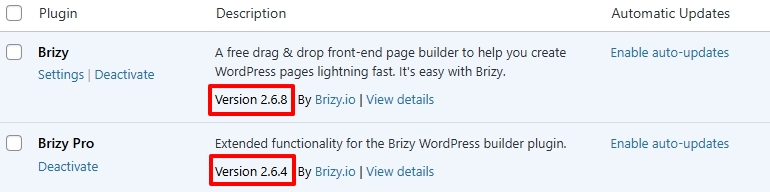 If a specific issue is not resolved after updating to these versions, make a minor change to your carousel/contact form (like increasing the padding by 1 pixel) and update your project and check if resolves the issue.0
Please sign in to leave a comment.
Comments
3 comments