Icons and Form Fields Not Displaying Correctly in Public View, but yes on EDITOR - Brizy WordPress

I'm experiencing an unusual issue with Brizy WordPress that I haven't been able to resolve despite extensive troubleshooting:
**Issue Description:**
When editing pages in the backend, icons and form text fields display correctly. However, when viewing the same page in the public frontend (tested in incognito mode and different browsers), icons are completely missing and only the TEXTAREA field is visible in contact forms.
**Environment Details:**
- WordPress: 6.7.1
- Brizy: 2.6.7
- Brizy PRO: 2.6.3 (downgraded from latest version)
- Blocksy Companion: 2.0.84
- Two Factor: 0.11.0
**Troubleshooting Steps Taken:**
- Switched between different icon types (Gliphy and FA)
- Tested with both Blocksy Child and parent theme
- Downgraded Brizy PRO to version 2.6.3 for stability
- Disabled all caching
- Created a fresh installation on a different server using Duplicator
**Additional Information:**
- Other websites on the same server with similar plugin configurations work correctly
- Most importantly: The HTML code rendered by Brizy differs between the backend and frontend views
- No caching plugins are active
**Technical Background:**
As a senior PHP developer (25+ years) and Linux server administrator, I'm open to technical suggestions. I've noticed that the rendered HTML code is different between the editor and public views, suggesting this might be a Brizy-specific code issue rather than a server configuration problem.
**Icon on editor:**
```
<a class="brz-a" href="https://www.linkedin.com/company/..." target="_self" rel="noopener" data-brz-link-type="external">
<span class="brz-icon brz-span brz-css-vxcw1q brz-css-cnbou7">
<svg class="brz-icon-svg align-[initial]">
<use href="https://mydomain.com/wp-content/plugins/brizy/public/editor-build/prod/editor/icons/glyph/logo-linkedin.svg#nc_icon"></use>
</svg>
</span>
</a>

```
**Same Icon on public view:**
```
<a class="brz-a" href="https://www.linkedin.com/company/..." target="_self" rel="noopener" data-brz-link-type="external">
<span class="brz-icon brz-span brz-css-vxcw1q brz-css-flitd5"></span>
</a>
```
**Text INPUT for NAME on contact form, on editor:**
```
<div class="brz-forms2__item brz-css-14v46i0 brz-css-z7aiq1 brz-css-1rydvk7 brz-css-1pphc0h">
<div>
<input type="text" placeholder="NOMBRE" class="brz-input brz-forms2__field brz-forms2__field-text" value="NOMBRE">
</div>
</div>
```
**Text INPUT for NAME on contact form, on public view:**
```
<div data-brz-translate-text="1" class="brz-forms2__item brz-css-14v46i0 brz-css-z7aiq1 brz-css-1rydvk7 brz-css-1pphc0h">
</div>
```
I've avoided diving into Brizy's codebase as it seems beyond the scope of regular troubleshooting. Any insights from the Brizy team would be greatly appreciated.
Best regards,
Sergi
-
This is the URL address where you can check these "irregularities":
https://wp6.imasdeweb.com/contacto/
Perhaps visiting it and checking its HTML/JS you get some insight to help in the understanding and solution.
0 -

Hi,
Thank you for reaching out to us.
Please make sure you have the following versions installed and let us know if the issue persists.

Kind regards,
Ariel H.0 -
Hello Ariel,
Thank you for your suggestion. I had downgraded Brizy Pro to version 2.6.3 yesterday, but this morning (we're just starting the day here in Mexico) I realized that I hadn't disabled automatic updates, and it automatically updated to the versions you indicated.
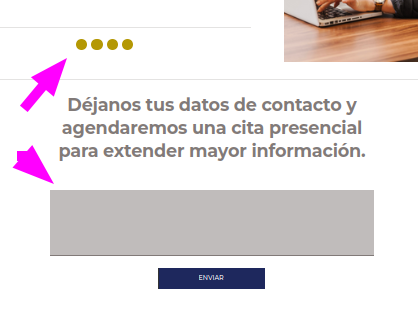
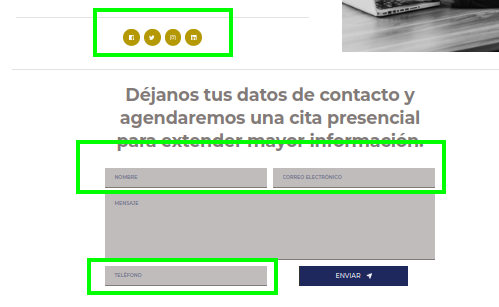
The good news is that half of the layout issues have been fixed:
- Certain icons are now visible (social media)
- The TEXT inputs in the contact form are now visibleHowever, what's strange is that these fixes are working on the development server but not on the production server (where I uploaded this new website yesterday)... It's odd because I spent 10 minutes reviewing the versions and installed modules on both WordPress instances, and they're the same (I had to deactivate some plugins to make them match, except for the two-factor authentication).
Production server:
Development site:
Any other suggestions?
Thanks!
Sergi0 -
The issue has been resolved, though in an unexpected manner: after making a minor modification to the contact form and clicking the "update" button to save changes, everything was mysteriously fixed! 🤔
I should mention that this migration involved a domain name change, which might have contributed to the initial problem.
Anyway, thanks for your help, Ariel.
0
Please sign in to leave a comment.
Comments
4 comments