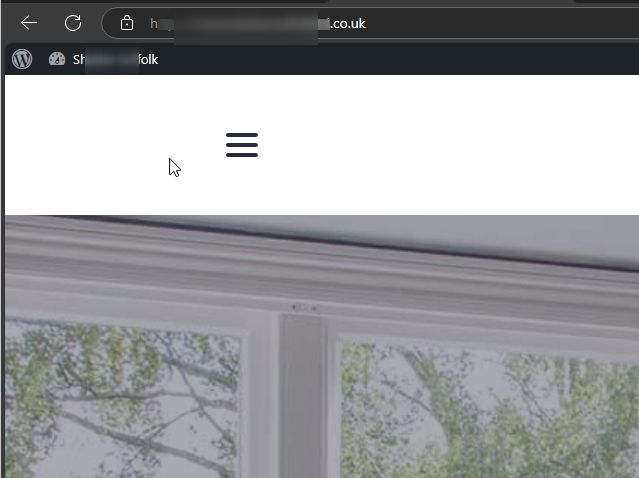
Header disappears when selecting hamburger menu

Hi,
My header disappears when selecting hamburger menu. Please see link below to video screen recording.
https://www.dropbox.com/scl/fi/xnkmszm4pqphm30xvvdka/header-disappears.mp4?rlkey=tktcrw5uc4kki5uceue4hwx2f&st=uwfa3qb0&dl=0
I have hidden the header hamburger menu on mobile. Would this have anything to do with it? Never seen this happen to any of the other sites I have built.
Thanks
-

Hi Adam,
Thank you for contacting us.
This issue is often caused by optimizations made on the website. If you’re using any caching plugins or server-side caching, please try purging the cache to see if that resolves the problem.
If the issue continues, please provide us with temporary access to your WP Admin page so we can inspect your site. Kindly add us as an Admin user to your WordPress Dashboard and send the following details to communitysupport@brizy.io:
Community Post link: https://support.brizy.io/hc/en-us/community/posts/23793042069010
WordPress Admin URL:
Username:
Password:Please make a full backup of your site as a precaution.
Best regards,
Ariel H.0 -
Hi Ariel,
Thank you for getting back to me. I have no cache plugins and not aware of any server side caching either. I have set you up as a user and sent them to the email address you provided.
Thanks
0 -
Hi Adam,
Thank you for the update. Could you also update the user account to an Administrator role so we can have full access to your WordPress Admin dashboard?
Best regards,
Ariel H.0 -
Hi Ariel, apologies. Just updated to administrator. Thanks
0 -
Hi Adam,
Thank you for your cooperation. Rebuilding the global header seems to have resolved the issue. Please check again and let me know if you encounter any further problems.
Best regards,
Ariel H.0 -
Thank you. I can confrim this is resolved.
0
Please sign in to leave a comment.
Comments
6 comments