Totally Buggy ACF WYSWIG fields

Hello
I keep asking when you can fix this issue which seems to plague the templates I have built. This started happening sometime back when I updated the plugin.
If you look at this page: https://meditateincapetown.org/retreats/meditation-retreat-western-cape/ you will see that the text fields have a mind of their own: formatting, text colour and even line height. Sometimes it works sometimes it does not == BUGGY.
You will see that there is now a brand new bug with the icon + text field. However much I try to align the icon at the top left of the text it puts it in the middle.
I spend so much time trying to format this by different methods. Sometimes on some pages doing #[ACF term] works on other pages adding it via the text menu works. Sometimes the buggy nature of the software decides that a paragrpah deserves 2 line heights etc etc. All I would like it to be able to add text and it to look as it should on the front end using ACF.
THIS USED TO WORK.....
Could you please fix this buggy field behaviour.
You can have my log in details and work out the best way to go about adding text via ACF fields.
Thanks
-

Hi Tushita,
Thank you for reaching out, and I’m sorry you’re experiencing these issues.
For the text formatting problem, could you please share the specific page or blocks where this is happening, along with some screenshots? This will help us get a clearer picture of the issue.
We’re aware of the icon alignment problem, and it should be fixed in an upcoming update. In the meantime, if you send us the page where this occurs, we can provide a temporary CSS fix.
For the ACF inconsistency, it would be really helpful if you could let us know which templates or pages are affected and provide a screencast to demonstrate the issue. This will allow us to better understand and replicate the problem.
Looking forward to hearing from you.
Best regards,
Ariel H.0 -
Hello
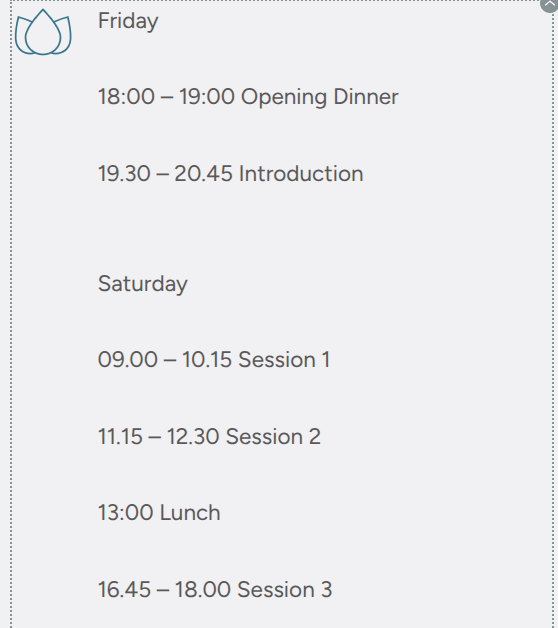
Have been very busy but would like to show you what the issue is.If you see this link to the website you will see the issue if you scroll down to Retreat Schedule:The text is from an ACF WSIWYG field which has been added from the text menu on the front end (there is no CSS in the text added).As per the screenshots below you will see the text which I have added in the WSIWYG via the WooCommerce Product back end page & the output. The big issue is that the paragraph height is 2 lines high. I do not want this, I would like the next paragraph to start on the next line and add an extra line in the WSIWYG if and when I want this. How can this be changed?I would also like to change the login details to Brizy to this email address rather than: tus*******per@gmail.com.Thanks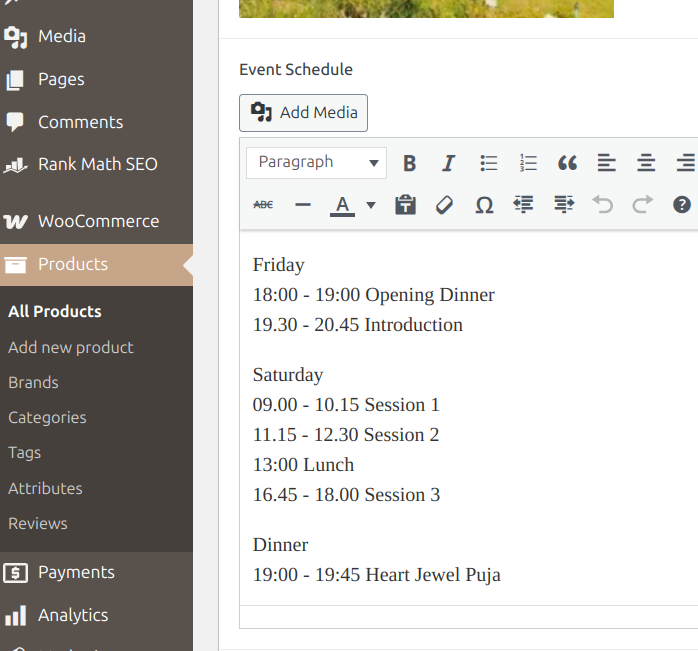
 0
0 -
This used to work straight out of the box but now all the formatting on the back end WYSIWYG is lost on the front end.....
0 -
Hi Tushita,
Thanks for sharing the details.
The recent update made some changes to text blocks to help translation plugins work better. This caused the extra spacing you're seeing.
To fix it, please add this CSS:
.brz .brz-rich-text > * {
  white-space: normal;
}
You can add the CSS by going to Dashboard > Appearance > Customize > Additional CSS. I tested this using an online CSS editor - https://imgur.com/M8mOPjK
For updating your Brizy login email, just log in to your account console, click on the Account tab, and you’ll be able to update your email address there - https://i.imgur.com/CSHiLTz.png
If you have any questions or need further help, feel free to reply.
Best regards,
Ariel H.0

Please sign in to leave a comment.
Comments
4 comments