Brizy wp site showing blank white page after new host backup/restore

I recently changed hosting so I backed up data and restored site on the new host. However, now site is only showing a blank white page. I know the issue is from Brizy because when I deactivate Brizy Pro, some content shows up on the site. When I re-activate Brizy Pro again the site only shows a blank white page.
Please help immediately. Thanks
-

Hello Michael,
The file paths of a WordPress website may not function properly when you a backup of a site is made in one domain name and restored in another. Usually one needs to find and replace file paths in the website database from the source domain to destination domain. You can read more about it at https://www.wpbeginner.com/plugins/how-to-update-urls-when-moving-your-wordpress-site/
Alternatively you can use a migration plugin like WPVivid, and follow an automated process to migrate your website. Conder remigrating your website following the procedure at How To Migrate Your Site To A New Host | wpvivid demo
If you were using a CDN like Cloudflare in your source website, kindly disable it before migrating. After completing the migration process, you can reconnect CDN to the new domain.
If none of the above helps, kindly get back to us. We will take a look at your source and destination websites to help you with the migration.
0 -
I did use WPVivid for backup and restore.
Unfortunately Brizy paths have issues.The website is now invisible on the front end. Can you please solve this and also show me how I can fix it myself in the future back/restores as soon as possible.
Thanks
0 -
Hello Michael,
In your WordPress Dashboard under Settings - General, if you have added "www" before your domain name in the WordPress Address and Site Address, kindly remove it, save changes and check of the file paths issue gets resolved.
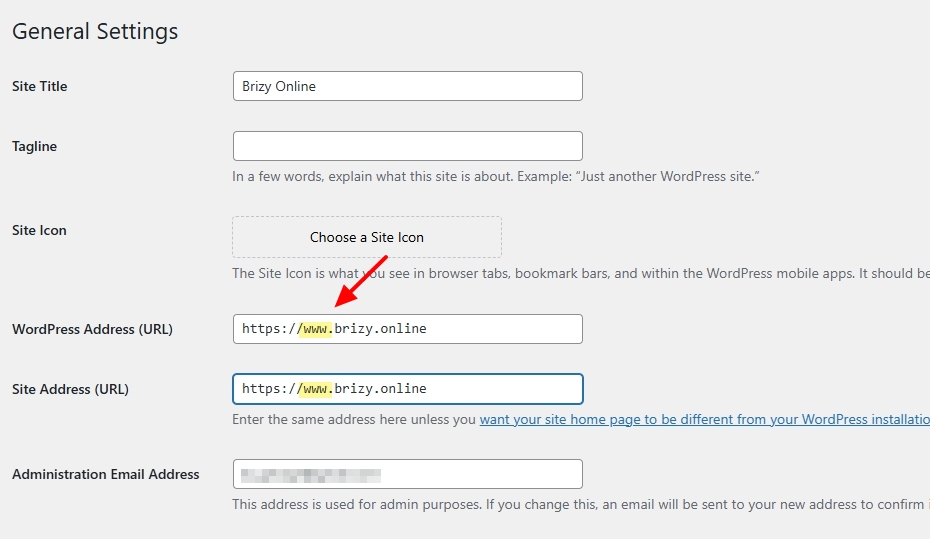
If this does not help, we will need access to both the source and destination websites to help you migrate the website without errors. Please add a new user to your source and destination websites and send the following details to our email: communitysupport@brizy.io
- Support Forum link: https://support.brizy.io/hc/en-us/community/posts/23279690231058
-
Source Website
WordPress Admin URL:
Username
Password -
Destination Website
WordPress Admin URL:
Username
Password
Please let us know in this forum when you send us the email.
0 -
Hi Geroge, I just checked and there is no www in those fields.
I have just emailed you the details you have asked for. Let me know if you need anything else.
Thanks
0 -

Hi Michael,
Thank you for your cooperation.
After further investigation, we found that disabling the mega menu allows the page to function normally. Could you try rebuilding the mega menu and let us know if the issue continues?

In the meantime, we’ll also investigate this behavior in our test environment to identify the cause.
Best regards,
Ariel H.0
Please sign in to leave a comment.
Comments
5 comments