Menu styling queries: icon dividers and the width of dropdowns

Hi, I have a couple of styling queries regarding the horizontal menu page links:
1) I have set up some icons to act as page dividers but they change colour on hover, see my screenshot below circled. Can I make these icons stay a fixed colour so they do not hover (and change colour), so they appear as dividers? Or is there a better way to add some sort of divider between these page links?

2) How do I change the width of the dropdown menu tabs, they are very long and my page names are quite short. I couldn't find the setting for this...
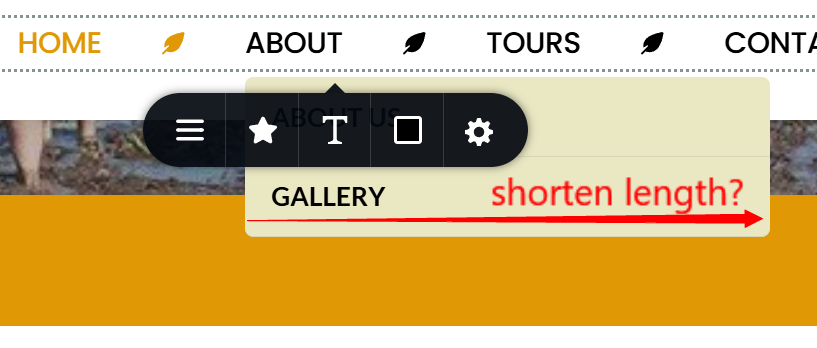
The preview link is here: https://pudakul.brizy.site/
Thanks a lot
-

Hello Eva,
You can design a menu like this by adding a right border to your menu links. I have added a new page called "Header menu divider" in your project and have created this design there. Please have a look.
 0
0 -
Thanks KC George! I'll take a look.
Can you advise about #2 of my query above, regarding the width of the dropdown menu tabs?
0 -
Hello Eva,
I am sorry I missed your second question. The width of the drop down menu is not customizable. You could consider setting up Mega Menu instead of the default drop down menu. Mega menu allows you to set the width of the menu container.

Have a look at Got Stumped Setting Your Mega Menu Width? Here's How it's Done with Brizy Builder for the procedure to set the width for the mega menu container.
0 -
Thank you for your help :)
0
Please sign in to leave a comment.
Comments
4 comments