I am billed twice

I am a WP plugin pro for 3+ years, just one website. I just purchased the Black Friday Deal 50% on WP plugin and thought it would extend my license for another year. But my account now has two bills with different start time. I request you either to apply the NEW purchase to my existing account, the same website, or to cancel my new purchase. Because I only have one website but now has two licenses and billings. Please confirm. thanks
-

Hello Jin,
You purchased the legacy Personal WP plan in April, 2022 and the existing Personal WordPress plan today. The Cyber Monday deal at https://www.brizy.io/pricing-wordpress is available only for new purchases and not for existing subscription renewals. Hence a new plan was added to your account when you made the purchase.
Currently you have these two plans in your account
- Personal WP: This is a legacy plan which is no more available for purchase. Upgrading or purchasing additional PRO licenses is not possible with this plan. You are currently subscribed to this plan until April 27, 2025
-
Personal WordPress: This is an existing plan and hence its easy to upgrade or add additional PRO licences to your plan. For instance you have the option to purchase an single additional PRO license if you like

In general, you have two options to move forward.
- Cancel the Personal WordPress plan you purchased today and get a full refund. You will keep the legacy plan which cannot be upgraded. You will need to purchase another plan if you require more Brizy Pro licenses in the future.
- Cancel the legacy Personal WP plan by April 27, 2025 and keep the current Personal WordPress plan. You will have access to two PRO licenses until April 2025. Additional PRO licenses will be available for purchase after the legacy plan expires in April 2025.
Considering these factors, kindly let us know how you would like to proceed.
0 -
It doesn't make sense if I keep the two plans through Apr. 2025 because I only have one website to use Brizy Pro. Can I cancel the current plan, which is the legacy, and switch to the new plan I bought yesterday with the same website? Thanks
0 -
Hello Jin,
Yes, you can generate a new license key from your account and change the license key in your project after canceling the legacy Personal WP plan you purchased in April 2022. Please confirm your decision to cancel the legacy Personal WP plan.
0 -
Hi, I'd like to cancel the existing license and use the new one. Can you explain what I need to do to switch? Will the switch impact my website? And do I get a refund on the days that I will not use in the existing license? Thank you!
0 -
Hello Jin,
To switch the license key, in your WordPress Dashboard under Brizy - Settings - License tab, disable the current license key by clicking on the "Deactivate" button. Copy the new license key from your Brizy account and add it here.
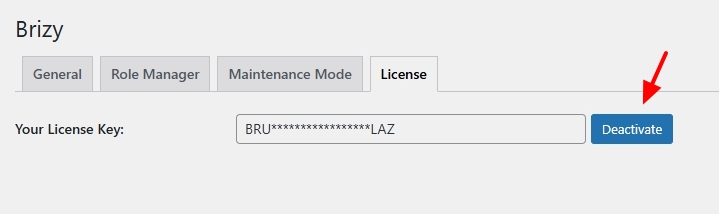
When a user cancels their subscription during the first month of buying a plan they are eligible to receive a refund. The Personal WP legacy subscription is not eligible for a refund.
We have not yet cancelled your Personal WP legacy subscription. Shall we proceed?
0 -
I have switched the site key under License. To confirm, do I need to reinstall Brizy Pro? I am asking b/c the one I renewed in Apr was the legacy version and the new sign-up in Dec is the new version.
If I don't need to reinstall and no additional action is required, please cancel the Apr subscription. Thanks
0 -
Hello Jin,
You don't need to reinstall Brizy Pro after replacing the license key.
We have cancelled your Personal WP legacy subscription and it is scheduled to expire on April 27, 2025
0
Please sign in to leave a comment.
Comments
7 comments