Issue when url changed

Hi there,
Just moved a dev site https://www.aw.freshhq.co.uk/ to live url https://www.ameliawilsoninteriors.co.uk/ using Installatron in our hosting cpanel.
We've got a couple of issues:
- We can't use Brizy to edit the site
- There are some links that haven't updated to the live url, see icons on homepage that just look black and then on https://www.ameliawilsoninteriors.co.uk/press/ all the PDF's link to the dev site.
Can you advise?
Thanks,
Darren
-

Hi Darren,
Thank you for reaching out to us. Before proceeding with the steps to address the issue, could you confirm if you’ve successfully activated your license on the new domain? If the license is still tied to the previous domain, please deactivate it and activate it again. If you encounter an error during activation, kindly take a screenshot and share it with us.
Regarding the issues you mentioned, please try the following steps:
1. Ensure that the Home and Site URLs in Settings > General match. Since you’ve activated SSL, confirm that both URLs use HTTPS instead of HTTP.
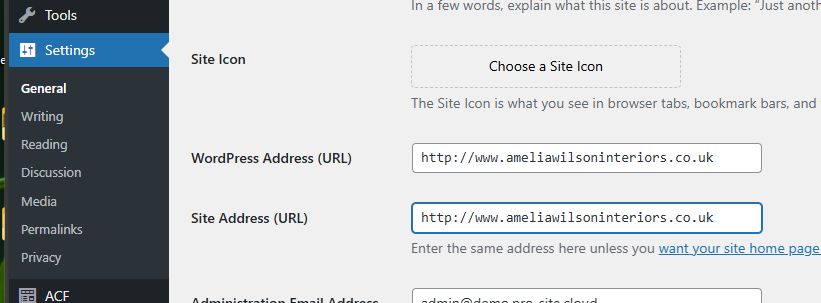
2. Reset the permalinks and see if this resolves the issue: https://wpastra.com/docs/how-to-refresh-wordpress-permalinks
3. If resetting the permalinks doesn’t help, use the Replace URL Tool in Brizy > Tools. Enter your old and new domain names without any trailing slashes and hit the Replace URL button.
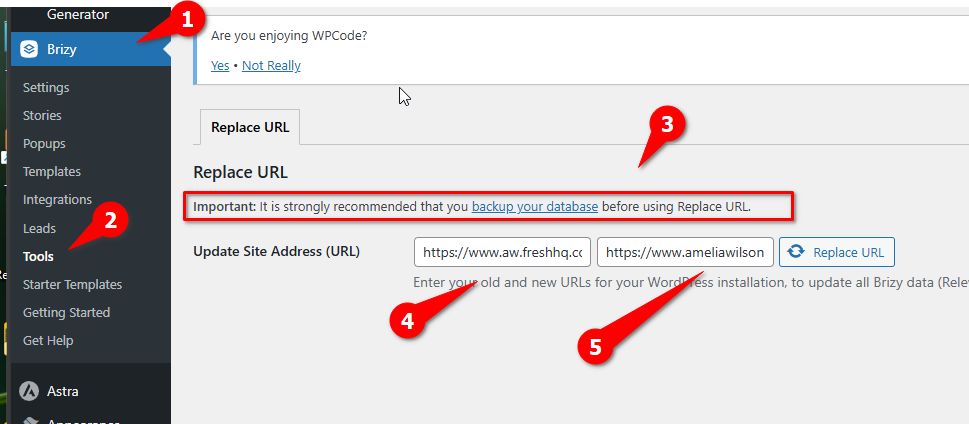
After completing these steps, check if you’re able to edit your pages and verify if the PDF documents are displaying the correct links.
Let me know how it goes!
Best regards,
Ariel H.0 -
Hi Ariel,
Followed those 3 steps as outlined above and can confirm that nothing has changed. I can't edit with Brizy and links to the dev site are still there.
And to further complicate things the header has disapreared but we can't edit it to fix it!
What would you suggest?
Thanks,
Darren0 -
Hi Darren,
Thank you for the update.
It’s likely that Installatron doesn’t automatically update all the site URL during migration. To ensure a proper migration, I recommend using the WP All-in-One Migration or Duplicator plugins. These tools automatically update URLs during the process and won’t interfere with the Brizy Editor.
https://wpshout.com/all-in-one-wp-migration
https://avada.com/documentation/how-to-migrate-your-website-with-duplicator/While both options work well, my personal preference is WP All-in-One Migration for its simplicity. I hope this helps.
Best regards,
Ariel H.0 -
Ok, I'll take a look.
What I would say is that we've had issues however we migrate a site, either manually or using Installatron.
All I would say since the recent updates Brizy is not an easy plugin to use.
Thanks,
Darren0 -
Also the site is over 2GB - lots of galleries.
The Maximum upload file size: 64 MB.
Any thoughts or is this something you can help us with?
Thanks,
Darren0 -
Sorry one last message.
In the end we changed the url of live site to something else and then in WordPress of dev site used the main domain name and then updated the url in WHM.
We then have had to manually edit every page to get every image and logo working.
An unbelivable way of working.
0 -
Hi Darren,
Thank you for the update. I'm happy to hear that you were able to resolve the issue on your own.
Best regards,
Ariel H.0 -
Hi Ariel,
I'm not sure if you are understanding. This has been hugely time consuming and problematic. I have lost hours of my day. I am in constant contact with Brizy Support at the moment it feels.
The constant issues we're having with Brizy since the new version in July are like nothing I've ever known.
I appreciate this is not your fault but it does need to be raised with Brizy that something is just not working at the moment. To put it frankly I am not satisfied or happy with how today has gone in regards to putting this site live.
Thanks,
Darren
0 -
Hi Darren,
I completely understand your frustration, and I’m truly sorry to hear about the time and effort you’ve lost during this process. Migration is never an easy task, and issues can arise due to different server settings or configurations, which can complicate the process. Unfortunately, this is a challenge not only specific to Brizy, but also common with other page builders.
I really wish I could offer a quick and straightforward solution that works right away, but as you know, these types of issues can sometimes require a bit more troubleshooting. I’ll certainly raise your concerns to our senior support to ensure they’re aware of the ongoing issues.
Best regards,
Ariel H.0 -

This is really not good enough. We operate with a staging environment, and have a process to automatically deploy the tested staging environment to production. Everything *except brizy* works. Amateur tool - give me a wp-cli command that actually changes urls, also for images.
0 -
Hi Erik,
I apologize for the delay in addressing this issue, we're still working on it. Before making any changes, please backup your database to ensure you can restore it if needed.
1. Run the following command to simulate the changes without making any updates:
wp search-replace 'https://old.domain' 'https://new.domain' --skip-columns=guid --dry-run
2. Once you're satisfied with the dry run results, run the command without --dry-run to apply the changes:
wp search-replace 'https:/old.domain' 'https://new.domain' --skip-columns=guid
On certain websites, URLs might not update fully. In such cases, manually open each page in Brizy Builder and save them again. This will update all occurrences in your WordPress database, including Brizy image URLs.
Best regards,
Ariel H.0 -
Ariel, I've done all the things I should do, including a search-replace.
"On certain websites, URLs might not update fully." - this is why I call it an amateur tool. I can't go around manually editing tested sites being deployed to production.
I did however make my own python script to fixup brizy urls, which solved the issue for me for now.
0
Please sign in to leave a comment.
Comments
12 comments