Bug

Since I made an update of Brizy Pro my web page has no more image https://4dimensions.ca/
Please help me
Stéphan
-

Hi Stéphan,
Thank you for reaching out.
Could you please try purging LiteSpeed Cache and see if that resolves the issue?
https://support.hostinger.com/en/articles/6973388-how-to-clear-the-litespeed-cacheThis could also be caused by a version mismatch between Brizy and Brizy Pro. Please make sure both versions are up to date.

Let me know how it goes after trying this.
Best regards,
Ariel H.0 -
Thanks for reply
I have the same version of Brizy and Brizy pro as you specify.
I emptied the caches but it did not solve the problem.
I restored the site from a backup, I have updated all the plugins except Brizy pro
The site is ok in the editing page of Brizy but on the web the header is missing.
When I am updating Brizy pro, the site is really broken again
This is the liste of plugin in Wordpress (ver 6.7.1)
Advanced Google reCAPTCHA
Backuply
Brizy
Brizy Pro
Duplicator
LiteSpeed Cache
UpdraftPlus - Sauvegarde/Restauration (desactivated)
WP Statistics
WPS Cleaner
WPS Hide Login
WPS Limit Login
Yoast SEO
Zero Spam for WordPress
Thanks for your timeStéphan
0 -
Hi Stéphan,
Thank you for the update.
Could you please provide us with temporary access to your WP Admin page so we can inspect your site? Kindly add us as an Admin user to your WordPress Dashboard and send the following details to communitysupport@brizy.io:
Community Post link: https://support.brizy.io/hc/en-us/community/posts/23068665196050
WordPress Admin URL:
Username:
Password:Please make a full backup of your site as a precaution.
Best regards,
Ariel H.0 -
Hi Stéphan,
Thank yo ufor your cooperation.
We have resolved the issue with the header block on your site, this issue can sometimes occur during updates. If it happens again, open any page with Brizy, add 1px padding to your global headers, and save your changes. This action will force the new Brizy Compiler to apply to the page.

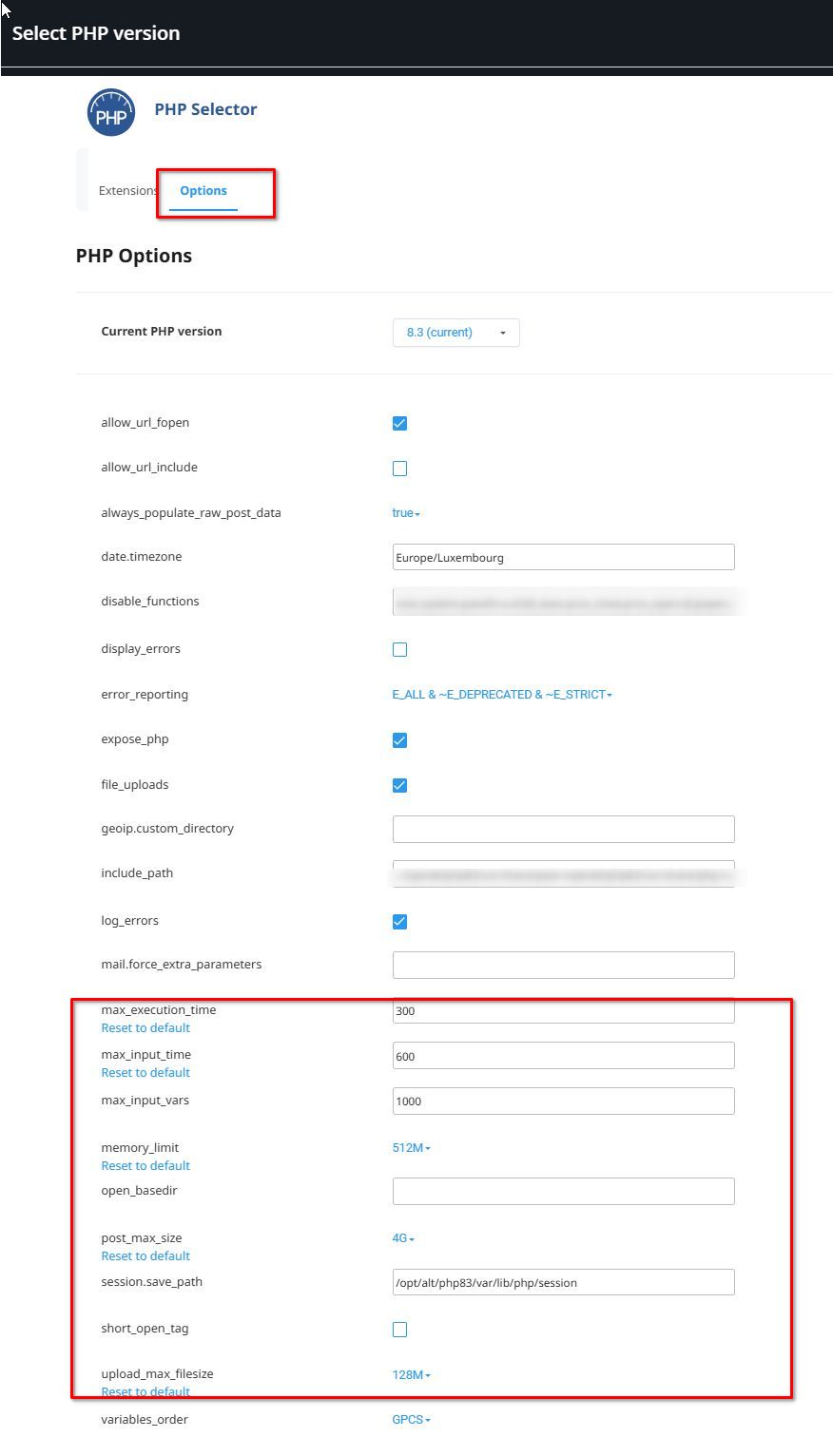
I was able to save changes on your website without encountering the error you mentioned. However, you may want to increase the following in your server for best results.
max_execution_time: 300
max_input_vars: 6000
memory_limit: 512M (or higher)
post_max_size: 128M
upload_max_filesize: 128M
If you have access to cPanel, go to "Select PHP Version,"" click on the "Options" tab, and you should be able to make these changes there. Otherwise, please contact your hosting provider for assistance.
If you have any further questions, please let us know.
Best regards,
Ariel H.0
Please sign in to leave a comment.
Comments
4 comments