Brizy menu does not appear on the contact page , but appears on all other pages

The brizy menu does not appear on the contact page, but on all other pages and there is no WP menu in the bottom as per the video and yes it is a pro account, very frustrating.
When I make changes, they don't save. I get an error message saying another version is open on another page or browser, but this is not the case.
-

Hello Oasis,
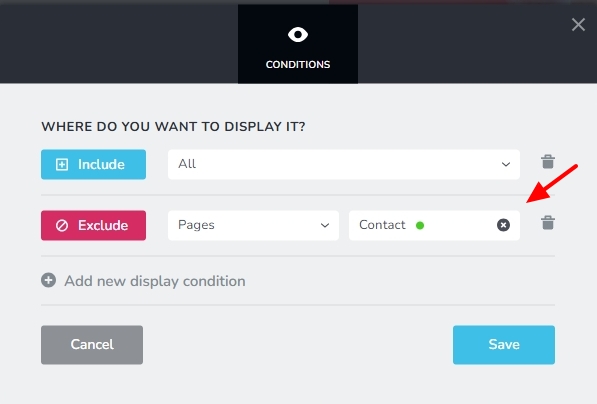
If you are using a global header, kindly ensure that the Contact page is not excluded from the Display Conditions for the header block.
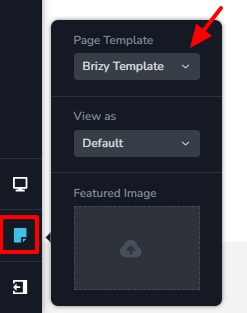
Kindly also ensure that you are using "Brizy Template" for the contact page (and not the "Default" option). Open the Contact page in the Brizy editor, select the "Page" icon on the left sidebar and check if you see "Brizy Template" under "Page Template".
Kindly share with us the URL of your contact page so that we can take a look.
0 -
HI,
I did the above, and did not work.
However, I rolled back to version 2.6.0, and that seemed to have helped. Strangely enough, using the brizy template option removes the page from display completely, but now it is in brizy, default, and the contact page is displayed, and the changes are saved.
Unfortunately, I am now having the same issue with the About page. The fixes applied to the contact page do not save or display on the website. The page is just blank and only displays the global blocks, e.g., the footer and menu header.
I am currently only running brizy and theme plugins, I deactivated all other plugins to ensure it is not a plugin issue, including the SSL plugin.
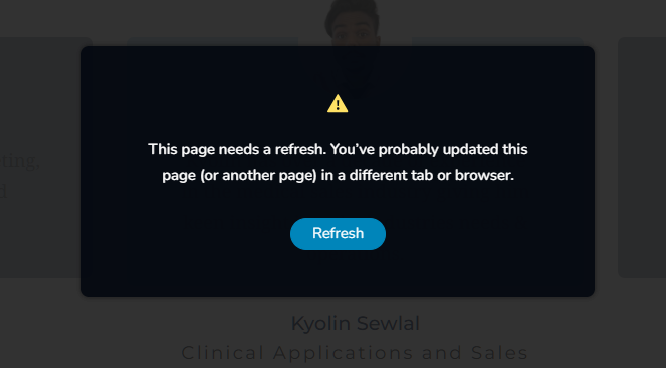
Every time I make a change to this site it does not save the changes when I click on the update, I receive the following error: Please refresh this page and when I do nothing I did is saved and I have to start over, when I return to Wordpress I will have an auto-save option and sometimes that auto save will save some of the work done. it's very frustrating it's been 3 days trying to make simple changes.
Site is:www.chronosmedical.co.za
This is on a pro license (lifetime)
Your assistance in this regard would be appreciated
0 -
error received
 0
0 -

Hi Oasis,
Could you please provide us with temporary access to your WP Admin page so we can inspect your site? Kindly add us as an Admin user to your WordPress Dashboard and send the following details to communitysupport@brizy.io:
Community Post link: https://support.brizy.io/hc/en-us/community/posts/23022541992466
WordPress Admin URL:
Username:
Password:Please make a full backup of your site as a precaution.
Best regards,
Ariel H.0
Please sign in to leave a comment.
Comments
4 comments