No images shown

Hello,
I created a website in Brizy cloud and made a HTML Export. After I uploaded to my website,
all images are not shown. 😢
What have I done wrong?
Here is the project link: https://pear324112.brizy.site/
In the preview it looks all good, but after upload to my webspace, all images are broken.
https://www.gieringer-consulting.de/
Please advice.
Thank you very much.
Cheers
Markus
-

Hello Markus,
The Export HTML option does not work with the legacy Brizy Cloud projects, which were developed before February 2021. Projects which are created after February 2021 uses the current Brizy Cloud project format. Kindly recreate the projects in the current Brizy Cloud project format, following the procedure below.
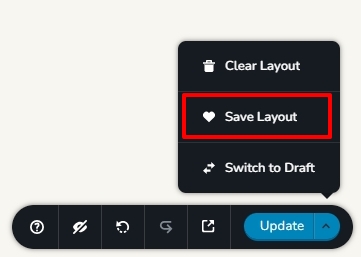
- Save each page as a layout in the legacy project (see the attached image)
- Create a new project and add pages one by one and import the page layouts saved in step 1
- Save the popup design in the legacy project, add a new popup in the new project and import the design and add display conditions.
- Copy paste the global styles and typography from the old to the new project
- Re-setup the email notifications for Brizy forms in the new project
Then regenerate the Export HTML file and reupload to make the images work.
 0
0
Please sign in to leave a comment.
Comments
1 comment