not able to add video from media. media upload so slow.

I am unable to upload a video file to the media library. It takes lot of time to upload and even after uploading it doesnt play in the media library. Cant insert the video on pages as well.
The site images also loads very slow.
-
One more thing i want to say i recently updated my php to 8 version and then all my brizy sites stopped working then reversed it back to 7.4 the sites started working but slow now.
0 -

Hi Vikas,
Could you let us know the file size of the video you’re trying to upload? It’s possible the file is too large for your site to process.
In the meantime, you might find this tutorial on compressing video files helpful. Please give it a try and see if it resolves the issue.
Best regards,
Ariel H.0 -
the video is just 56mb. I even converted it to 11 mb but still nothing. It doesn't even play in media library.
0 -
the overall WordPress dashboard is working so slow.
0 -

Hello Vikas,
If you are hosting with GoDaddy on a shared hosting service, your default upload limit is 32MB. You have the option to increase your upload limit to up to 128MB. To change your PHP upload limits, kindly follow instructions at https://www.godaddy.com/en-in/help/php-upload-limits-on-shared-hosting-1475 If you continue to face issues with video uploads, kindly take the help of GoDaddy Support.
A video is entirely downloaded before it begins to play when you upload it to your Media Library and add it to a webpage. Compared to downloading media files, streaming is more efficient. When streaming a video, the video is played by the browser without downloading it. Instead of loading the entire file at once, the video loads in chunks.
Hence uploading video files to the WordPress Media Library is not a recommended practice except for 4-5 second long videos of 2-3 MB in size. Longer and bigger videos are usually uploaded to a video streaming platform like YouTube or Vimeo and streamed by the browser. You can also use the free tier of an online services like these to upload and stream videos.
0 -
Thanks for the information. I was able to upload to cloudinary but how to activate AutoPlay now? Its not auto playing. Plz help.
0 -
Hello Vikas,
You can auto play a Cloudinary video embedded to your page using the URL option in the Brizy Video element by enabling the "Autoplay" option under the "Playback" tab. I have uploaded a video to Cloudinary and embedded it at https://brizy.online/cloudinary-video/ with the auto play option enabled.
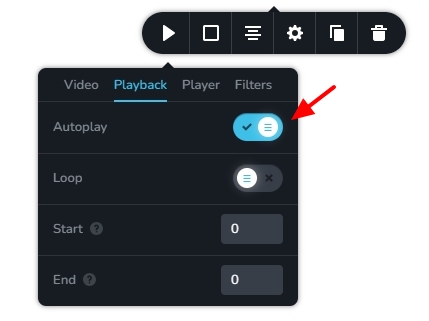
Please keep in mind that most modern web browsers have a policy that automatically mutes videos that autoplay. This is a standard practice across major browsers to give users more control over media playback. Due to this policy, if you auto play a video, it will play muted until the user unmutes it.
0
Please sign in to leave a comment.
Comments
7 comments