Error with adding a default WC Single Product template inside a Brizy template

WORKAROUND SOLUTION BELOW
I am trying to use a brizy template with a WC single product.
I have selected the correct condition. 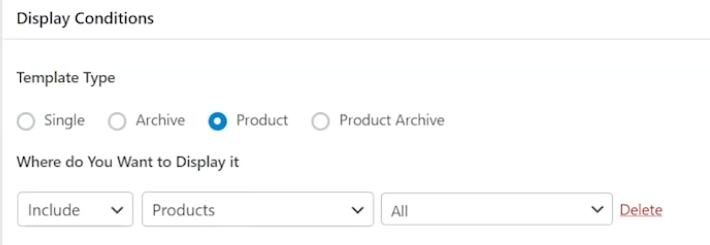
But I cannot seem to use the WC default "single" product listing inside a brz template.
I've even tried adding a shortcode using the brz shortcode element and the woocommerce shortcode for single products, and it still doesnt show:
[product_page id="95"]
The strangest thing is that, when I add the shortcode, it renders inside on the builder ui , but wont render on the page when previewed
I even tried to use this: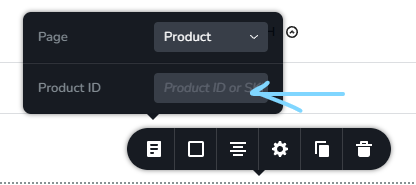
But, I cant make it dynamic to the page... Its make me explicitly put in an Product ID...
How can I just make it dynamic to the product?
-

Hello Sam,
Displaying the default WooCommerce Product listing inside a Brizy template is not necessary. The procedure to develop a single product template is slightly different. Kindly follow the tutorial Unlock the Brizy WooCommerce Builder to Create a Single Product Template!
0 -
George,
Thank you. But that doesnt work. I am a pro developer and I am having trouble with that way of which you posted. It doesn't bring in any other wc plugin that effect the button area. I've added a plugin to add in a PayPal button. Using the brz woocommerce templating suggested, does not show the PayPal button for me.Is there anyway to get the default wc single product to show inside a brz template is my question?
This should be an obvious consideration, being that I can add the default of all other wc elements e.g products archive, cart, checkout, etc.. I just want to add in the default single product.. please see my screenshot above.
There is definitely an issue here._____________________________________________________________________
Using the Brizy WC single product elements shows as:

_____________________________________________________________________
Using the default WC single product template, shows as:

As you can see, the second one is the one that seems to work best for me.
I just want to show the default WC single product template inside the Brizy template.0 -
✮✮✮✮✮ WORKAROUND SOLUTION ✮✮✮✮✮
WARNING. YOU ARE ABOUT TO EDIT BRIZY PLUGIN FILES AND CODE. A NEW BRIZY PLUGIN UPDATE WILL OVERWRITE ANY CHANGES MADE. YOU WOULD HAVE TO REDO SOLUTION AFTER EACH UPDATE.
OK I found a solution. I've edited a function in brizy files in:
plugins\brizy\content\providers\free-provider.php
inside a function starting at Line 141$this->registerPlaceholder( new Brizy_Content_Placeholders_Simple( __( 'Product Page', 'brizy' ), 'editor_product_page', function ( $context, $contentPlaceholder ) {
I just replaced Line 148:if ( empty( $atts['itemId'] ) && current_user_can( 'manage_options' ) ) {
return __( 'Please set a valid product', 'brizy' );
}With this:if ( empty( $atts['itemId'] ) ) {
$product = wc_get_product();
$atts['itemId'] = $product->get_id();
}
if ( empty( $atts['itemId'] ) && current_user_can( 'manage_options' ) ) {
  return __( 'Please set a valid product', 'brizy' );
}And now everything works!!!
Question. Why doesn't this exist already?
It seems to me like it would be the fallback "default" for the Brizy Woocommerce Pages Element > Product, if a user does not want to enter a product ID or SKU, and just leave the field blank. Like in my screenshot example below: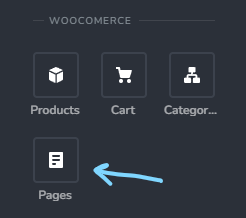
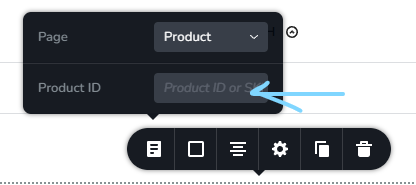
Now all I have to do is go into Customizer, and edit the product page elements and whalaa!!
I am using the Blocksy theme as the based theme.0
Please sign in to leave a comment.
Comments
3 comments