This page needs a refresh. Error

I am updating this page https://horizon.mainlandcreative.com/about/ and no matter what I do I get this error when trying to save the page.
This page needs a refresh. You’ve probably updated this page (or another page) in a different tab or browser.
I even closed it out and waited a few days and tried again but get the same thing. *I can edit other pages.
-

Hi Clyde,
Thank you for reaching out.
This issue often occurs when there are too many revisions on a page, which can lead to performance problems and make it challenging to edit with Brizy. To check revisions on a specific page, navigate to the "Pages" section, select the desired page, and view the revisions displayed on the right sidebar, as shown in this screenshot.
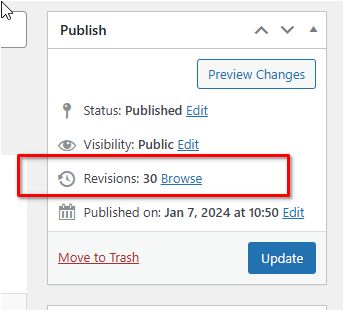
To help resolve this, I recommend following the steps outlined in this guide: https://www.elegantthemes.com/blog/wordpress/how-to-manage-wordpress-revisions-to-optimize-site-performance.
This article covers manual revision management through PHPMyAdmin or the simpler WP Optimize plugin.Additionally, this issue could also occur if the page exceeds the maximum HTTP request size. In this case, please contact your hosting provider to increase both SecRequestBodyLimit and SecRequestBodyNoFilesLimit in the ModSecurity configuration:
<IfModule mod_security.c>
    SecRequestBodyLimit 4194304
    SecRequestBodyNoFilesLimit 2097152
</IfModule>
Please give this a try and let me know the outcome.
Best regards,
Ariel H.0 -
Just removed all page revisions as well as capped it at 2 revisions per page.
I also had the hosting company modify the ModSecurity settings.
Still having the same issue.
0 -
Hi Clyde,
Thank you for the update.
Could you please provide us with temporary access to your WP Admin page so we can inspect your site? Kindly add us as an Admin user to your WordPress Dashboard and send the following details to communitysupport@brizy.io:
Community Post link: https://support.brizy.io/hc/en-us/community/posts/22739156204434
WordPress Admin URL:
Username:
Password:Please make a full backup of your site as a precaution.
Best regards,
Ariel H.0 -
Done, thank you!
0 -
Hi Clyde,
Thank you for your cooperation.
Upon checking. erorr 400 Bad Request error is showing in the console, this typically occurs when the server cannot process the request due to the request exceeding server limit
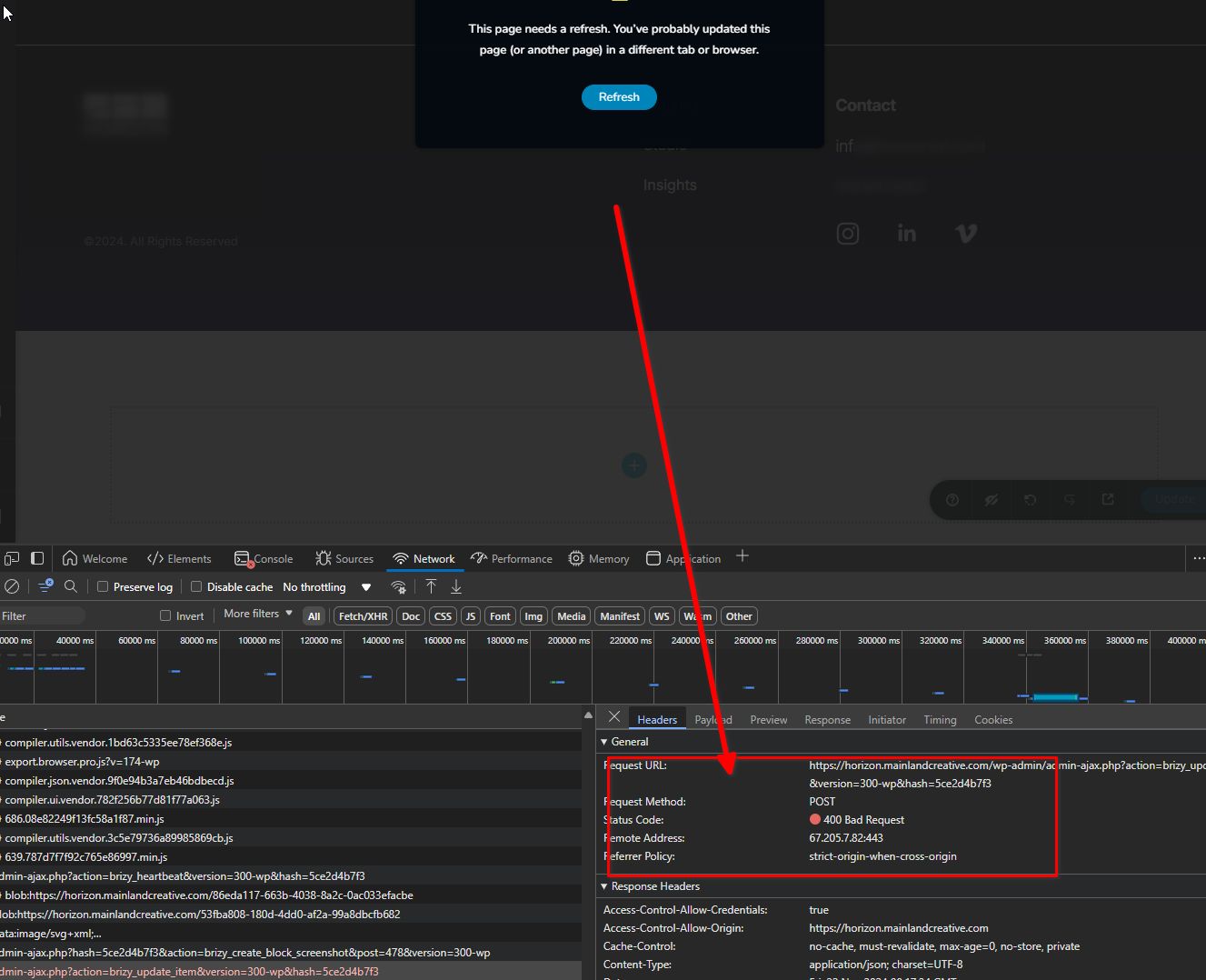
To resolve this, please increase the PHP max_input_vars to 6000 and set the WP_MEMORY_LIMIT to 512M. You may need assistance from your hosting provider to make these adjustments.
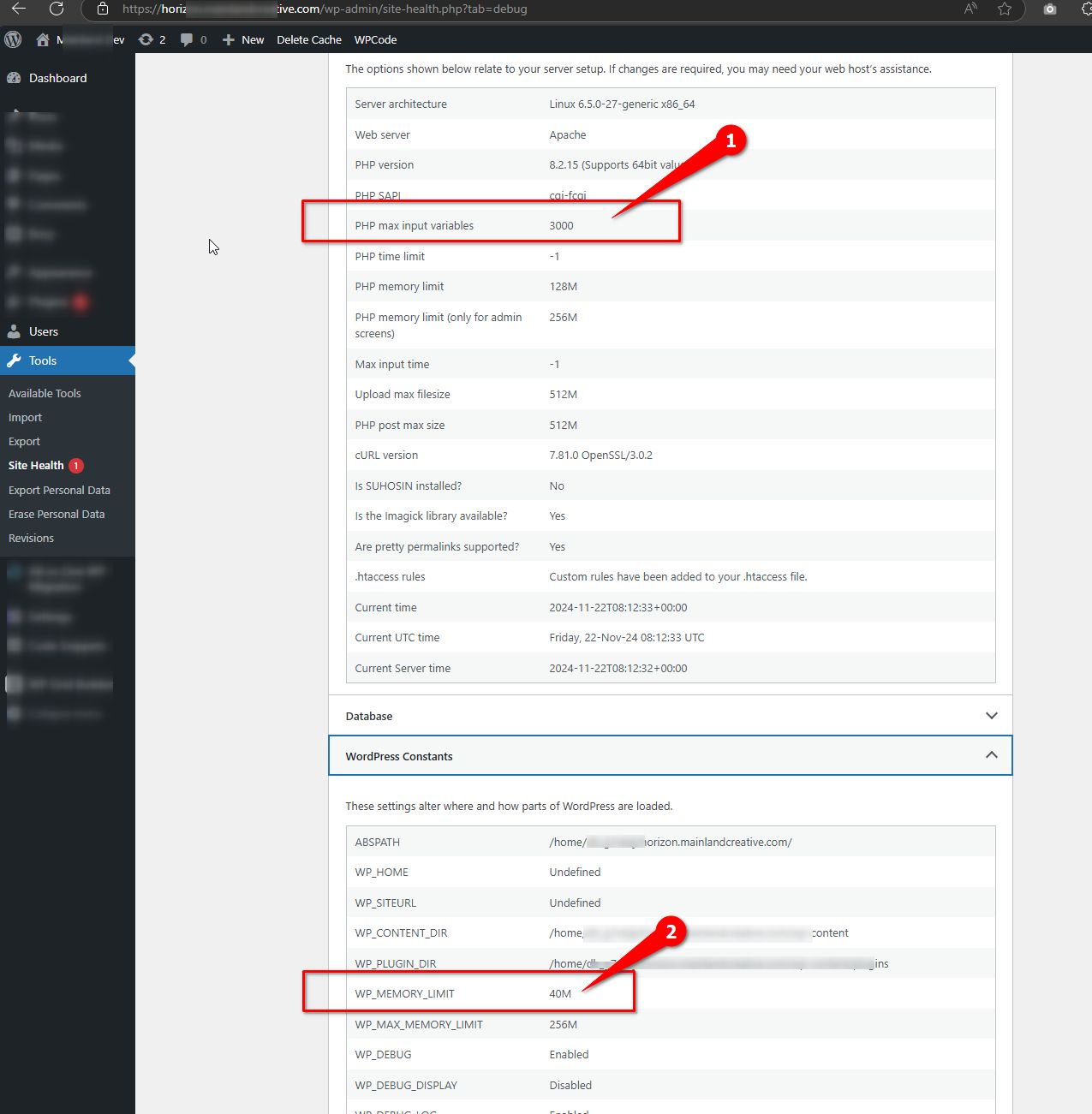
If you'd prefer to handle this yourself, the following articles provide step-by-step guidance:
-https://kb.buzinessware.com/knowledge-base/how-to-set-max_input-_vars-for-domain-in-cpanel
-https://wp-staging.com/increase-php-max-input-vars-limit-in-wordpress/For increasing the WP_MEMORY_LIMIT, you can follow this guide to update your wp-config.php file:
-https://wpnotch.com/how-to-increase-wordpress-memory-limit
Please give this a try and let me know the outcome.
Best regards,
Ariel H.0 -
My hosting provider said they are not able to update this (I was not able to either).
Why is it using so much memory? They said it would be the plugins fault for pulling too much.
0 -
Hi Clyde,
Thank you for the update. With the current limit in place, you won't be able to add additional blocks or content to the page, which restricts your ability to expand or fully customize pages like this one.
Increasing the PHP max_input_vars to 6000 will allow you to add more blocks, while raising the WP_MEMORY_LIMIT will improve the overall editing experience.
If these limits cannot be increased, you may need to reduce the assets or blocks used on each page to stay within the constraints.
Best regards,
Ariel H.0
Please sign in to leave a comment.
Comments
7 comments