FIxed logo size on Header

Dear Support Team
As we are building a size with Brizy, we are facing few challenges, might be we are not aware of the settings, could you please support.
https://mandarin21497218.brizy.site/en/
1. Logo on the header, is going out of proportion, when we are scaling the window, how to fix that ?
2. When we setup hyper link to the grid images at the back, the text linked with move effect is not animating or the effect is not showing, could you please explain how to get the same effect with image hyperlinked. TIA
-

Hello Akshaya,
- The Logo on your website changes size because you have not worked on the responsive designs for tablets and mobiles. Kindly switch to the Tablet and Mobile design views as demonstrated in the screen recording at https://jmp.sh/lWy0B62Q and make necessary changes to your tablet and mobile designs
- After adding a hyperlink, the text animation appears working in your project. Kindly share more details of the issue so that we can offer better help.
0 -
Dear Mr. George
Many thanks for the guidance, we resized the logo for the tablet and mobile screen, to feel the logo in consistent.
Regarding to the second point, could you please check Zayed Sports city, the text is not moving. The only change, we did was we hyperlinked the background picture to the same link as the text, but the text effect is not getting displayed, is there any alternative way ? we need the image to be hyperlinked and the text to have move effect too !
Appreciated your support.
Akshaya0 -
Hello Akshaya,
When adding a hyperlink to the image, the entire image turns clickable and the hyperlink captures the mouse movements. The overlaying text also must capture mouse movements for the hover effect. When two elements are layered one on top of another and both need to capture mouse movements, only one element gets to respond the mouse movement. Having a hyperlink to the image and hover effect for the overlaying text maybe difficult.
0 -
Dear Mr. George
Many Thanks for your response.
My client referring to this website https://www.cyark.org/projects/ and its been achieved here both the image and the overlay text, if you find any workaround in future, please let me know.Best regards
Akshaya0 -
Hello Akshaya,
I have increased the overlay text's Z-index value and the hover effect works with a hyperlink added to the column. Higher Z-index value pushes the text layer to the top of the column layer. Kindly check the "Zayed Sports City" example.
The area highlighted in red is not hyperlinked because the text element extends all the way to the edge of the column. Consider adding a column element and the left column can have the same width as the red box and the text can be placed on the right column. This will increase the clickable hyperlinked area.
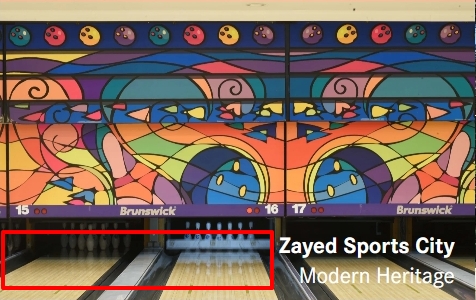
You can find the Z-index setting in the Styling panel on the right under the "Advanced" tab
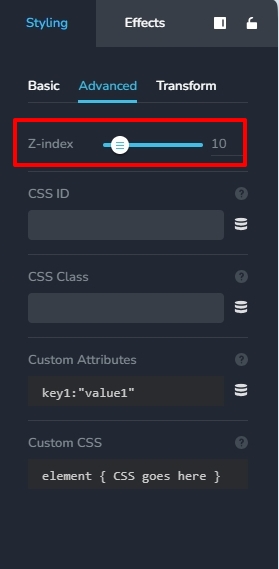 0
0 -
Many Thanks Mr.George. Its working like a charm.
Will try to do as two columns to extend the clickable area.Best regards
Akshaya Dinesh
0
Please sign in to leave a comment.
Comments
6 comments