Unable to activate key

Dear Support Team,
I tried to activate brizy pro into my new website. Then is showed error as shown below:-

-

Hi Bayo,
Thank you for reaching out.
The cURL error 7 you're encountering while trying to activate your Brizy license key typically indicates an issue with your server or firewall.
Below are some possible causes for this error:
1. The PHP memory limit is too low.
2. The PHP version on your site is outdated.
3. The cURL library version is not up to date.
4. Firewalls installed by your hosting provider may be blocking access to license activation.a). To resolve this, please update the following settings in your php.ini file or contact your hosting provider for assistance:
max_execution_time: 300
max_input_vars: 6000
memory_limit: 512M (or higher)
post_max_size: 128M
upload_max_filesize: 128M
b.) If you have access to cPanel, search for 'Select PHP Versions', click the 'Options' tab, and update these settings there.
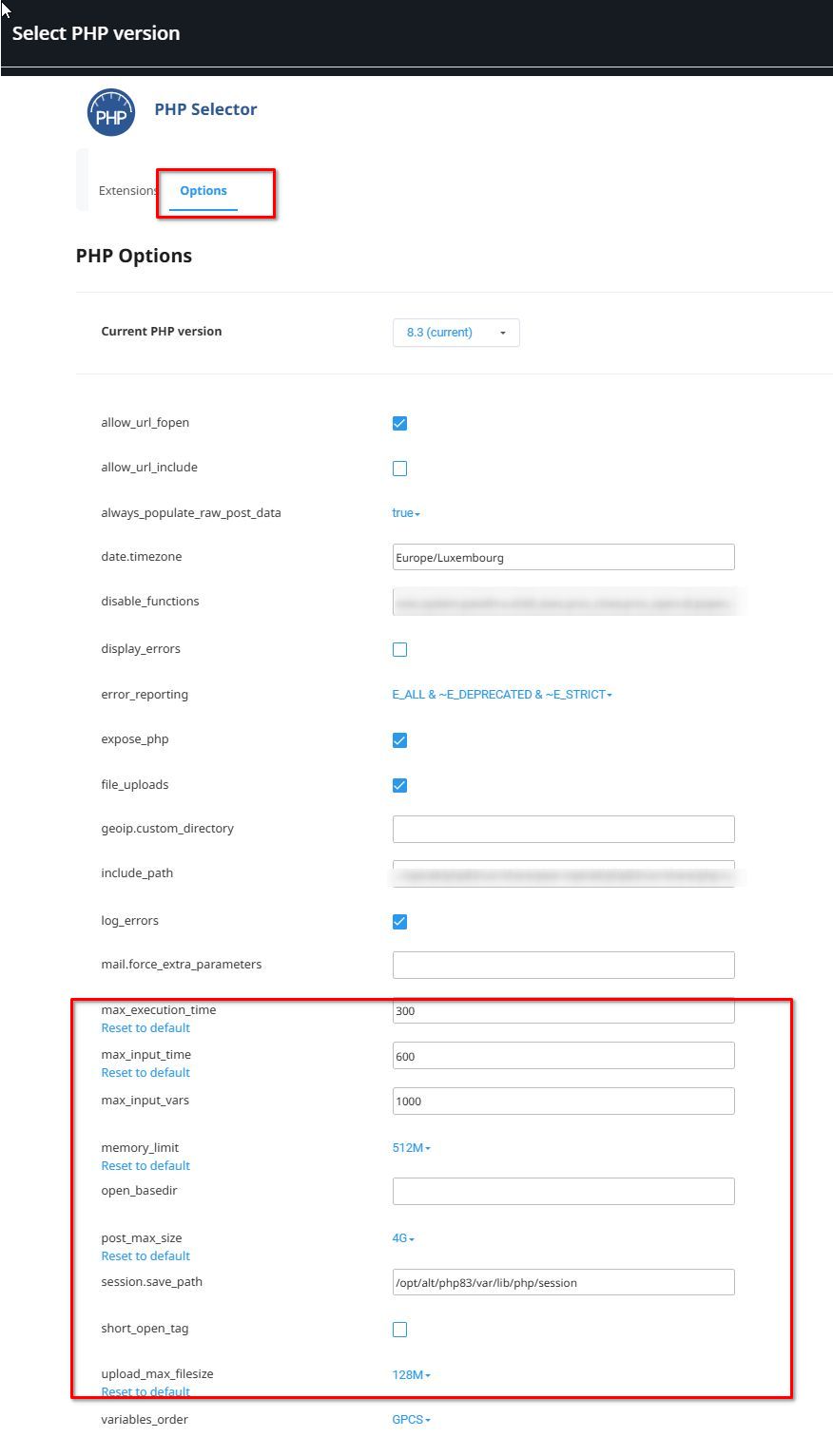
c.) Also, confirm with your hosting provider that you’re using cURL version 7.87.0 or higher.
d.) Contact your hosting provider and ask them to whitelist Brizy in the firewall to resolve the issue.
Please try these steps and let me know how it goes.
Best regards,
Ariel H.0
Please sign in to leave a comment.
Comments
1 comment