Menu Not Displaying Code Not Actual Options

Hello,
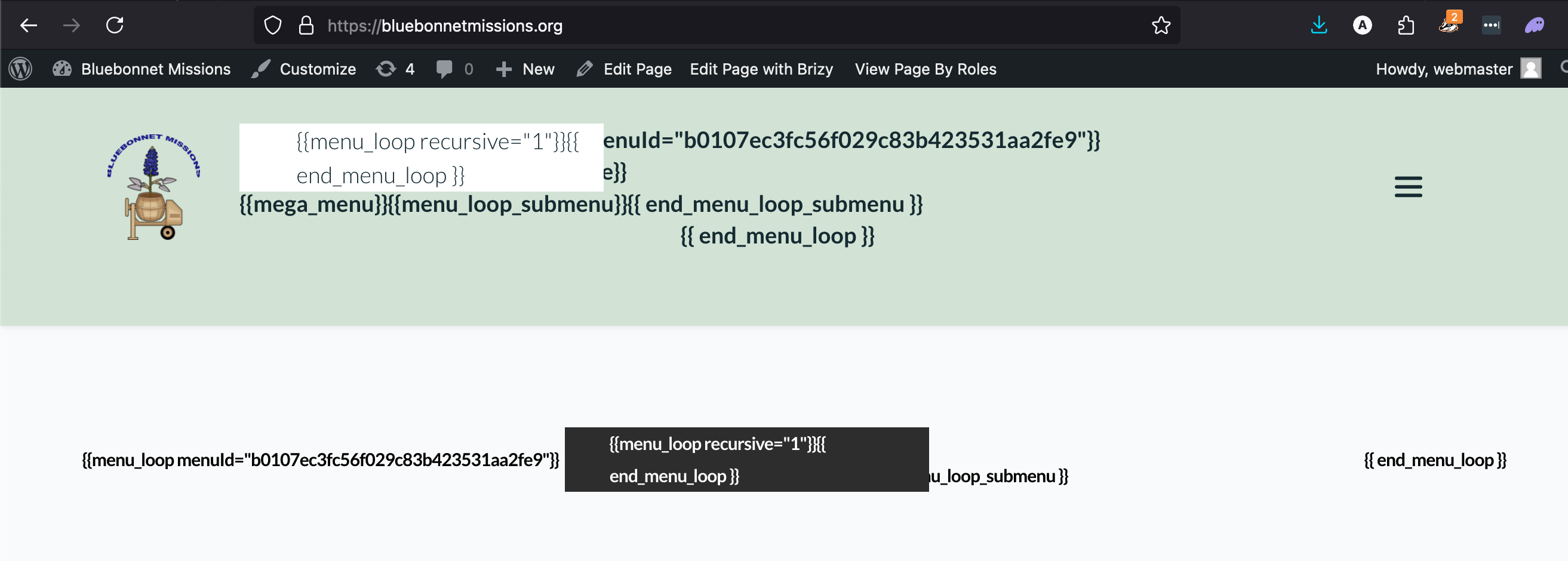
I've tried adding new menus, deleting old ones and I'm not getting any success. I also tried going into the 'appearance' area and deleted all of the old menu links and options and reset them, that didn't help either. The image below is what I see. The menus are just two different attempts. The top menu has several pages linked, the second only has 'home' linked.
website: https://bluebonnetmissions.org/
-

Hi Abel,
Thank you for reaching out to us.
Please ensure that you already have these versions installed and see if this fixes the issue.

To fix a broken layout and menus after an update or site migration, please open any page, select any global or simple block, and update the padding by 1 pixel. Hit "Update" to save your changes, and then preview your site to check if this fixes the issue.
For newly migrated sites experiencing this issue, please purge Permalinks as an extra step following the steps suggested in this link: https://wpastra.com/docs/how-to-refresh-wordpress-permalinks/
This issue is demonstrated in this screencast: https://youtu.be/fHkz-1G-avM.
This also shows how to fix the error "This page needs a refresh..." warning when editing a page for websites using WordFence.
Please try this and let me know how it goes.
Best regards,
Ariel H.0
Please sign in to leave a comment.
Comments
1 comment