Cart icon only updates after refreshing

Hi, I have added the woocommerce cart icon to my menu bar. On a test product, I have inserted woocommerce add to cart shortcode button below it. I enabled AJAX and downloaded the ajax to prevent the page from refreshing when customers click on add to cart. I also have a pop up plugin to alert customers that an item is added to cart.
However now when you do click on it, the cart icon in the menu bar does not change the quantity. I have to refresh then it'll update. Is there a solution to this?
You may replicate the issue on www.sowingseedz.com/studystudio.
There is only one add to cart button to test, so u will know which one to try it on.
Appreciate your help!
-

Hi Id,
Thank you for reaching out to us.
Currently, the Brizy Menu Cart element doesn’t support AJAX, which is why the cart icon in the menu bar doesn’t automatically update the quantity when an item is added.
To achieve this functionality, I recommend using your theme’s header instead of Brizy’s header. Many themes offer AJAX-compatible menu carts that update automatically without needing a page refresh.
Please let us know if you have any further questions.
Best regards,
Ariel H.0 -
Hi Ariel,
Sorry I may be a bit amateur on this.When you say I gotta use the theme's header, you mean I can't use "Edit with Brizy" at all is it?
How do I use the theme's header but still have my whole web on Brizy?
0 -
Hi Id,
Thank you for the update.
You can still edit your pages with Brizy; the only change is that you’ll use your theme’s header instead of Brizy’s. To do this, you can disable Brizy's header and footer by setting the page template to "Default" in the page settings.
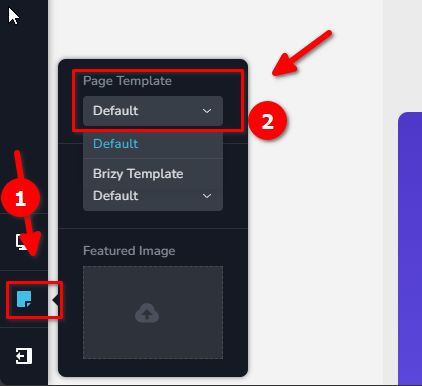
This will allow you to manage the header and footer using your theme’s features, while still building and editing the rest of the page with Brizy. You can refer to this article for a guide on creating a custom header and footer with your current theme: https://wpastra.com/guides-and-tutorials/wordpress-customize-header/
If you have any further questions, please let us know.
Best regards,
Ariel H.0
Please sign in to leave a comment.
Comments
3 comments