how to use webp

I remember brizy support short pixle integration, it's gone in latest version?
plz advice how do I use webp image
-

Hi Su Peng,
Thank you for contacting us. Brizy supports the WebP image format natively, so you can upload and use WebP images without needing an additional plugin.
Best regards,
Ariel H.0 -
how do I automatically convert image to webp?
0 -
Hi Su Peng,
Thank you for the update. To automatically convert images to WebP format, you can use plugins like Imagify and Smush.
Best regards,
Ariel H.0 -
The thing is, I use plugins like these to convert my images to webp. But after I edit the page with brizy again, the image just revert back to the original format. is there any compatibity issue with brizy and webp?0
-
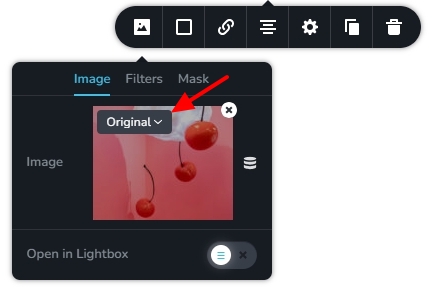
 Hello Su Peng,In the image element, you can make these image size choices
-
Custom: If you want Brizy to resize your images for performance, choose the “Custom” option. This option is selected by default for all images. When you select this option, image optimization by a plugin (including webp conversion) would not apply to your images
-
Original: Select this option if you would like to retain the original resolution and size of your images. You can also choose other available image sizes that WordPress permits. When you choose either original or any other size, your image will not be optimized by Brizy. Image optimization plugins will be able to optimize your images when selecting this option. Kindly choose this option to enable webp conversion for your images.
 0
0 -
-
I have to do this for every image I upload? that is not fun.
Also, I created a page for testing and change it to 'original' and the webp conversion still don't workhttps://app-66c46a12c1ac19106cee2cc3.closte.com/new-page-test/
plz take a look
and why are you guys so weird in handling images? elementor just don't have this issue
0 -
Hello Su Peng,
We apologize for the inconvenience. With the recent Brizy versions, image conversions do not work well with plugin like Imagify and Shorpixel. We are working on fixing it. We hope to release a fix for this issue along with a future Brizy update.
0 -
....
0 -
Hi Su Peng,
You could try using the "Converter for Media" plugin; I can confirm it works well with Brizy. You can check this page as an example: https://demo.pro-site.cloud/site01/image/. Right-click on the image and select "Save" to see that it saves in WebP format.
Best regards,
Ariel H.0 -
I already try that, the thing is you need to click 'bulk. optimization' and after you edit a page, the webp conversion is gone. you need to click 'bulk optimzation' again. and sometime just don't work. you can try with a couple new pages to see what I mean.
it's just disappointing0 -
Hi Su Peng,
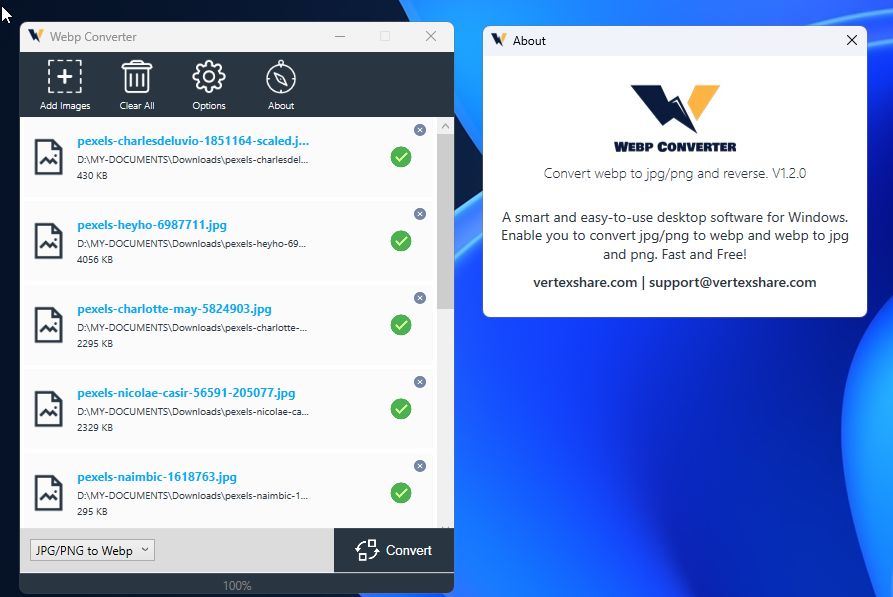
I apologize for the frustration with these limitations. Since Brizy natively supports direct uploads of WEBP images, a potential workaround is to use a desktop app like WebP Converter to bulk convert your images to WEBP before uploading them directly to Brizy. This approach avoids relying on plugins and should help streamline the process while you’re building your sites.
Best regards,
Ariel H.0
Please sign in to leave a comment.
Comments
11 comments