Add Checkbox to Brizy Cloud form & Account Level

1) I have the Appsumo deal. Can you tell me which Brizy cloud deal this maps to? I assume I have access to all of the Pro features?
2) I would like to add a mandatory checkbox to my form on Brizy cloud. How do I do this?
Thank you.
-

Hi Sharon,
Let me go over your questions
- You are subscribed to the the AppSumo Deal 2019 with 3 custom domains and 1 WP License. This plan does not map to any of our existing plans; You can see the features of this legacy plan at https://support.brizy.io/hc/en-us/articles/360041710651 You have access to all PRO builder elements and custom domain publishing for 3 Brizy Cloud websites and all PRO features for one Brizy WordPress website
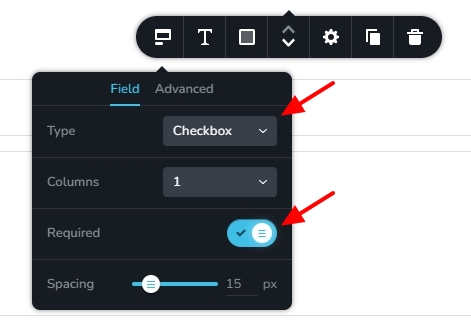
- You can add a checkbox field to your Brizy form by selecting the "Checkbox" option in the Brizy Form element. You can make the field mandatory by toggling on the "Required" switch.
0 -

I have an issue with a client's website where I have to place a check box to opt-in for SMS messaging for her service. It's now mandatory in Texas. I was told by the IT that it can not be a mandatory field, it has to be a dedicated check box.
Is there a way to add that into forms?
0 -
Hello Ryan,
Are you saying that you want to setup a form with a opt-in for SMS messages like the one at https://restaurant-1.brizy.site/contact
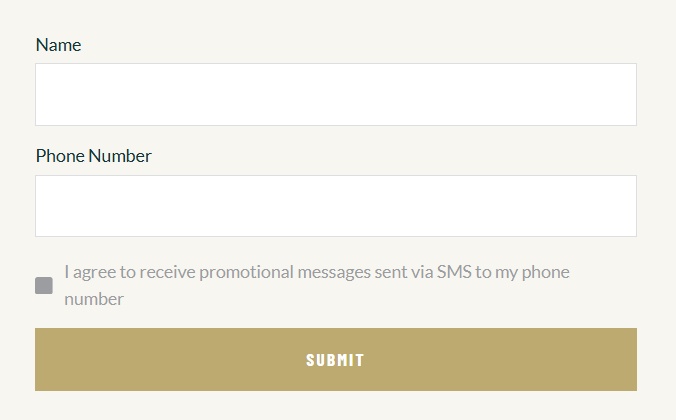
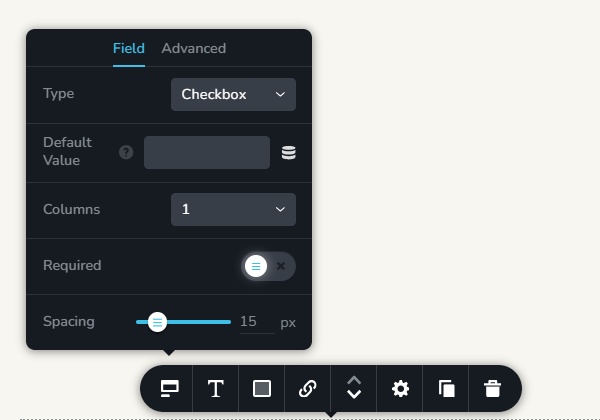
Please use the "Checkbox" field in the Brizy form and do not make it mandatory. If you are asking for something different, kindly elaborate.
 0
0
Please sign in to leave a comment.
Comments
3 comments