404 page

How do i Set up a 404 page using the Brizy cloud??
0
-

Hi Brian,
Thank you for reaching out.
To set up a 404 page in Brizy Cloud, please follow these steps:
1. Click on the CMS icon.
2. Go to Project Settings.
3. Select System Pages.
4. Enable "Page Not Found."
5. Click "Edit Page" to start designing your custom 404 page.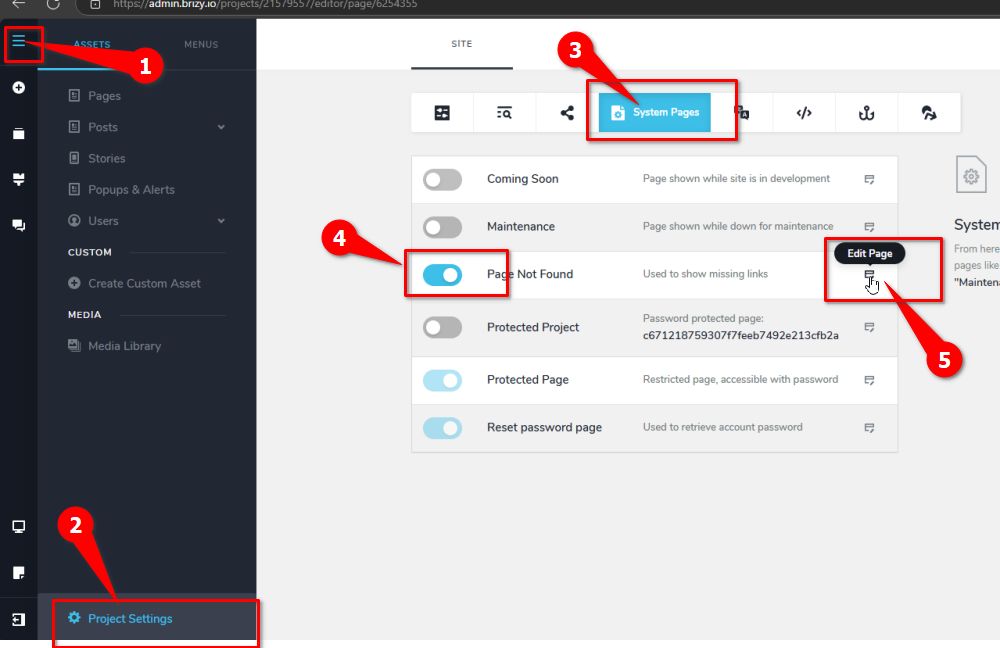
Best regards,
Ariel H.0
Please sign in to leave a comment.
Comments
1 comment