Blur Navbar

Hi,
I'm new to this, is there a way to add a slight blur to the whole navbar section?
Thanks in advance
-

Hello Alexander,
Unfortunately there is no option to add a blur to the header block. If you are looking for a way to make the header block less prominent, you could reduce the opacity of colors added to the elements in the header block following the procedure at https://jmp.sh/ms8psYzO
0 -
Hi KC,
Thanks for clarifying, I was hoping to add a slight blur on scroll for that exact theme you used in your screen cap.
Is a blur on the nav something which could get implemented in the future? There are plenty of websites I've come across which have subtle nav bar effects such as this.
0 -
Hello Alexander,
You have mentioned that "There are plenty of websites I've come across which have subtle nav bar effects such as this". Kindly share with a one or two URLs of such websites. This will help us understand your request better.
0 -

Hi Alexander,
Thank you for your feedback. I understand the need for a blurr effect similar to the example you shared.
I encourage you to also post this on our Ideas and Roadmap page at https://www.brizy.io/ideas-and-roadmap. This platform helps us track suggestions more effectively and prioritize feature requests based on user needs.
We appreciate your input as we work towards improving Brizy Builder.
Best regards,
Ariel H.0 -
Hello Alexander,
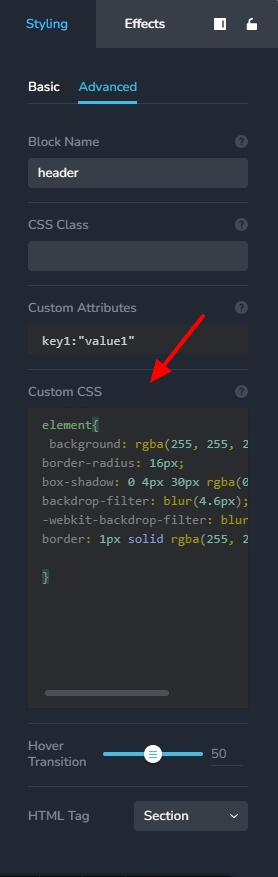
You can generate the CSS code for the glassmorphism effect at https://css.glass/ and add it to your header block to give it the effect you are looking for. I have added the below code to the header at https://restaurant-1.brizy.site/en/
element{
background: rgba(255, 255, 255, 0.09);
border-radius: 16px;
box-shadow: 0 4px 30px rgba(0, 0, 0, 0.1);
backdrop-filter: blur(4.6px);
-webkit-backdrop-filter: blur(4.6px);
border: 1px solid rgba(255, 255, 255, 0.2);
}
Kindly add the CSS code under "Custom CSS" under the "Advanced" tab of the "Styling" panel
 1
1 -

You can use this
0 -
Thanks! This works!
0
Please sign in to leave a comment.
Comments
9 comments