wp blog site migration to cloud

What are the considerations to migrate my blog.estudiocontar.com to brizy cloud to prevent ranking and traffic?
Is there any bulk way to do it?
Thanks
-

Hello Oscar,
There is no easy way to migrate a project from Brizy WordPress to Brizy Cloud. You will need to recreate the project in Brizy Cloud following the below steps
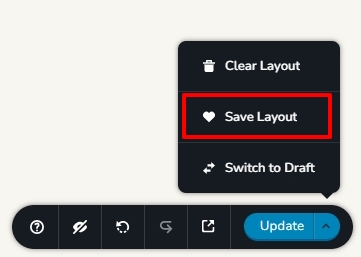
- Save each page as a layout in your Brizy WP project (see the attached image)
- In a new Brizy Cloud project, add pages one by one and import the page layouts saved in step 1 to different pages
- Copy paste the global styles and typography from Brizy WP to Brizy Cloud project
- Recreate menu in the Cloud, setup global blocks and display conditions
- Re-setup the email notifications for Brizy forms in the Cloud project
- Import the blog posts one by one following the same process followed for Pages
Due to the differences in the slug structure between WordPress and Brizy Cloud you will need to setup redirects for your website URLs. For example, https://blog.estudiocontar.com/ need to redirect to https://blog.estudiocontar.com (without forward slash). URLs like https://blog.estudiocontar.com/2024/07/11/spss-en-estadistica-reemplazado/ need to be redirected to https://blog.estudiocontar.com/spss-en-estadistica-reemplazado
These redirects can be setup in your Brizy Cloud project. However if you have hundreds of blog posts, there would be some effort involved in setting up these redirects.
0
Please sign in to leave a comment.
Comments
1 comment