I cannot edit pages

Ciao,
after upgrading from:
Brizy 2.4.44 > 2.5.9
Brizy Pro 2.4.38 > 2.5.5
I cannot edit any pages.
How can I solve this? I don't want to rebuild the whole site.
Thank you very much,
F.
-

Hi Francesco,
Thank you for contacting us.
If you are using WordFence, please temporarily disable it, clear your cache, and check if this resolves the issue.
Additionally, you might consider temporarily setting WordFence to Learning Mode, which can also help resolve the issue:
https://www.wordfence.com/help/firewall/learning-mode/If you don't use WordFence, please also verify if you have access to temporarily disable the Firewall/Mod Security in your hosting console. This should help resolve the issue.
If the issue continues, please provide us temporary access to the Admin page of one of your websites having this issue so we can take a look. Kindly add us as an Admin user to your WordPress Dashboard and send the following details to communitysupport@brizy.io:
Community Post link: https://support.brizy.io/hc/en-us/community/posts/22284771074834
WordPress Admin URL:
Username:
Password:Please make a full backup of your site as a precaution.
Best regards,
Ariel H.0 -
Hi Francesco,
Thank you for your cooperation.
The issue appears to be due to mixed content. Mixed Content errors occur when some assets load over HTTP instead of HTTPS, causing the browser to block them. To resolve this, ensure that all URLs in your Brizy settings, WordPress settings, and page content are set to HTTPS.
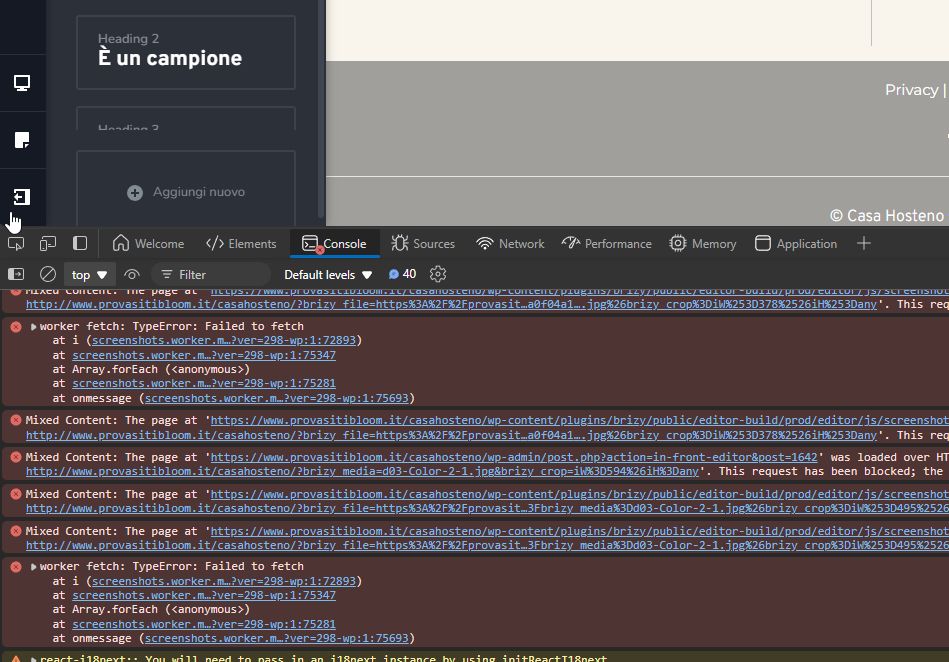
If needed, you can use a plugin like Better Search Replace to update HTTP URLs in your database to HTTPS. Afterward, clear your cache and check if the error is resolved.
Best regards,
Ariel H.0
Please sign in to leave a comment.
Comments
2 comments