Broken images after a WP migration

Hello,
I used Softaculous to clone a website and now all the images appear broken when you're outside of Brizy Edit mode, even on the old website. However, if you go into Brizy Edit mode, all the images are there.
Can you help?
I can give you access to my site
-

Hi,
Thank you for reaching out to us.
We've noticed this issue with domains that use the 'www' subdomain. To fix this, try removing 'www' from your production site. Go to Settings > General and remove 'www' from your Home and Site URL, then save your changes.
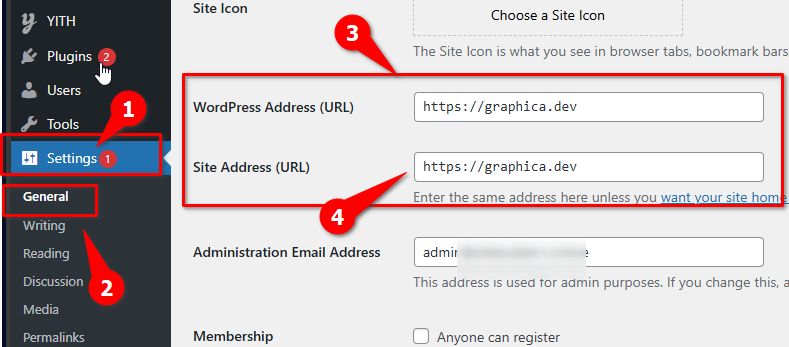
After this, you might need to flush the permalinks as an extra step. You can find instructions here: https://wpastra.com/docs/how-to-refresh-wordpress-permalinks.
This should fix the broken images in the front end.
If the issue persists, please provide us with temporary access to your WP Admin page so we can take a look. Please add us as an Admin user to your WordPress Dashboard and send the following details to communitysupport@brizy.io.
Community Post link: https://support.brizy.io/hc/en-us/community/posts/22280973745426
WordPress Admin URL:
Username:
Password:Please make a full backup of your site as a precaution.
Best regards,
Ariel H.0 -
Hi Ariel,
I do not use the www subdomain in my urls.
The Wordpress address URL and the site URL are https://greentrading.space for the live/production site and https://stage.greentradingspace for the staging server.
Brizy Support have been added as an admin user previously.
I've sent a password reset email to communitysupport@brizy.io so you can access the WordPress Dashboard again after you reset the password.
Please let me know if you need anything else from me.
Best,
Swee
0 -
Hi Swee,
Thank you for the update.
The issue seems to be due to a mismatch between the versions of Brizy and Brizy Pro.
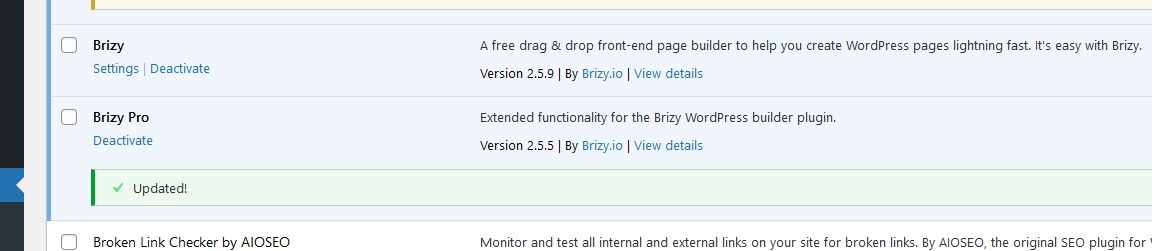
We have updated Brizy Pro to the latest version and cleared SpeedyCache, which appears to have resolved the problem. Please check on your end to confirm.

Best regards,
Ariel H.0
Please sign in to leave a comment.
Comments
3 comments