Brizy Wordpress Gallery: Thumbnails with images in portrait mode not working

When using the image gallery with only images in portrait mode, the thumbnails are still being displayed in landscape mode and therefore ruining the gallery.
Is there any solution to this behaviour?
Best,
Stefan.
-

Hi Stefan,
Thank you for reaching out to us.
Please set the Layout to Grid and the Aspect Ratio to 9:16.
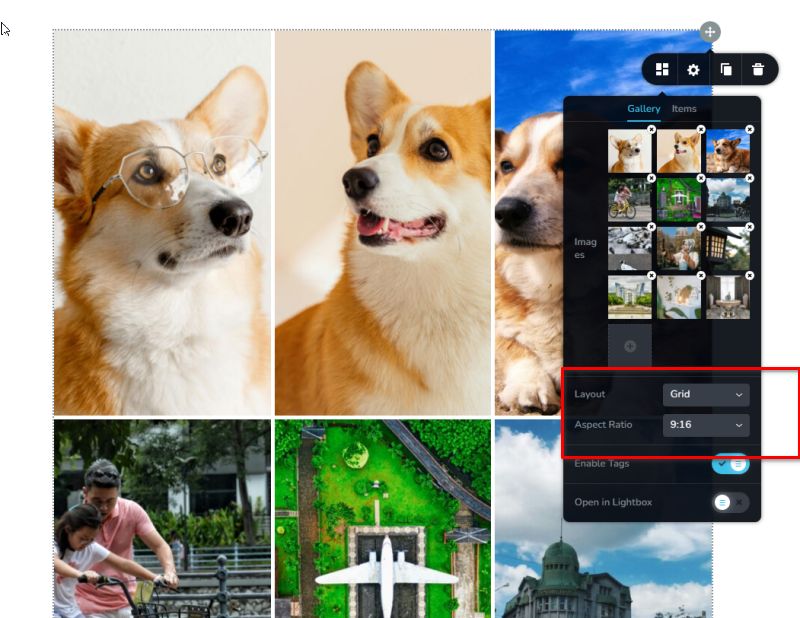
Please try this and let me know how it goes.
Best regards,
Ariel H.0 -
Hi Ariel,
thanks for your reply.
This is indeed changing the orientation problem.
BUT... I'm presenting my work as a photographer.
And my photos have an aspect ratio of 2:3, not 9:16.
So even in this case, the thumbnails aren't representing my photographs correctly either.0 -
So far, the only solution I see is:
- use the grid setting
- add a custom image thumbnail sizes to the media library reflecting an aspect ratio of 2:3
- select these custom thumbnails inside the gallery.
Works perfectly fine. But I would have prefered NOT to use PHP just to make the Brizy gallery work in portrait mode with an aspect ratio of 2:3. Especially as 2:3 / 3:2 is the standard dimension for full frame cameras...
0 -

Hi Stefan,
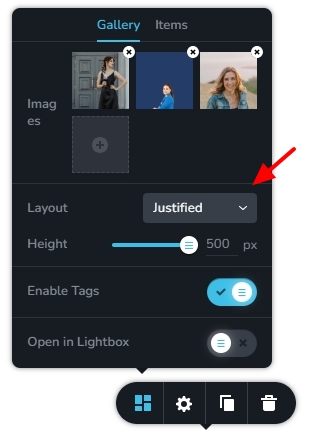
Kindly check if the "Justified" option in the Gallery element would work for you. Have a look at this screen recording https://jmp.sh/nTci42lO
 0
0 -
Hi KC,
thank you very much, that is solving my problem.Thanks for your help and best regards,
Stefan.0
Please sign in to leave a comment.
Comments
5 comments