How to Resolve Text Displayed Only on the Top Page

Since yesterday, the following text has been displayed only on the top page, so please tell me how to resolve it. It is a Japanese website.
Warning: Attempt to read property "post_type" on null in /home/xb273845/(sitename)/public_html/taxi/taxi/wp-content/plugins/brizy/admin/blocks/main.php on line 207
Warning: Attempt to read property "ID" on null in /home/xb273845/(sitename)/public_html/taxi/taxi/wp-content/plugins/brizy/admin/blocks/main.php on line 208
-

Hi Masakazu,
Thank you for reaching out to us.
We have already reported this issue to our dev team, it should be fixed soon.
The warnings are non-fatal, and should not affect your site's overall functionality.In the meantime, please add the following directives in wp-config.php to hide the warning on the front-end.
ini_set('log_errors','On');
ini_set('display_errors','Off');
ini_set('error_reporting', E_ALL );
define('WP_DEBUG', false);
define('WP_DEBUG_LOG', true);
define('WP_DEBUG_DISPLAY', false);If you don't have access to update the wp-config.php file, you can also use a plugin to hide error reporting.
https://wordpress.org/plugins/debug/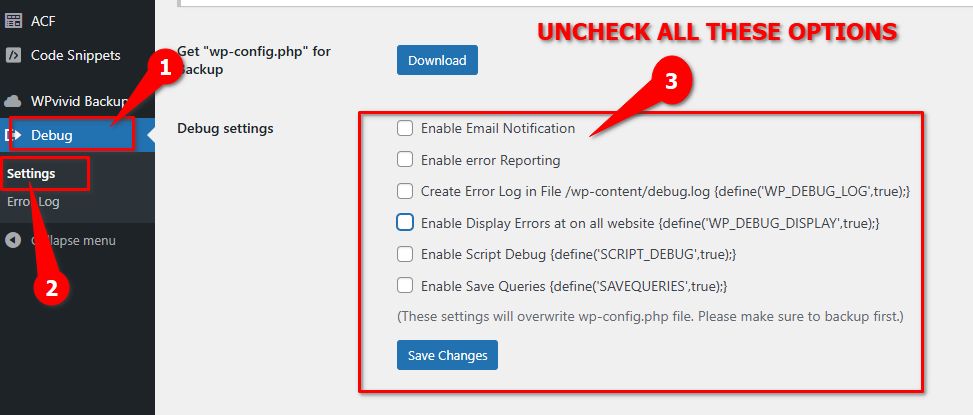
Sorry for the inconvenience.Best regards,
Ariel H.0 -
Hi Masakazu,
We've released an update to resolve this issue. Please update, and feel free to reach out if you have any further questions. If you added the above directives in your wp-config.php file, you could remove them or leave them in place—they simply suppress PHP warnings and won’t affect your site.

Best regards,
Ariel H.0
Please sign in to leave a comment.
Comments
2 comments