Desativar o e-mail de e-mails no formulário e apenas cadastrar o lead no painel.

Olá! Estou usando o formulário e ele da erro ao enviar o e-mail, já testei algumas configurações. Mas o ideal seria desativar o envio de e-mail, cadastrar no painel de lead do plugin, não encontro essa opção, quando clico em cadastrar ele mostra mensagem de erro que o e-mail não pode ser enviado.
É possível apenas fazer o cadastro do lead?
-

Hello Bruno,
When new users register with a website, they will be listed under Users - All Users in your WordPress Dashboard. They will not be listed under Brizy - Leads section. Kindly have a look at the screen recording at https://jmp.sh/POadaQzS
If you have more questions after watching the screen recording, kindly get back to us.
0 -
Olá!
Muito obrigado pela atenção, talvez eu não tenha explicado corretamente.O site é este:
http://projetos.interminas.net/lokebeerAo clicar neste botão:
https://projetos.interminas.net/lokebeer/wp-content/uploads/2024/10/1.pngEstou abrindo um formulário, nome e telefone. Ao preencher o usuário é direcionado para o whatsapp para ser atendido.
https://projetos.interminas.net/lokebeer/wp-content/uploads/2024/10/2.pngNão gostaria que fosse enviado o e-mail, mas gostaria que os dados dele ficassem registrados no site antes dele ser redirecionado. É possível?
Obrigado!
0 -
Hello Bruno,
Please ensure that WordPress, Gmail, and SMTP email notification settings are turned off to collect leads without sending out email notifications.
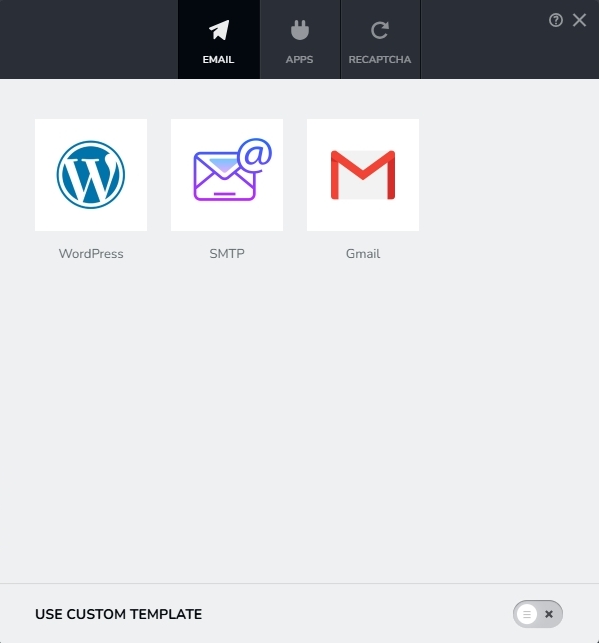
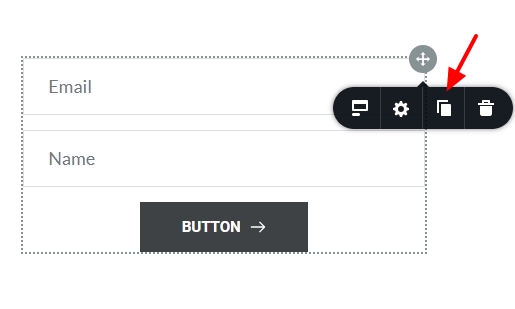
Please duplicate the form by clicking at the upper right corner and choosing the "Duplicate" icon in order to disable email notification settings. Delete the original form and the duplicated form will not have email notification configurations.
 0
0 -
Great! It worked! Thank you very much!
0


Please sign in to leave a comment.
Comments
4 comments