External video link

Hi,
I have tried to add a custom link , particularly VadooTV
I understand i can upload it but this is hosted on an external site.
Regards
Latif
-

Hi Latif,
Thank you for contacting us.
You can include external video links in the Brizy Video element's URL option, provided the hyperlink leads to an MP4 file. An example of a legitimate path is https://res.cloudinary.com/drjpmnhfp/video/upload/v1690520572/Limitless.mp4. Videos that have a URL path such as https://adilo.bigcommand.com/watch/tUI0E3Gu will not work with the Brizy video element's URL option.
Since Brizy Cloud is not a video streaming platform, videos uploaded to Brizy Cloud must be first fully downloaded before it starts playing on your website. Hence uploading a video to Brizy Cloud is not a recommended option
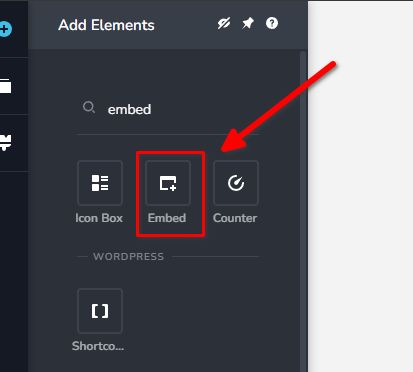
You can also generate an embed code from your VadooTV dashboard as explained on this link: https://vadootv.tawk.help/article/embedding-a-video-on-your-site Once you have the code, you can use Brizy's Embed Element and paste the embed code to display the video on a specific page.
Best regards,
Ariel H.0 -
Hi,
Thank you, is it possible to embed an iFrame for the POPUP?
Thanks.
0 -
Hi Lafif,
The embed code should also work in a popup.
0
Please sign in to leave a comment.
Comments
3 comments